LLM evaluations that score your models and your agents on the same test set
The Evaluations application turns “does the new model actually work better?” into a number. Write a set of test cases — or import a public benchmark — point them at any mix of language models and AI agents, and get back a pass rate, a latency figure and a dollar cost for each one, with every single answer kept so you can see exactly what changed.
No notebook to maintain, no separate eval harness, no API keys to wire up. It runs against the models and agents already installed in your Assistant Cortex.
From a question to a score in three steps
1. Build the test set
Write test cases as an input prompt and the expected output, or import a public benchmark such as MMLU, GSM8K or HellaSwag and get thousands of them in one click. Choose how answers should be graded, and set the system message, temperature and sampling the run should use.
2. Pick what is under test
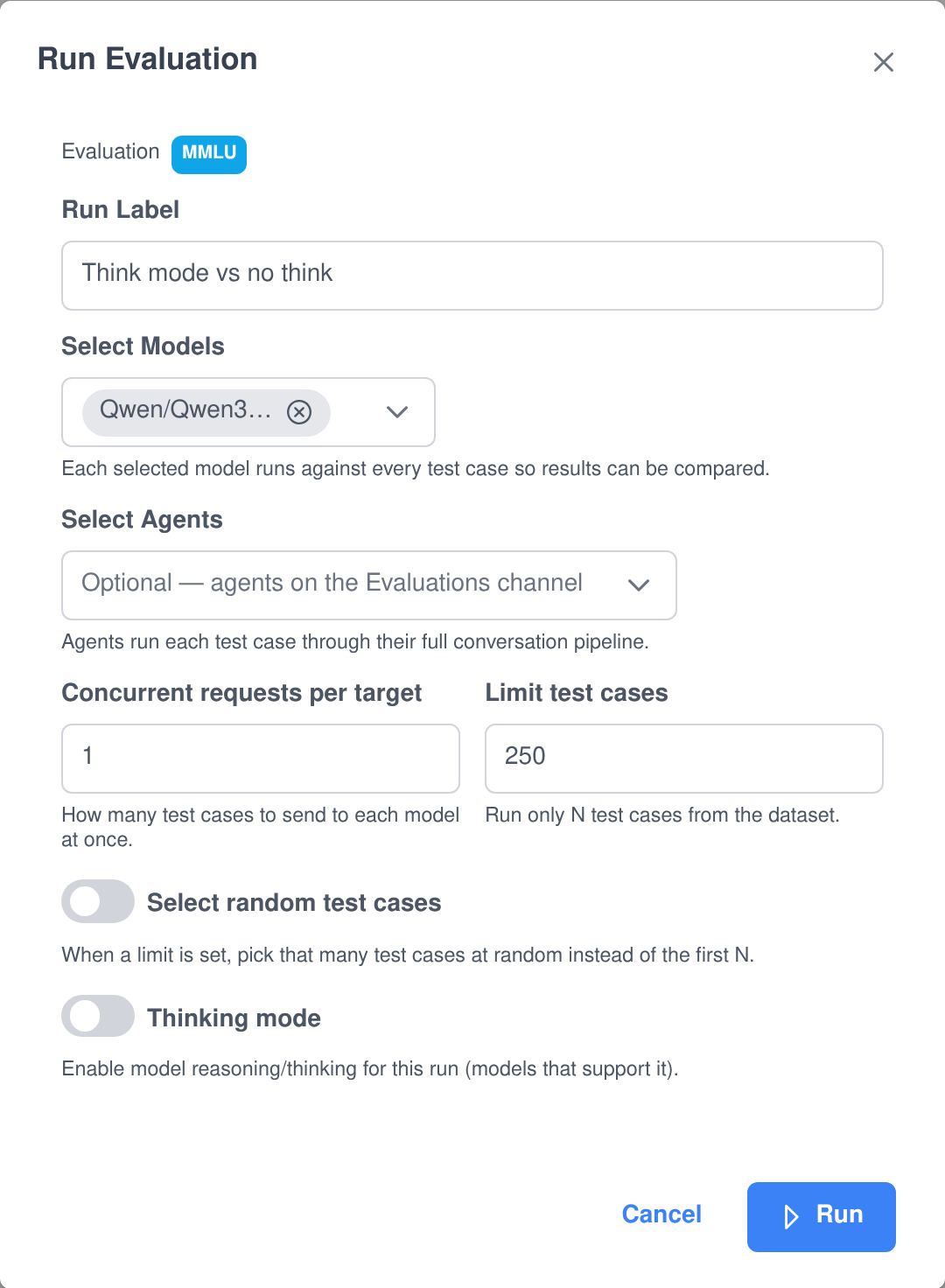
Select any number of models and any number of agents in a single launch. Cap the run to N test cases, sample them at random from a seed, turn thinking mode on, and decide how many requests to keep in flight at once.
3. Read the result
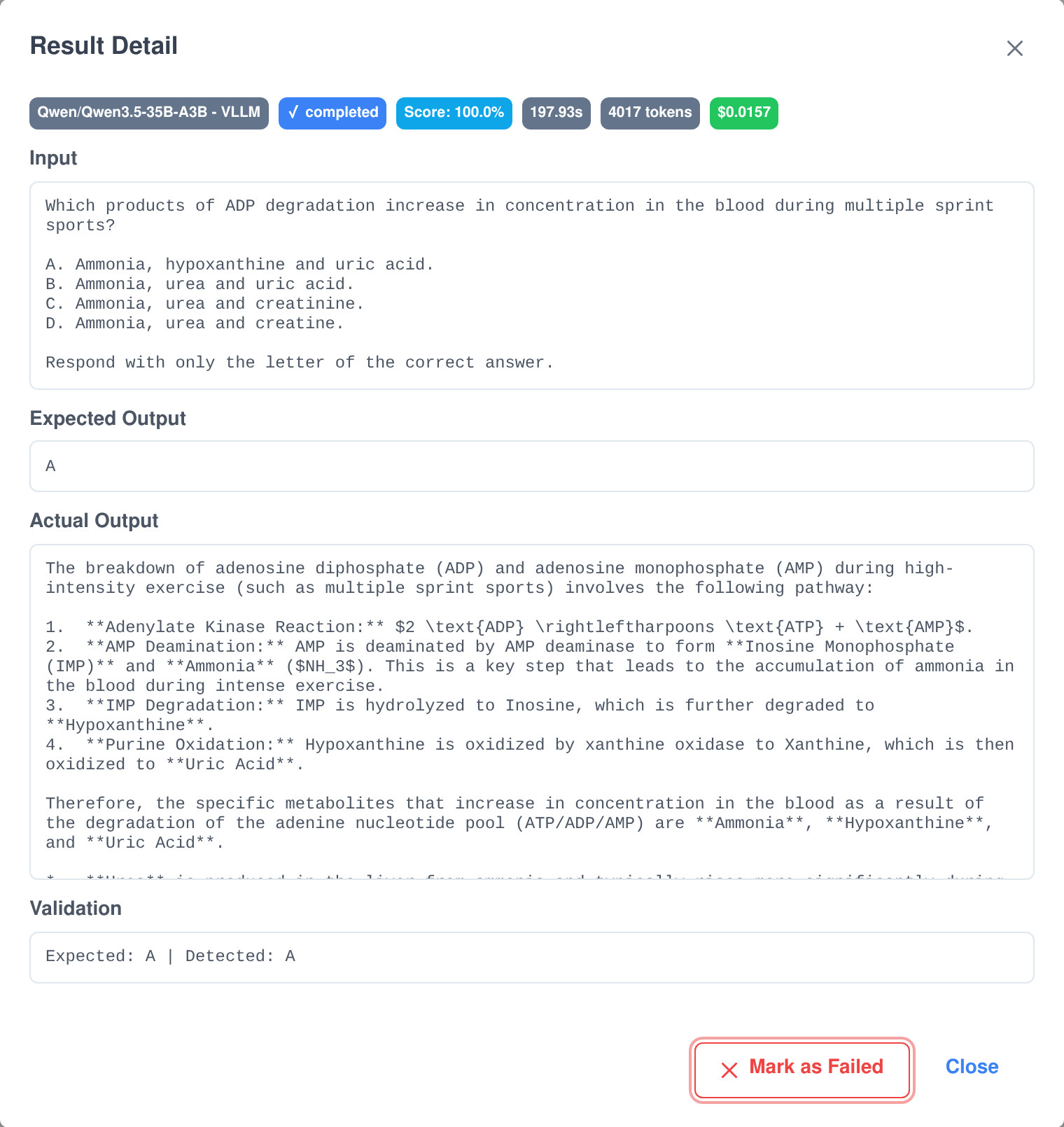
Each target gets its own run record with a pass rate, average latency, token count and computed cost. Open any test case to see the prompt, the expected answer, what the model actually produced and why it was graded the way it was.
Ten ways to grade an answer, and a human override
Language output is not one thing, so it is not graded one way. Each evaluation picks the validator that matches what it is really testing, and the validator’s configuration — a regex pattern, a similarity threshold, a JSON schema — is stored with the evaluation so every run is scored identically.
Built-in validators
- Exact match, contains, starts with, ends with. Whitespace and case are normalised, so a trailing newline is not a failure.
- Regex. Your own pattern and flags, for output that has to fit a shape rather than a string.
- Numeric. Pulls the number out of a wordy answer and compares it, which is how a maths benchmark like GSM8K is scored.
- Multiple choice. Finds the A–J answer letter inside free-form prose, so a model that explains itself before answering is not marked wrong.
- JSON schema. Checks that structured output is actually valid against the schema you expect.
- Similarity. Scores how close the answer is to the expected text and passes above a threshold you set.
- LLM judge. Another model grades the answer and writes down its reasoning, which is saved with the result.
- Human. Mark any individual result passed or failed by hand; the override is recorded on the run.
Runs you stay in control of
- Concurrency you set. Between 1 and 20 test cases in flight per target — turn it up on a fast endpoint, down on a shared GPU.
- Limit and random sample. Run the first 250 cases, or 250 drawn at random from a seed you record so the same sample can be run again.
- Thinking mode. Toggle model reasoning per run, with a second system prompt kept on the evaluation specifically for thinking runs.
- Pause and resume. Stop a long run after the in-flight requests finish and pick it up later; completed rows are kept.
- Survives a restart. A run interrupted by a server restart is parked as paused instead of being lost, ready to resume.
- Live progress. Watch pass, fail and pass-rate counters climb while the run is going, and stop it if it is clearly going wrong.
Evaluate agents, not just raw models
A model on its own is not what your users talk to. An agent has a system message, a set of tools, a knowledge base and a router in front of it, and any one of those can be the thing that broke. So an agent is a first-class target here: selected as an agent, it runs each test case through its full conversation pipeline, exactly as a real chat turn would go, and the conversation it produced is linked to the result.
- Models and agents in one launch. Select several of each and they are all measured against the same test cases in the same run.
- One run record per target. Each model and each agent gets its own row, so the comparison is like-for-like rather than an average.
- Label the launch. Give a run a name — “Think mode vs no think”, “after prompt rewrite” — and it stays attached to the results for good.
- The full pipeline is under test. Tool calls, knowledge lookups and the agent’s own system message all count towards the score, because they all affect the answer.
Every run is a record you can compare, including what it cost
Runs are not thrown away when the next one starts. Every launch leaves a row holding the number of tests, how many passed, the score, the average latency, the tokens consumed and the cost computed from your model pricing — so the quality question and the budget question get answered by the same table.
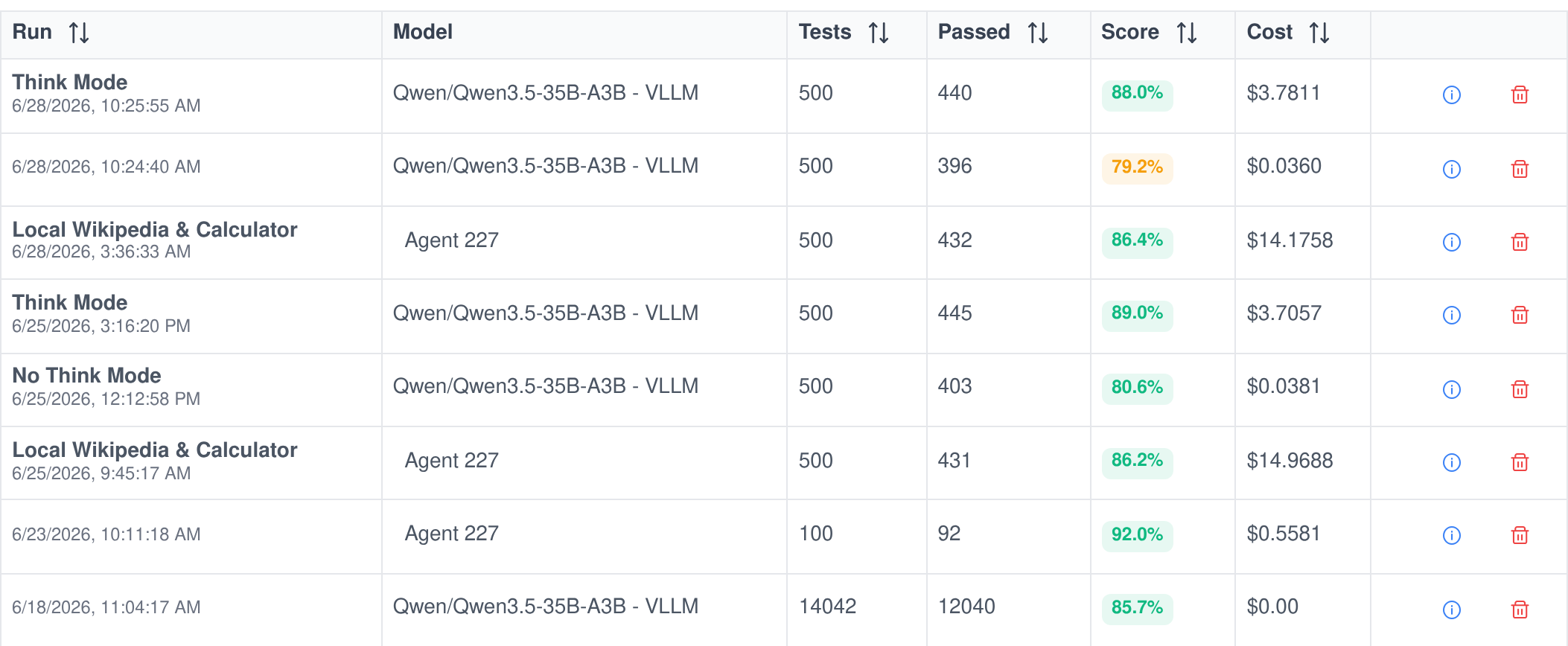
Quality against price
Cost is computed per test case from input and output tokens and totalled on the run, so a two-point gain in accuracy can be weighed against what it costs to get it.
Speed as a first-class number
Latency is recorded per test case and averaged per run, which is how you catch the configuration that scored better but got three times slower.
The settings are kept too
Each run stores the configuration it was launched with — test-case count, limit, random seed, thinking mode and concurrency — so a result from six weeks ago is still explainable.
A score is only useful if you can open it up
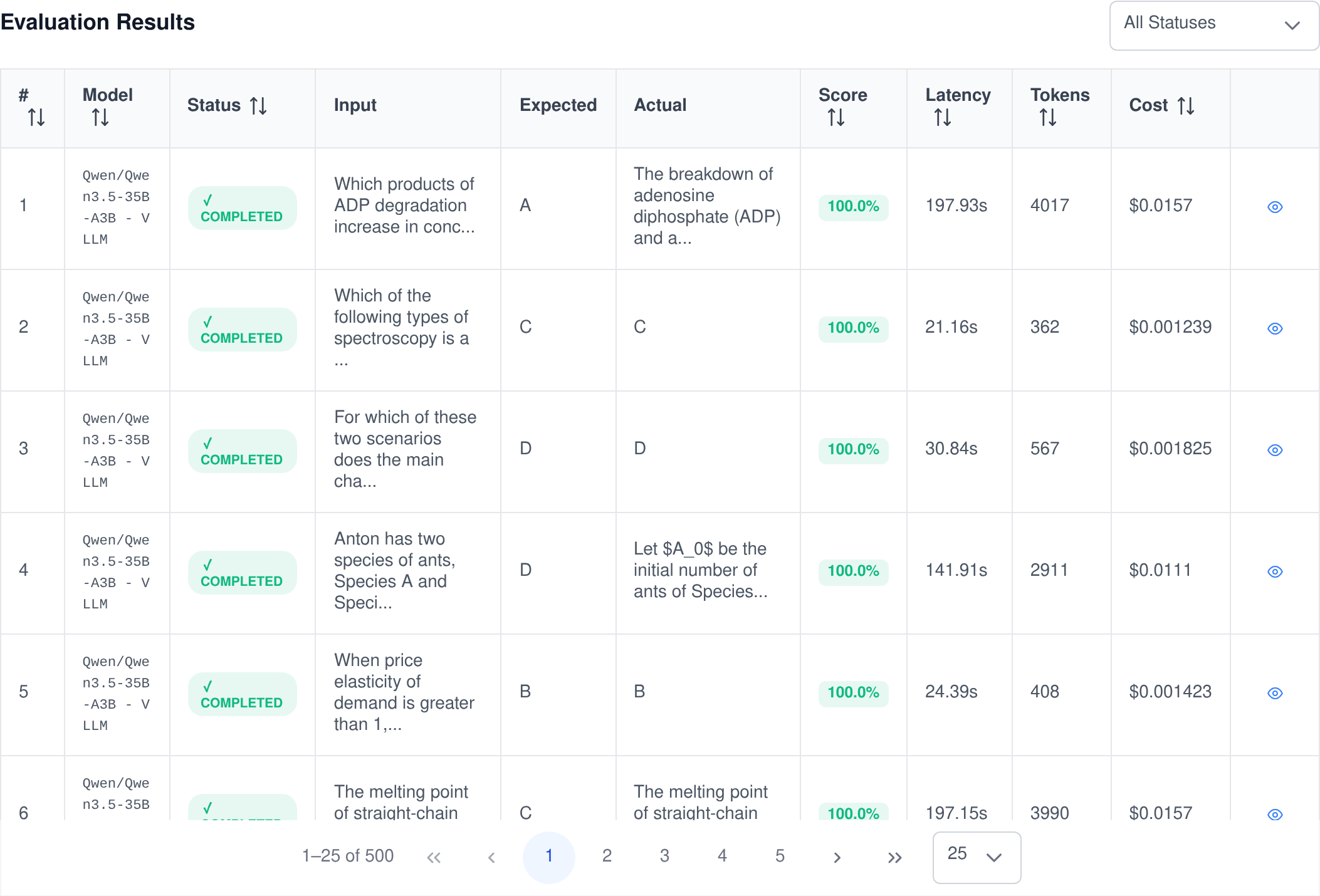
“79.2%” tells you something is wrong but not what. Every test case in every run keeps its prompt, its expected answer, the model’s actual output, the grader’s verdict, the latency, the tokens and the cost, so you can go straight from the number to the twenty answers that caused it.
- Filter to the failures. Narrow the results grid by status and read only the cases that did not pass.
- See the grader’s working. The validation line says exactly why a case was scored the way it was — the letter it detected, the similarity it measured, the judge’s reasoning.
- Read the whole conversation. When an agent was under test, the conversation it generated is linked to the result and can be expanded message by message.
- Disagree with the grader. Mark a case passed or failed yourself; the run’s totals update and the override is recorded.
- Sort by anything. Order the grid by score, latency, tokens or cost to find the outlier rather than scrolling for it.
Watch quality move over time
Because every run is kept, an evaluation becomes a history rather than a snapshot. Pass rate and average latency are plotted across every run of that test set, each point labelled with the model or agent it was, so a regression shows up as a dip rather than as a support ticket.
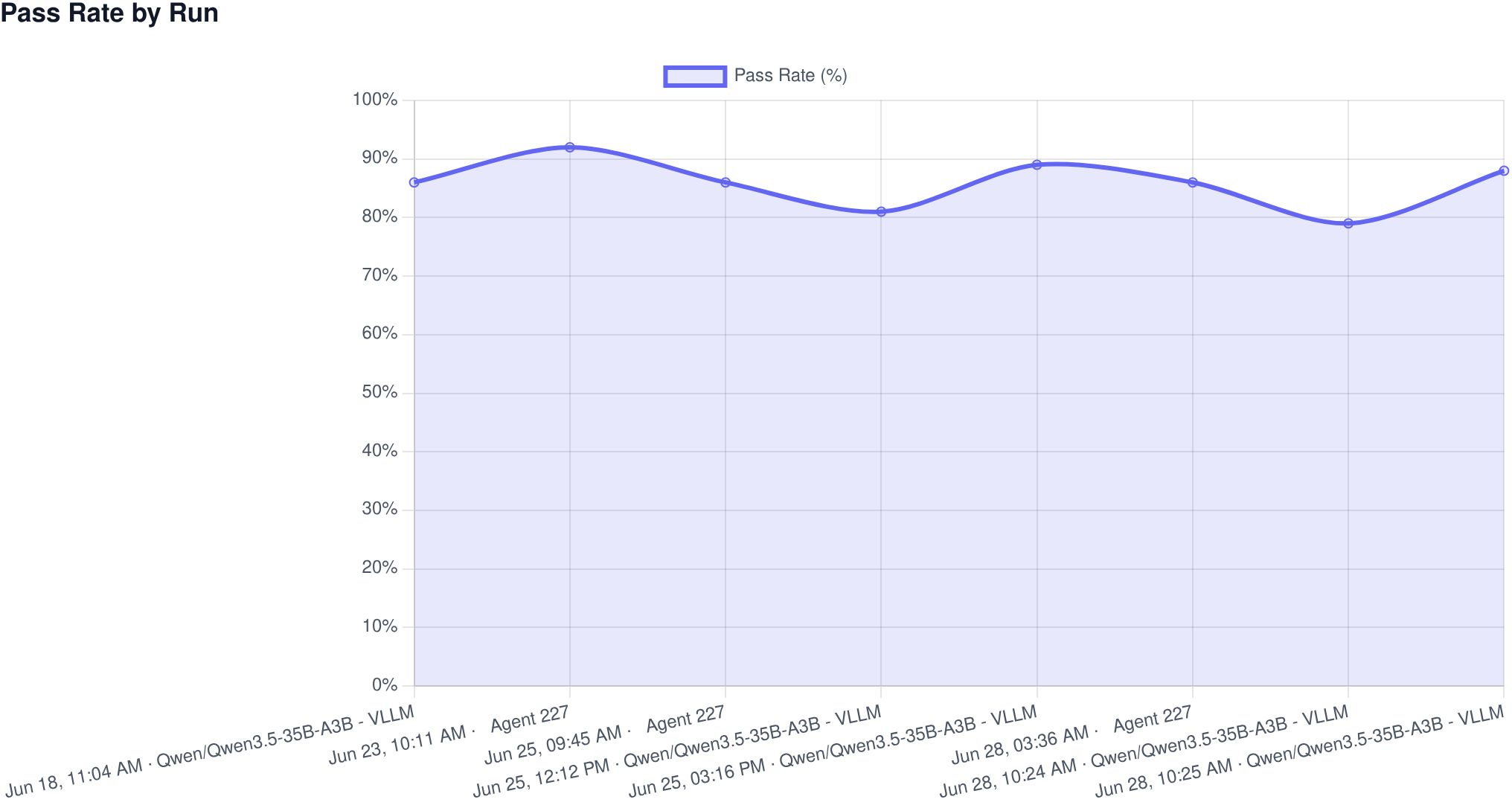
- Pass rate by run across the whole history of that evaluation.
- Average latency by run, so a speed regression is as visible as a quality one.
- Pass rate and latency by model for the run you are currently looking at.
- Pass, fail and unscored broken out, so a run that half-failed is not hidden inside an average.
Start from a public benchmark instead of a blank page
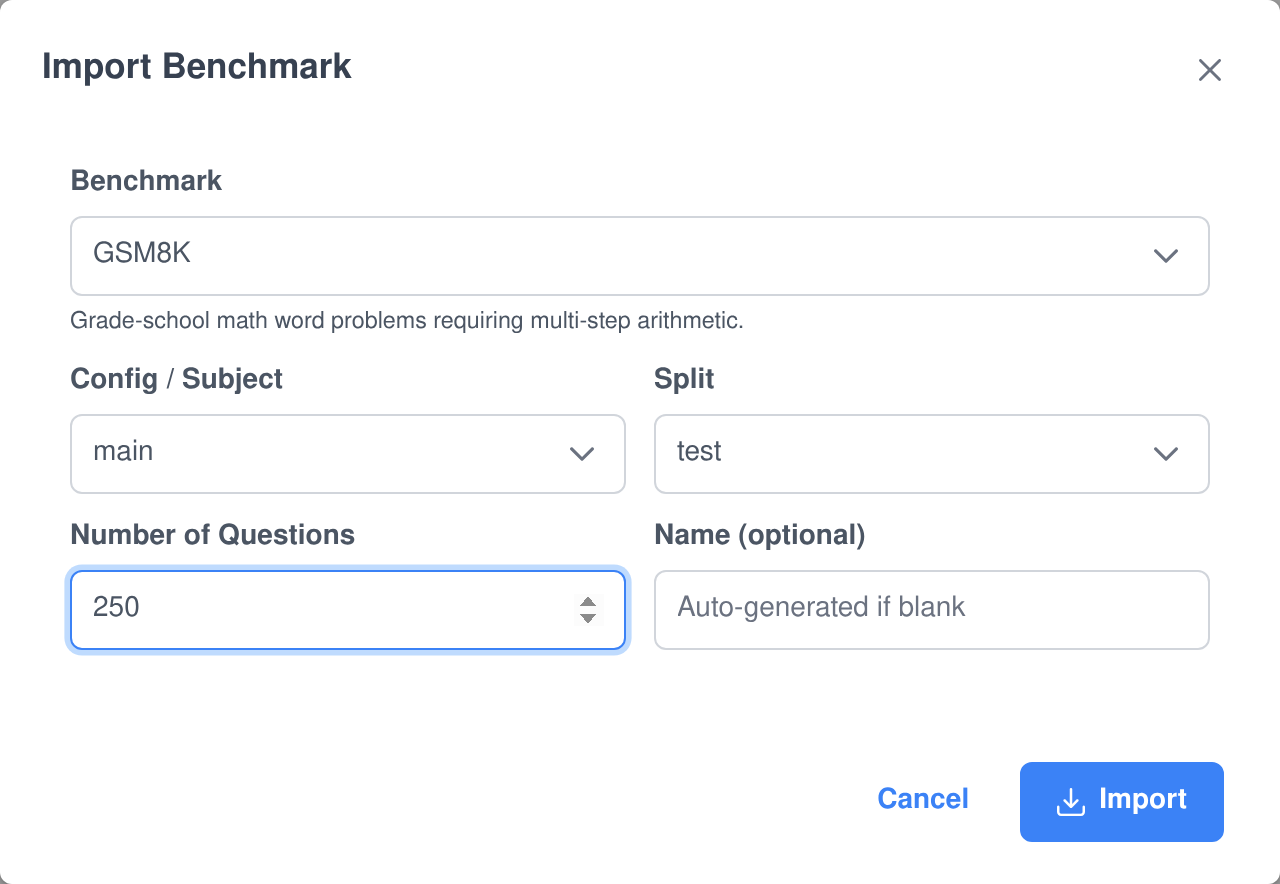
Six well-known benchmarks are built in and import straight from HuggingFace as ready-made evaluations — questions rendered as prompts, answers stored as the expected output, and the right validator already selected. Pick a benchmark, pick the config and split, say how many questions you want, and it lands in your evaluation list as a normal test set you can run, edit and extend.
- MMLU — 57 subjects of four-way multiple choice, importable subject by subject or all at once.
- ARC — the AI2 Reasoning Challenge, in its Challenge and Easy sets.
- HellaSwag — commonsense sentence completion.
- TruthfulQA (MC1) — questions designed to draw out confident falsehoods.
- GSM8K — grade-school maths word problems, graded numerically.
- WinoGrande — pronoun-resolution problems that need real-world reasoning.
Datasets are pulled from the HuggingFace hub’s Parquet files rather than the rate-limited row API, so importing thousands of questions is a matter of seconds, and an optional HuggingFace token lifts the limits further.
Evaluations that run themselves
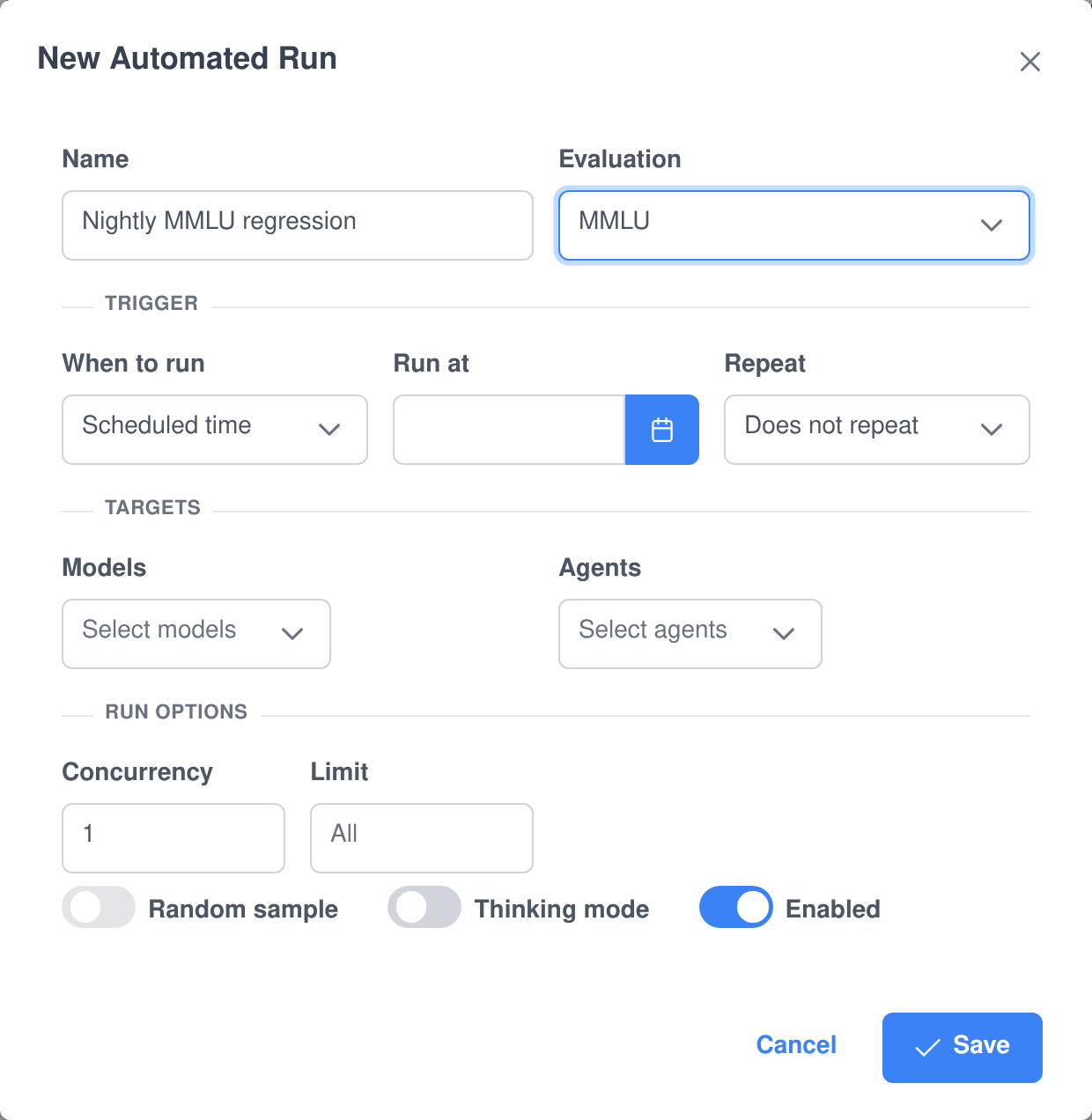
An evaluation nobody remembers to run is not a safety net. Automated runs save a complete launch configuration — the evaluation, the models, the agents, the limit, the sample seed, the concurrency and the thinking-mode setting — and fire it for you.
- On a schedule. Set a time and an optional repeat interval and it runs unattended, nightly or hourly, with the schedule advanced before the run starts so a slow run can never double-fire.
- When an agent changes. Point an automation at an agent and every saved revision of that agent kicks off the test set automatically — a regression suite that triggers itself the moment someone edits a prompt.
- On demand. Run any saved automation immediately from the list without rebuilding its configuration.
- Always reviewable. Each automation shows its trigger, its schedule, its targets and the outcome of its last run.
A test set and an evaluation are the same thing, twice
The companion Evaluation ⇆ Tests application converts either way: turn a test set you wrote for people in Test Creator into an evaluation for models, or turn an evaluation into a test set humans can sit. Multiple-choice options are extracted for you when a question needs them. It adds no screens of its own — the conversion simply appears inside both editors.
Every evaluation action is an AI ability — and an MCP tool
The Evaluation Manager ability lets your own agents build and read evaluations in the middle of a conversation — “make me an eval for our refund policy answers”, “which cases failed last night?” — and the results come back as cards rather than as a wall of text. The same functions are published by the Assistant Cortex MCP server, so Claude, your IDE or any other MCP client can drive them under exactly the same permissions.
ai_ability_evaluations_list_evaluations
List Evaluations
Lists the evaluations the caller owns, with each one’s id and how many test cases it holds — the starting point for everything else.
ai_ability_evaluations_create_evaluation
Create Evaluation
Creates a new evaluation with a name, a unique key, an optional description, the validator that should grade it and the system message its runs should use. Returns the new evaluation’s id and key.
ai_ability_evaluations_update_evaluation
Update Evaluation
Changes an existing evaluation’s name, description, validator type, system message or enabled flag. Only the fields you pass are touched.
ai_ability_evaluations_create_test_case
Create Test Case
Adds one test case — an input prompt and the output it should produce — to an existing evaluation, so an agent can grow a test set a case at a time as you talk through what it should cover.
ai_ability_evaluations_list_test_cases
List Test Cases
Lists an evaluation’s test cases with their ids, inputs and expected outputs, paginated so a benchmark of thousands of cases can be walked a page at a time.
ai_ability_evaluations_show_evaluation_results
Show Evaluation Results
Reports how an evaluation scored: the pass rate of its most recent run — or of a run you name — what model or agent was under test, the timing and token cost, and which individual test cases passed and failed. It can be asked for the failures only.
ai_ability_evaluations_show_test_case
Show Test Case Result
Opens a single test case in full — its input prompt, the expected result, what the model actually produced, and why it was graded a pass or a fail. Ask for it by test-case id or simply by its position in the evaluation.
ai_ability_evaluations_delete_test_case
Delete Test Case
Removes a single test case by its id, so a badly worded question found during a review can be dropped without opening the editor.
ai_ability_evaluations_delete_evaluation
Delete Evaluation
Deletes an evaluation together with all of its test cases and run results.
Governed like the rest of the platform
Permissions that split the work up
- Separate rights to view evaluations, create and edit them, run them, import benchmarks, delete runs and manage automated runs.
- Everyone sees their own evaluations; administrators additionally see the shared, system-owned ones.
- An evaluation cannot be edited or deleted while one of its runs is still going, so a run’s meaning never changes underneath it.
Your data, your infrastructure
- Runs execute against the models already installed in your Assistant Cortex, including fully self-hosted ones, so test prompts never have to leave your network.
- Evaluations, test cases and every run row are included in a user’s data export and removed when that user is deleted or a retention window expires.
- Deployable self-hosted or hosted, on your own GPUs or a provider’s, with the same behaviour either way.
What teams use evaluations for
- Choosing a model by running the same questions through every candidate and comparing accuracy, speed and cost in one table.
- Deciding whether reasoning is worth it — the same test set with thinking mode on and off, with the cost of each shown.
- Regression-testing an agent so a prompt tweak that quietly breaks a category is caught the same day it is saved.
- Checking a fine-tune against the base model on a public benchmark before it goes anywhere near production.
- Validating structured output with a JSON schema, so an integration that expects specific fields keeps getting them.
- Proving quality to someone else with a run history that shows what was tested, when, on what, and what it scored.
Frequently asked questions
Can I evaluate an agent, or only a raw model?
Both, in the same run. An agent runs each test case through its full conversation pipeline — its system message, its tools and its knowledge — and the conversation it produced is linked to the result so you can read what actually happened.
How are answers graded?
You choose a validator per evaluation: exact match, contains, starts with, ends with, regex, numeric, multiple choice, JSON schema, similarity against a threshold, or an LLM judge that writes down its reasoning. Any individual result can also be marked passed or failed by hand.
Can I use public benchmarks like MMLU or GSM8K?
Yes. MMLU, ARC, HellaSwag, TruthfulQA, GSM8K and WinoGrande import directly from HuggingFace as ready-made evaluations, with the config, the split and the number of questions all your choice, and the correct validator already selected.
Does it tell me what a run cost?
Yes. Tokens and cost are recorded for every test case and totalled on the run, computed from your configured model pricing, alongside the pass rate and the average latency.
Can evaluations run automatically?
Yes, in two ways. An automated run can fire on a schedule with an optional repeat interval, or it can fire whenever a particular agent is saved, which turns a test set into a regression suite that triggers itself.
What happens if I stop a run half-way?
You can pause a run and resume it later — the results already completed are kept and the run picks up where it left off. A run interrupted by a server restart is parked as paused for the same reason, rather than being lost.
Can an AI agent build and read evaluations for me?
Yes. The Evaluation Manager ability lets an agent create evaluations, add and remove test cases, list what exists and report how a run scored — including opening a single failing case in full. The same functions are exposed through the Assistant Cortex MCP server for any MCP client.
Who can see my evaluations?
Only you, unless you are an administrator, who additionally sees the shared system-owned evaluations. Viewing, creating, running, importing, deleting runs and managing automations are all separate permissions you grant per group.
Stop guessing which model is better
Import a benchmark, point it at what you are already running, and have a number before lunch.