Human-in-the-loop AI: approve the actions that matter, automate the rest
The Human Approval application sits in front of every AI ability your agents can call. An ordered rule chain decides what runs on its own, what is refused outright, and what pauses for a person — and a paused call waits in a realtime queue where a reviewer can approve it, correct its parameters, reject it, or answer the agent instead of running it at all.
No changes to the abilities themselves and no code. Pick an ability, write a rule, and the next matching call stops and waits.
From ungoverned agent to reviewed action in three steps
1. Govern an ability
Pick any ability your agents can call — running a remote command, sending an email, writing to a system of record — and set the policy it falls back to when no rule matches.
2. Write the rules
Build an ordered chain: let the safe calls straight through, refuse the ones nobody should ever make, and hold the rest for a person. Rules match on who is asking and on the arguments themselves.
3. Decide in the queue
A held call appears instantly on every open dashboard with the agent’s full reasoning behind it. One reviewer decides, the call resumes or does not, and the decision is kept.
Four ways to answer, not just yes and no
Assistant Cortex implements the human-in-the-loop interrupt contract popularised by LangGraph, so a reviewer has the full set of outcomes rather than a veto. Each rule decides which of the four it offers, and the dashboard shows only those.
Approve
The call runs exactly as the agent wrote it, and the conversation carries on where it paused.
Edit
Correct the parameters first. The ability genuinely receives your version, not the agent’s — narrow a command, fix a recipient, cap a limit.
Ignore
The call never runs. The agent receives it as a failed tool call, with your explanation attached, and reasons about what to do next.
Respond
Answer on the tool’s behalf. Your text comes back as a successful result, so the agent continues with what you told it instead of running anything.
A queue that updates while you are looking at it
Held calls appear on every open dashboard the moment they are raised — no refreshing, no polling. The queue records which ability was called, which rule stopped it, which agent proposed it and on whose behalf, and it keeps every decided request alongside the pending ones so the log is one list rather than two.
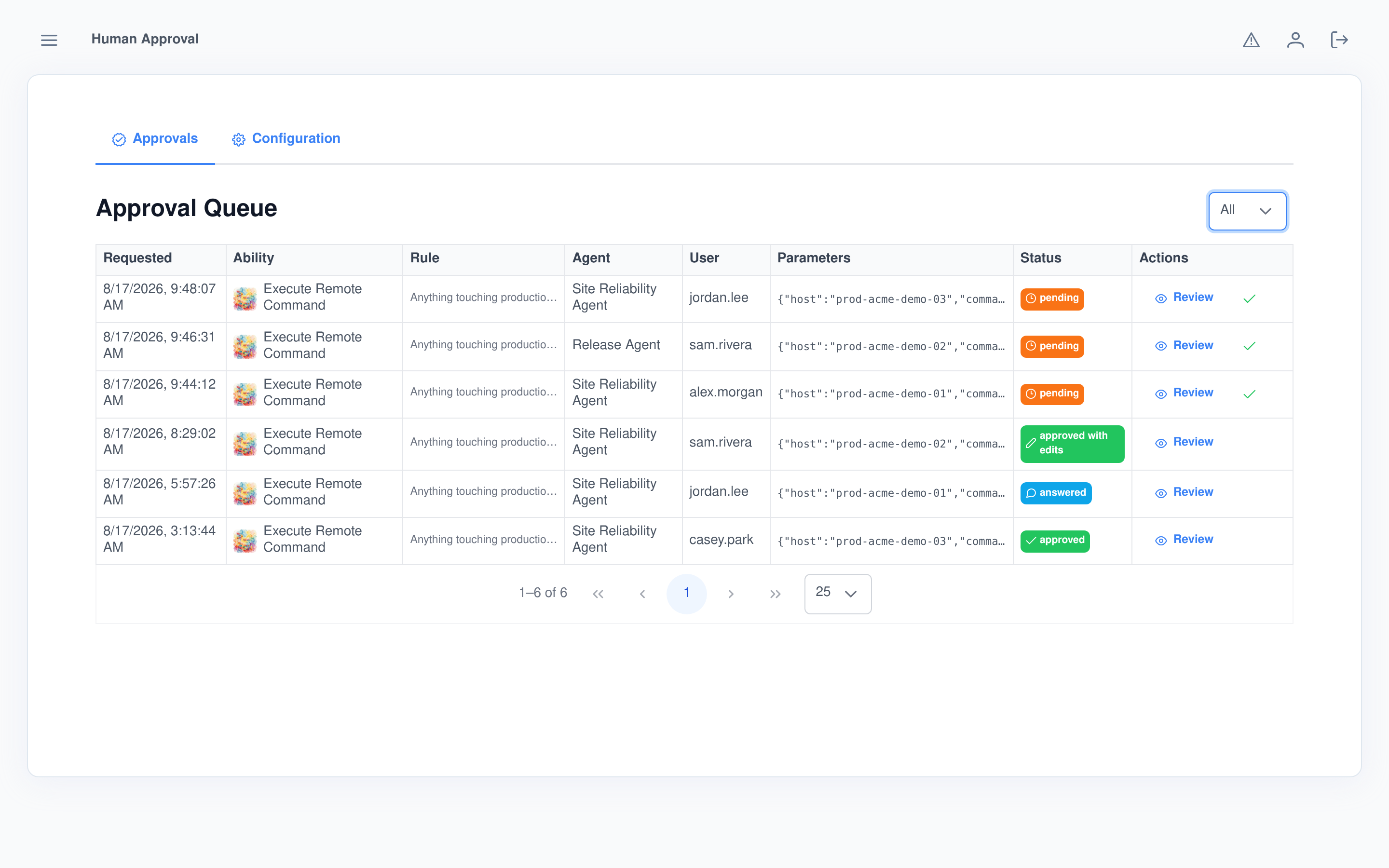
Judge the call, not just the command
A command on its own tells you nothing about whether to allow it. Every held request carries the whole path that led to it, so a reviewer can see what the user asked for, what the agent already checked, and why it decided this was the next step.
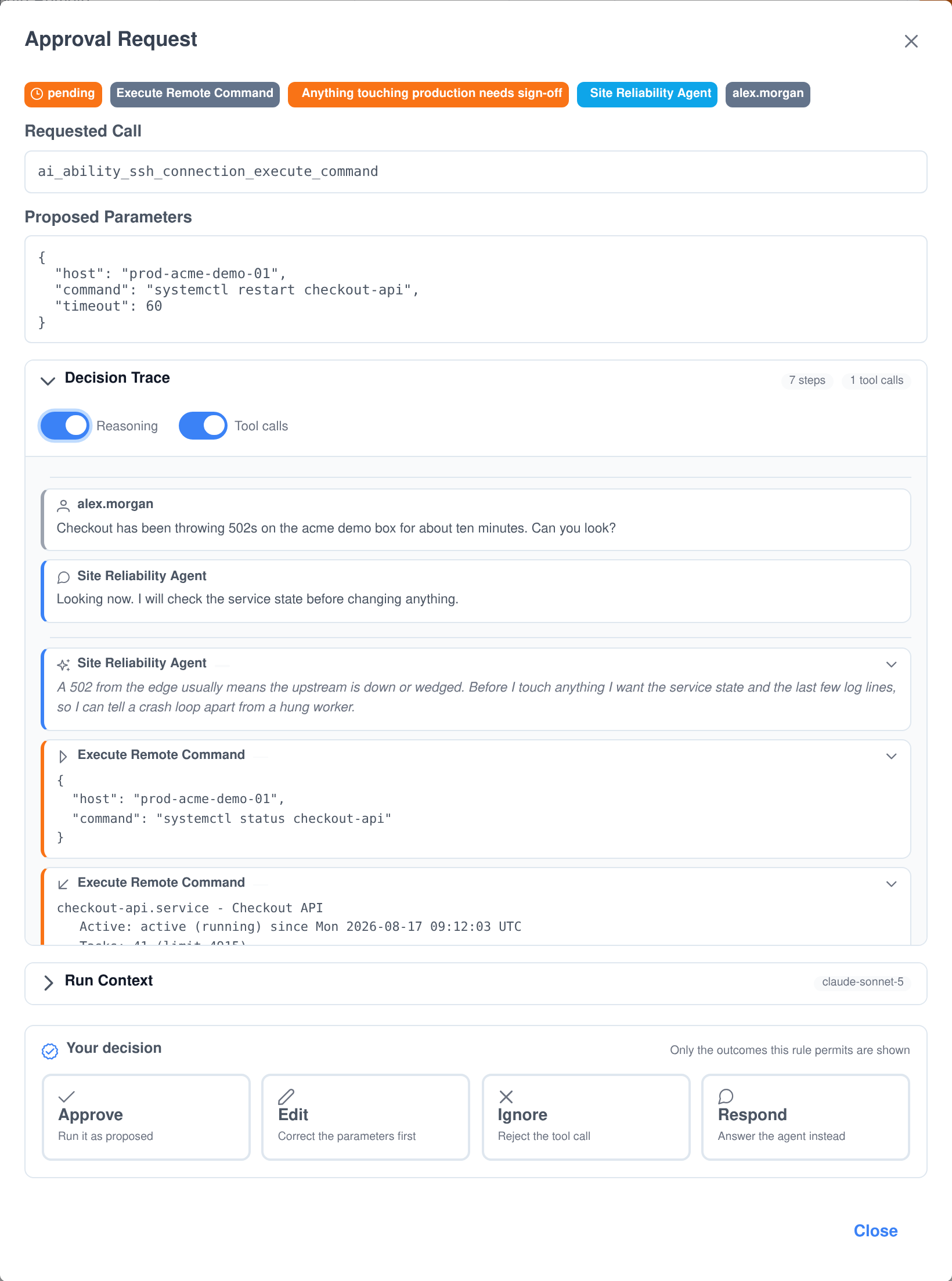
- The decision trace. The conversation that led here, then the turn in progress: the agent’s reasoning, each tool it already called with its arguments, and what each one answered.
- Reasoning and tool calls toggle off. Read the trace as a plain conversation when the internals are not what you are checking.
- Run context. The model that produced the call, whether it was thinking, the token counts, and how many tool calls it had already made this turn.
- The full conversation on demand. Load the entire stored conversation separately when the trace is not enough.
- Secrets stay masked. The gate runs before credentials are resolved, so a reviewer sees the parameters as the agent wrote them — never an unmasked key.
A firewall for agent actions
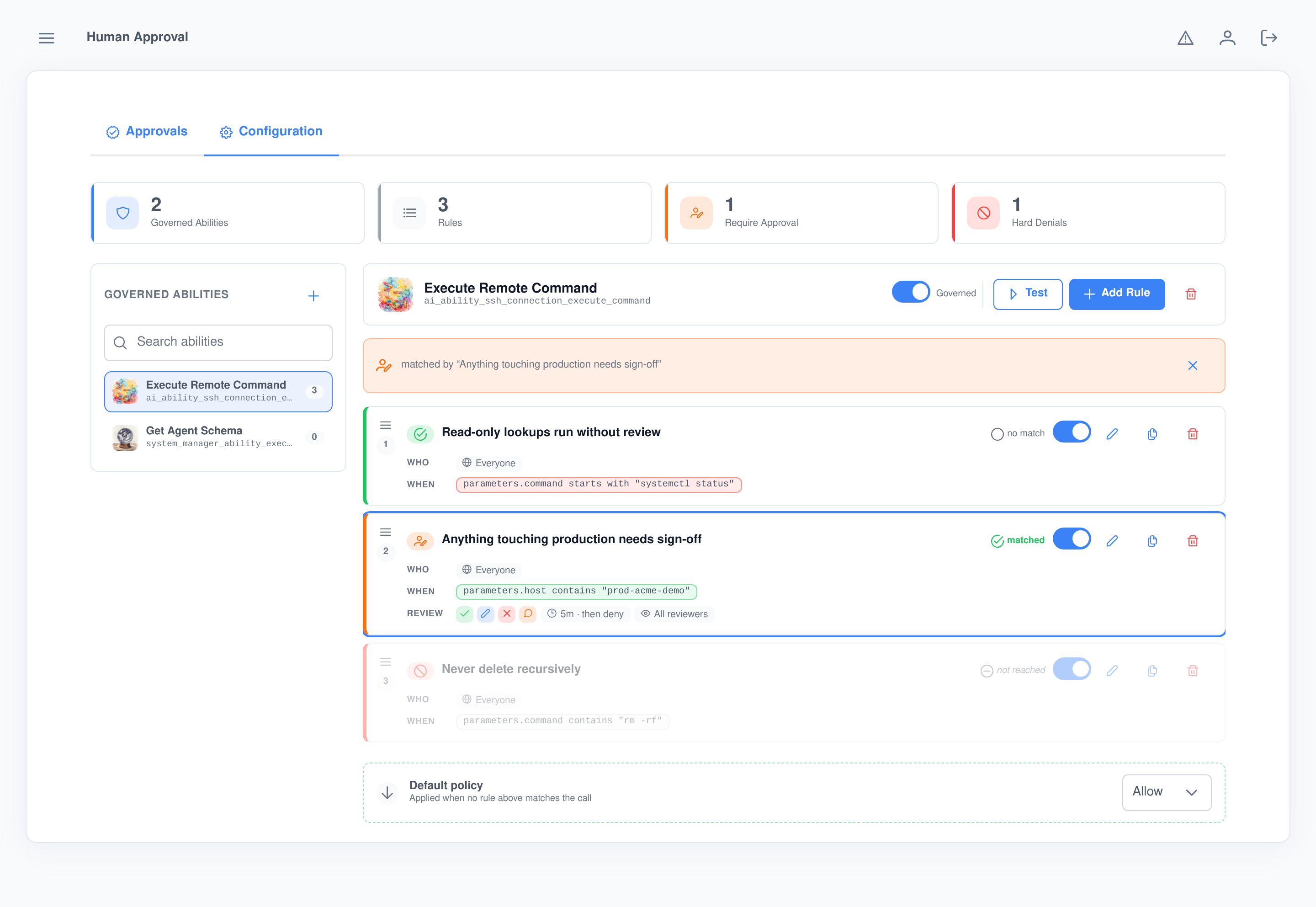
Each governed ability gets an ordered chain of rules, evaluated top to bottom, falling through to a default policy the way a firewall does. Not every rule ends in a person: an early rule can let the harmless calls run untouched, and a later one can refuse a call outright without ever raising an approval.
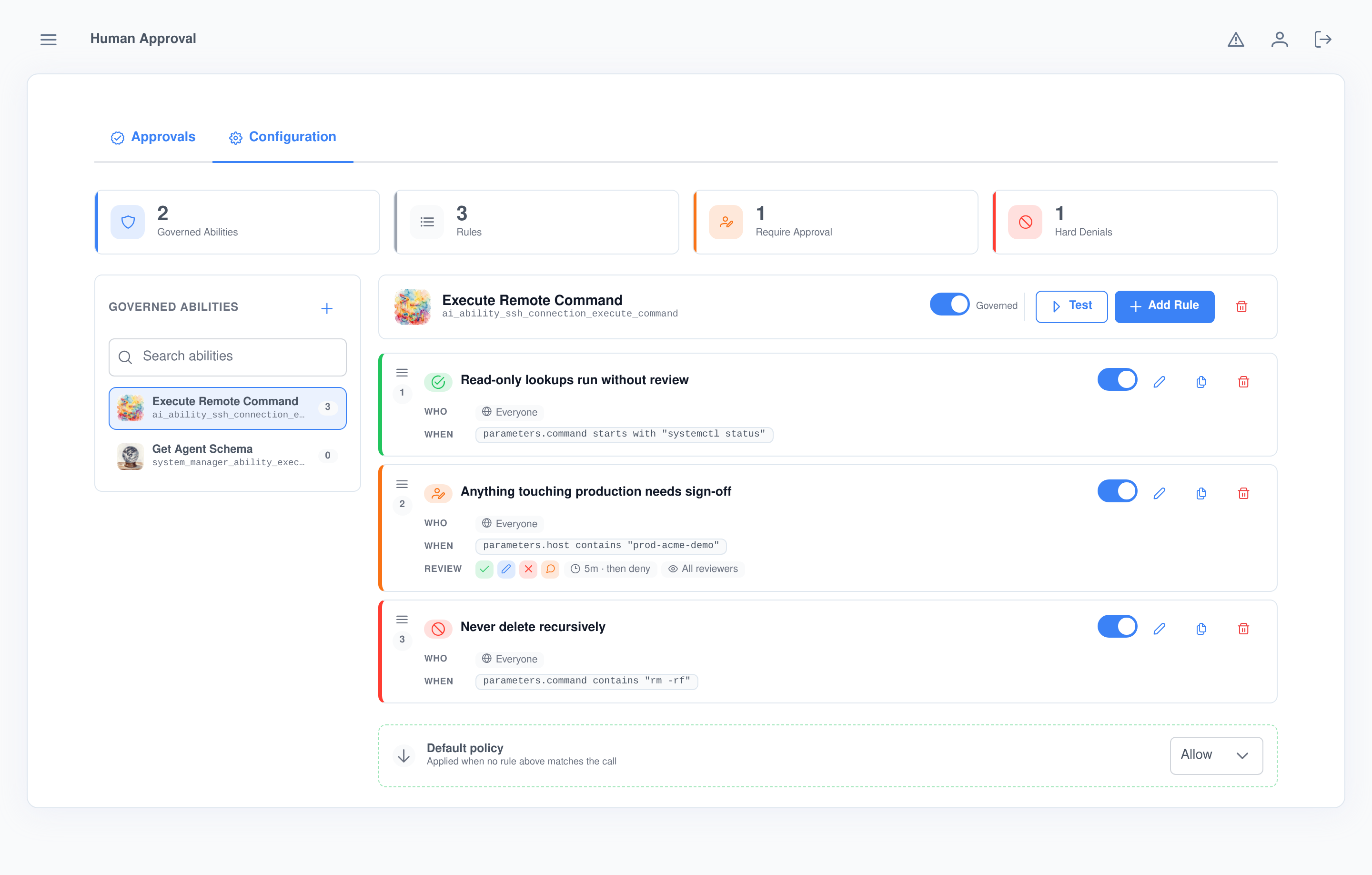
Rules that read the actual arguments
- Eighteen operators. Equals, contains, starts with, ends with, matches a regular expression, greater or less than, one of a list, present, missing, empty — and the negation of each.
- Any field, any depth. Conditions address the call arguments by dotted path, array indexes included, so
parameters.files[0].nameis as testable asparameters.host. - Beyond the arguments. Match on who is calling, which group they are in, which agent proposed it, and which channel it came from — chat, email or phone.
- Combined your way. Conditions join with AND or OR; the user list and group list combine as either.
Every rule carries its own terms
- Its own reviewers. A rule names the users and groups that may see and decide the calls it holds; everyone else never learns they happened.
- Its own outcomes. Offer all four, or only the ones that make sense — approve and reject a deployment, but never silently edit it.
- Its own clock. Wait anything from fifteen seconds to a day, and choose whether running out of time denies the call or lets it through.
- Its own refusal. Write the message the agent gets back when the rule denies it, so the model has something to work with.
- Reorder by dragging, disable a rule without deleting it, and duplicate one to start the next.
Written by people, not in a config file
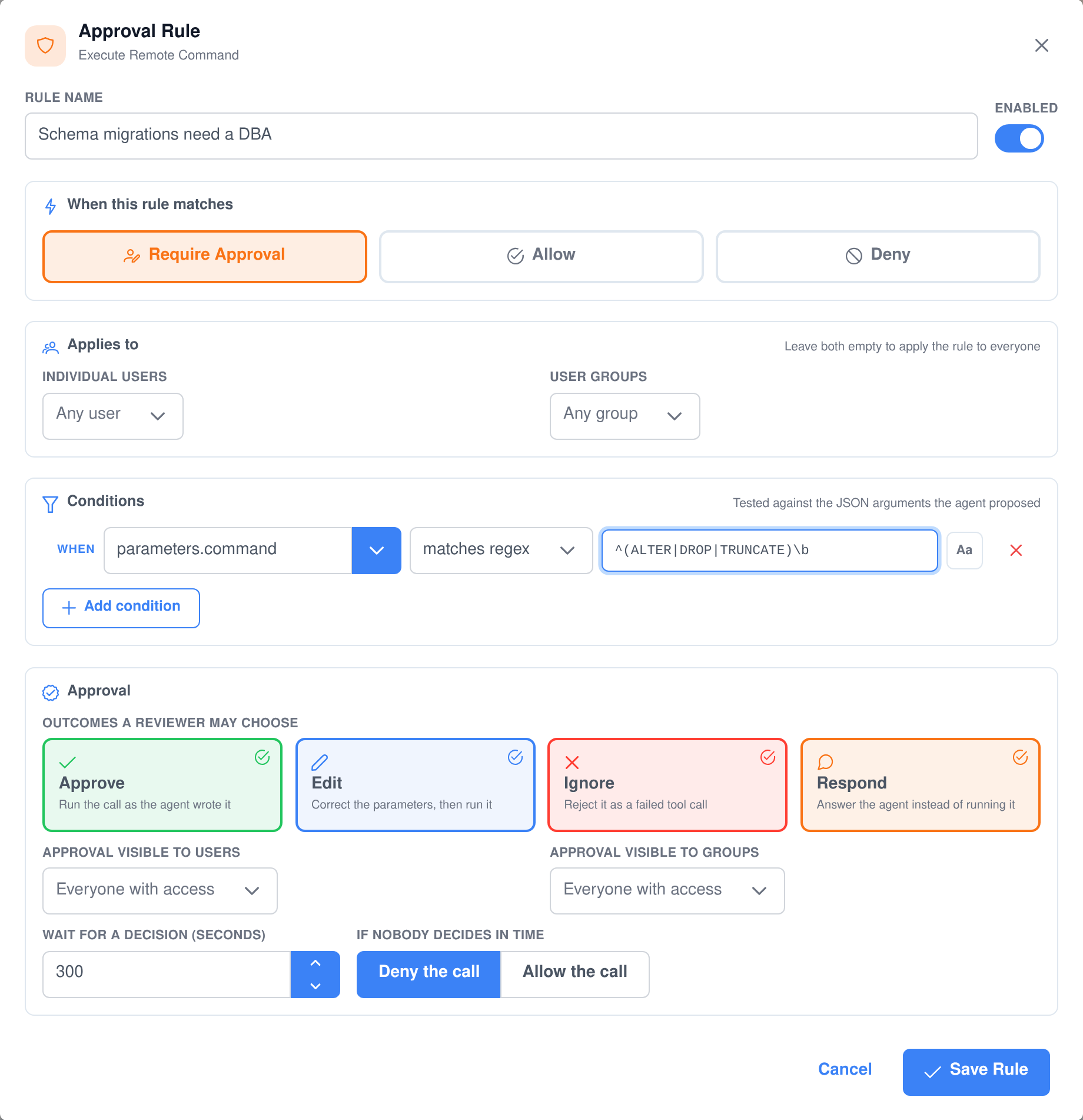
A rule is a form, not a DSL. Name it, choose what happens when it matches, say who it applies to, add the conditions, pick the outcomes a reviewer may take, and set how long it waits. The people who own the risk can write the policy themselves.
- Field suggestions as you type a condition, so you are not guessing at the shape of the arguments.
- Case sensitivity per condition, because host names and free text do not want the same treatment.
- Sensible defaults throughout: applies to everyone, visible to everyone with access, five minutes, then deny.
Test the policy before an agent does
Describe a hypothetical call — the parameters, the user, the agent — and run it through the chain without executing anything. The result is not a verdict on its own: every rule is marked as matched, no match, or never reached, and each condition shows the value it actually resolved to, so you can see precisely which test decided the outcome.
Built to be trusted with the decision
Nothing slips through
- It fails closed. If the policy cannot be read at all, the call is blocked rather than allowed. A gate that quietly stops gating is worse than an ability that refuses to run.
- Two reviewers cannot both win. A decision claims the request atomically, so a second reviewer — or a reviewer racing the timeout — loses cleanly instead of double-firing the call.
- A conversation never hangs. The held call is always released, even if recording the decision fails.
- A restart does not orphan anything. Requests that cannot be decided any more are closed out automatically, so the queue only ever shows live work.
Nobody is left waiting in the dark
- The requester sees a countdown. The conversation that triggered the call shows “Waiting for human approval” and how long is left on the clock.
- Dashboards update in place. Each open dashboard is tracked down to the page it is viewing, so a push rebuilds exactly what that reviewer is looking at.
- Pushes respect visibility. A realtime update is filtered per recipient, so a request never flashes up in front of somebody who is not allowed to see it.
- Ask from chat. Agents can report on the queue and the status of a request without anyone opening the dashboard.
It works on every ability, including the ones you write
The gate sits on the single point every AI ability call passes through, so it governs anything an agent can do — the abilities that ship with Assistant Cortex, the ones from the marketplace, and the ones your team builds — without a line of code in any of them. An ability nobody has governed runs exactly as it always did.
The queue is an AI ability — and an MCP tool
Reviewers are not the only ones who need to know what is waiting. The Human Approval ability lets an agent report on the queue mid-conversation, and the same functions are published by the Assistant Cortex MCP server so Claude, an IDE or any other MCP client can ask too. Reading the queue needs the reviewer permission; without it a caller only ever sees their own held calls.
ai_ability_human_approval_list_requests
List Approval Requests
Lists what is waiting on a human right now. Ask for a status instead — approved, denied, timed out or cancelled — and it returns recent decisions rather than the pending queue.
ai_ability_human_approval_request_status
Approval Request Status
Looks one request up by id and reports where it stands: still waiting, which way it went, and the note the reviewer left with the decision.
The evidence your auditor asks for
Every decision explains itself
- A decided request keeps the rule that stopped it, the parameters proposed, the parameters actually used if they were edited, who decided, when, and the note they left.
- Timeouts and cancellations are recorded as outcomes in their own right, not as gaps.
- Separate permissions to watch the queue and to decide on it, so an observer role is a real thing.
- Per-rule visibility narrows a sensitive approval to named people or groups, and the same check governs the list, the detail view and every realtime push.
And knows when to forget
- Approval records expire under the retention policy of the person whose call they held.
- A user data export includes the approval requests raised on their behalf.
- Deleting a user account removes their approval history with it.
- The module declares itself against GDPR, CCPA, HIPAA, SOC 2 and PCI DSS, and runs self-hosted or hosted with models of your choosing, including fully private ones.
What people put behind approval
- Anything that writes to production — restarts, migrations, config changes — while read-only checks run freely.
- Outbound messages to customers, so an agent can draft and send routine mail but never the difficult reply unreviewed.
- Spending and refunds above a threshold written as a condition on the amount.
- Records that leave the building — exports, shares, anything crossing a boundary a regulator cares about.
- A new agent’s first week, with everything held while you watch what it proposes, then relaxed rule by rule.
- Destructive calls nobody should ever make, denied outright by a rule rather than left to a reviewer’s attention.
Frequently asked questions
Does this slow every agent down?
No. Only abilities you have explicitly governed are evaluated at all, and within those, only calls matching a require-approval rule ever pause. A rule can let the ordinary cases through untouched so that a person is asked about the exception, not the routine.
Can a reviewer change the call instead of rejecting it?
Yes. The edit outcome lets you correct the parameters, and the ability receives your version rather than the agent’s. There is also a respond outcome, where the call never runs and your text is handed back to the agent as the tool’s result.
What happens if nobody is around to approve it?
Each rule sets its own wait, from fifteen seconds to a full day, and decides what running out of time means: deny the call, or let it through. Whichever happens is recorded as the outcome, so a timeout is visible in the log rather than silent.
Does it work with abilities we wrote ourselves?
Yes, with no changes to them. The gate runs at the single point every AI ability call passes through, so anything an agent can call can be governed — built in, from the marketplace, or your own.
Can I test a policy without waiting for an agent to trigger it?
Yes. The simulator runs a hypothetical call through the chain and executes nothing. It marks each rule as matched, no match or never reached, and shows the value every condition resolved to, so you can see which test decided the result.
Can I keep a sensitive approval away from most reviewers?
Yes. Each rule names the users and groups that may see and decide the calls it holds. That restriction applies to the queue, the detail view and the realtime updates alike, so an approval that is not yours never appears in front of you.
Will reviewers see our API keys and passwords?
No. The approval gate runs before credentials are resolved into the call, so the parameters a reviewer reads are the ones the agent wrote. Secrets are only filled in once the call has been approved.
Put a person back in the loop
The Human Approval application ships with Assistant Cortex. Start a trial, govern one ability, and watch the next call stop and wait.