A FAQ knowledge base your AI agents can search — and your team can edit
FAQ Manager is a system-wide question-and-answer store, backed by a database for structure and Elasticsearch for relevance. Every entry — question, answer, category, tags, alternate phrasings — is the same record your team edits in the UI and your agents search mid-conversation, so the answer a customer gets from an agent is the answer your team actually wrote.
No separate help-center CMS and no export step. Write the answer once, publish it, and any agent with access can find it.
From written answer to agent response in three steps
1. Write the entry
Add a question and answer, group it under a category, tag it, and list the alternate ways a customer might ask it. Set it to draft while you’re still writing, or publish it straight away.
2. It’s indexed automatically
Every create or update is mirrored into Elasticsearch immediately, so there’s no separate re-index step between publishing an answer and an agent being able to find it.
3. Agents search it live
Mid-conversation, an agent searches the same index by relevance, gets back the matching entries, and answers using the wording your team approved.
One knowledge base, built for two audiences
There’s no export, no sync job, and no second copy of the content to keep aligned. The row your team edits is the document an agent’s search query hits.
For your team
- One screen to manage every entry. Search, filter by status or category, and see a preview of the answer without opening each row.
- Draft, published or archived. Write and review an answer before it goes live, and archive outdated ones without deleting the history.
- Manual sort order to control which entries surface first within a category.
- An enabled toggle to take an entry out of rotation instantly without changing its status.
For your agents
- Relevance-ranked full-text search across the question, answer, category and tags, weighted so a question-text match outranks an answer-text match.
- Alternate phrasings and keywords per entry, so a customer’s own wording still finds the right answer.
- Schema introspection. An agent can ask for the entry schema before writing to it, instead of relying on hardcoded field names.
- Read and write access through the same ability an agent uses to answer a question — it can also create or update entries as new questions come up.
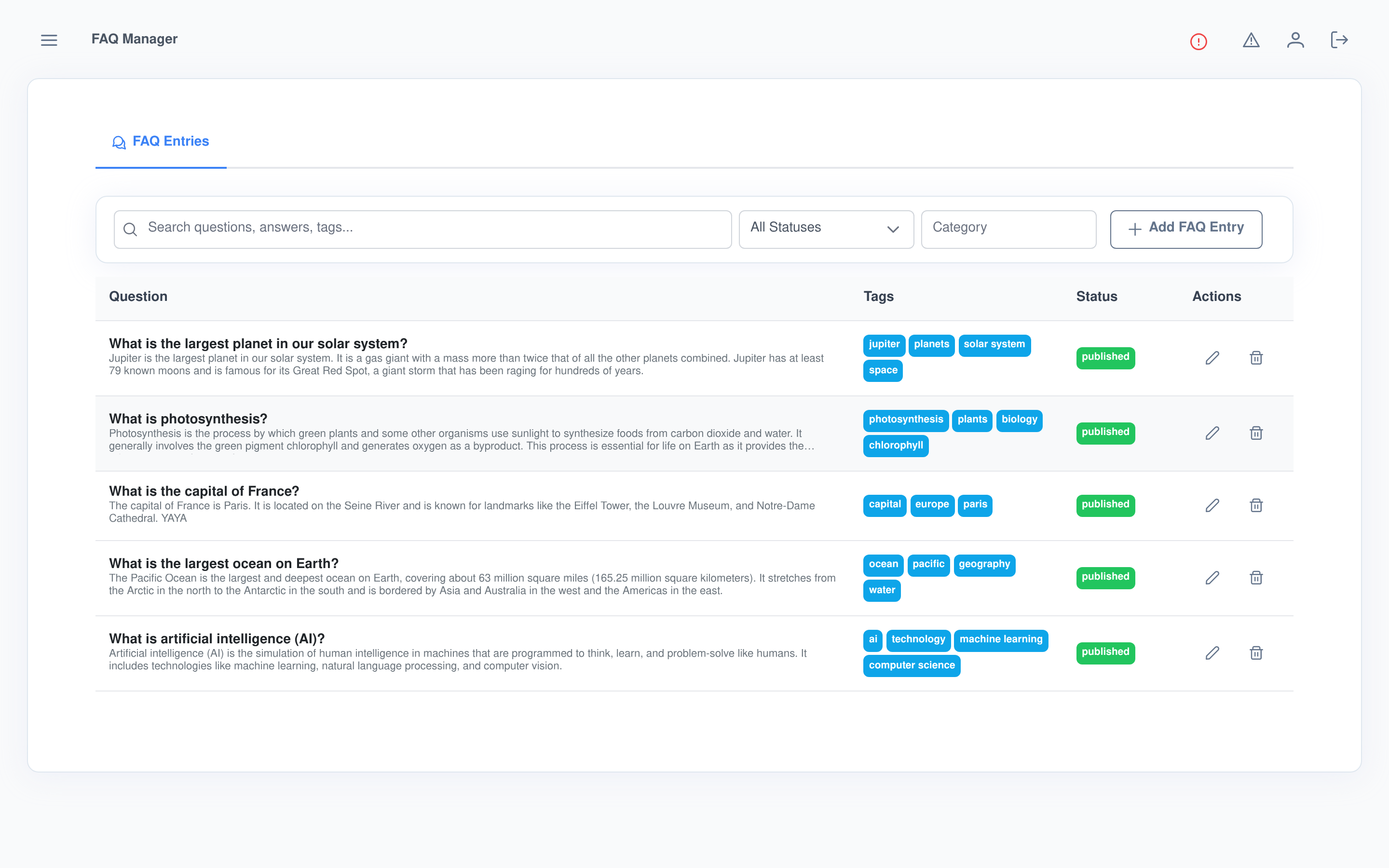
Every entry, searchable and filterable at a glance
The list screen is a single table: question with an answer preview underneath, category, tags, and a colour-coded status badge, with a search box and status/category filters above it. Anyone without manage access sees the same list but no edit or delete controls.
Everything a good FAQ entry needs, one form
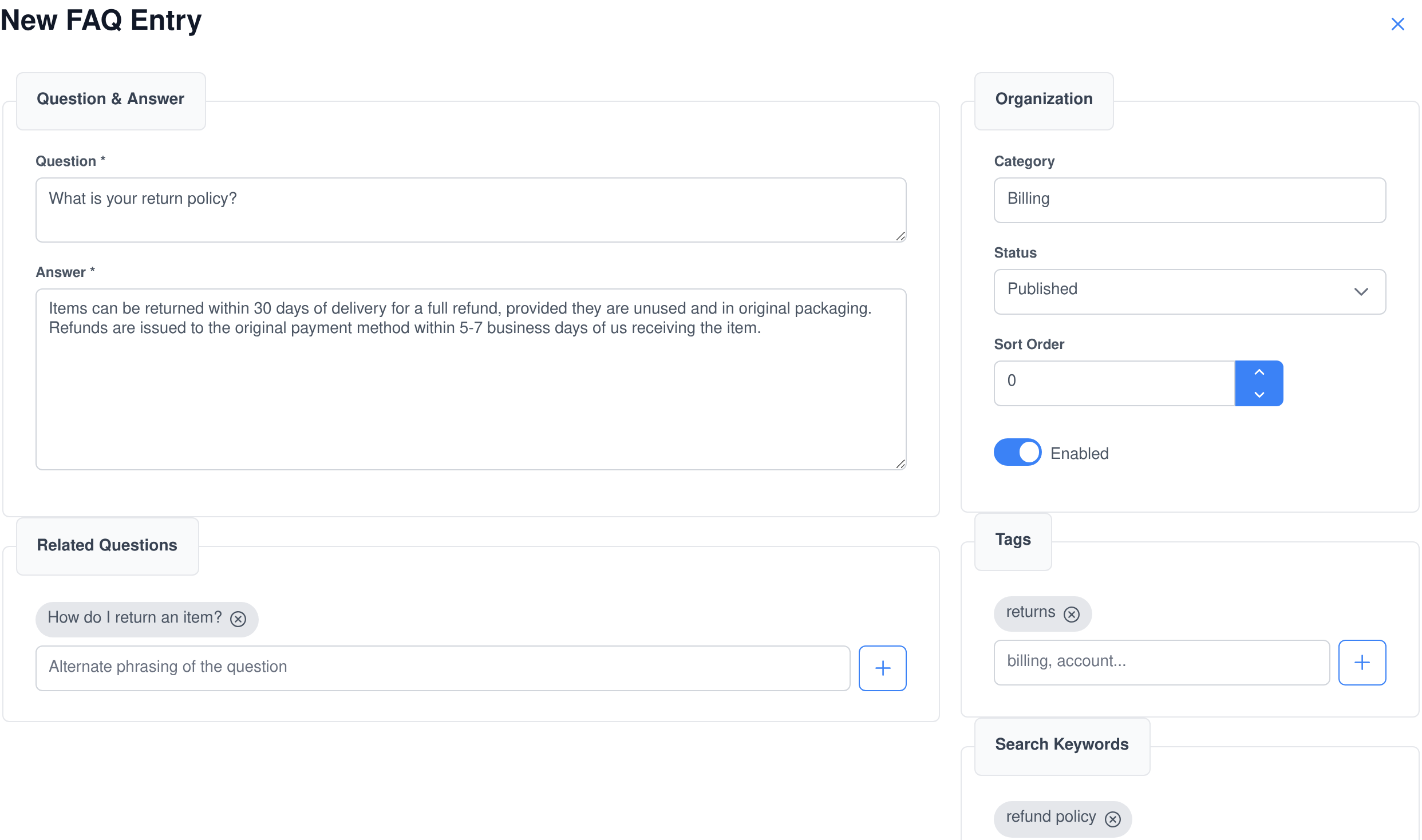
- Question and answer as the core of the entry, both plain text so there’s nothing to convert or format.
- Related questions — alternate phrasings added as chips, so “How do I return an item?” and “What is your return policy?” resolve to the same answer.
- Category, status and sort order to organise and order entries, plus an enabled toggle to disable one instantly.
- Tags and search keywords as separate chip fields, so an entry can be grouped by tag and still carry extra search terms that never show in the UI.
Two ways to search, for two different questions
An agent can ask “find FAQs about billing” and get a relevance-ranked full-text match against the question, answer, tags and category — or it can ask a precise structured question, like every archived entry with a sort order above 50, using column, operator and value conditions. Same data, whichever kind of question fits the moment.
Every FAQ action is an AI ability — and an MCP tool
The FAQ Manager ability lets an agent read and maintain the knowledge base as part of solving a task — not just answer from it. The same functions are published by the Assistant Cortex MCP server, so Claude, an IDE or any other MCP client can search or edit your FAQ store with exactly the capabilities, and exactly the permissions, your agents have.
faq_ability_execute_get_faq_schema
Get FAQ Schema
Returns the full SQL and Elasticsearch schema for the FAQ table, so an agent can see exactly what fields exist before it searches or writes.
faq_ability_execute_search_faq
Search FAQ Entries
Searches full-text by relevance, or with structured column/operator/value conditions, filterable by category, tag and status either way.
faq_ability_execute_upsert_faq
Upsert FAQ Entry
Creates a new entry, or updates an existing one by ID with a guard that excludes specific columns from the update, so an agent can add or correct an answer without risking the fields it didn’t mean to touch.
faq_ability_execute_delete_faq
Delete FAQ Entry
Removes an entry by ID and returns the record that was deleted, so the calling agent can confirm what came out of the knowledge base.
Governed like the rest of your data
Permissions that match your org
- Separate rights to view FAQ entries and to manage them — a viewer sees the searchable list, a manager can create, edit and delete.
- Without view access, the screen shows a locked state instead of the table.
- The same permission boundary applies whether the request comes from the UI, the AI ability, or an MCP client.
Runs on your terms
- System-wide entries stored in your own database, mirrored into your own Elasticsearch index — no third-party knowledge-base service in the loop.
- Scoped for GDPR, CCPA, HIPAA, SOC 2 and PCI DSS compliance handling alongside the rest of the platform.
- Self-hosted or hosted, on the same Assistant Cortex instance as your agents, chat and other applications.
What people use it for
- Support agent grounding so a chat or phone agent answers common questions from an approved source instead of improvising.
- Internal knowledge bases for policies, procedures and answers your team looks up repeatedly.
- Pre-sales Q&A that an agent can search while talking to a prospective customer.
- Self-service help centres where the same entries that back the agent can be surfaced directly to customers.
- Migrating an existing FAQ from another system, using the
sourceandexternal_idfields to track where each entry came from. - Agent-maintained documentation where an agent adds or corrects an entry as new questions come up, subject to its own manage permission.
Frequently asked questions
Do I need a separate search or knowledge-base tool?
No. FAQ Manager stores entries in your Assistant Cortex database and mirrors them into your own Elasticsearch index automatically, so full-text search is built in from the first entry you create.
Can agents update the FAQ themselves?
Yes, if they’re given manage access. The same upsert function an agent uses to add or correct an entry is available through the ability and through MCP, subject to the same permission as a human editor.
How does search know which entry is the best match?
Full-text search is weighted so a match in the question ranks highest, then a match in the related questions or keywords, then the answer, category and tags — so the most relevant entry to the customer’s actual wording comes back first.
Can I take an entry offline without deleting it?
Yes. Set its status to draft or archived, or switch off the enabled toggle. Filters on the list screen and in search let you narrow to any of those states.
Can I migrate an existing FAQ into it?
Yes. Each entry has a source and an external_id field so imported entries can be tracked back to where they came from, and the upsert function can be scripted or driven by an agent to bulk-load them.
Who can see FAQ entries that aren’t published yet?
Anyone with view access sees every entry regardless of status, including drafts — status controls how an entry is meant to be used, not who can see it in the manager. Restrict editing separately with the manage permission.
Give your agents an answer they can trust
FAQ Manager ships with Assistant Cortex. Start a trial, write your first entry, and let an agent search it on the next question.