An AI sales pipeline that finds the leads, researches them and books the demo
Sales Pipeline is the Assistant Cortex application for building a book of business from an empty database. Choose a region and a type of business, and a scheduled AI agent works through it city by city: it creates a record for every matching company, reads each company’s own website for contacts, hours, services and pricing, and marks it qualified or invalid. What survives becomes an outreach campaign by email, phone or LinkedIn, and a booked demo on a salesperson’s calendar.
Nothing to import and no lead-list vendor to sign with. You set a budget per campaign, and the research pauses itself when it reaches it.
From a region on the map to a booked demo
1. Research a region
Create a lead campaign for a country, a region and a business type. Every city in that region — and in all of its sub-regions — becomes a research task, and a scheduled AI agent works through them five at a time.
2. Qualify what it found
Each new business is then researched from its own website. Description, email addresses, phone numbers, opening hours, services and pricing land on the record, and the agent sets it qualified — or invalid, and out of your way.
3. Work the pipeline
Add the qualified businesses to an outreach campaign. The app writes one task per contactable email address, phone number and LinkedIn profile it holds, and a demo can be booked from any of them straight onto a salesperson’s calendar.
One pipeline, filtered the way a salesperson thinks
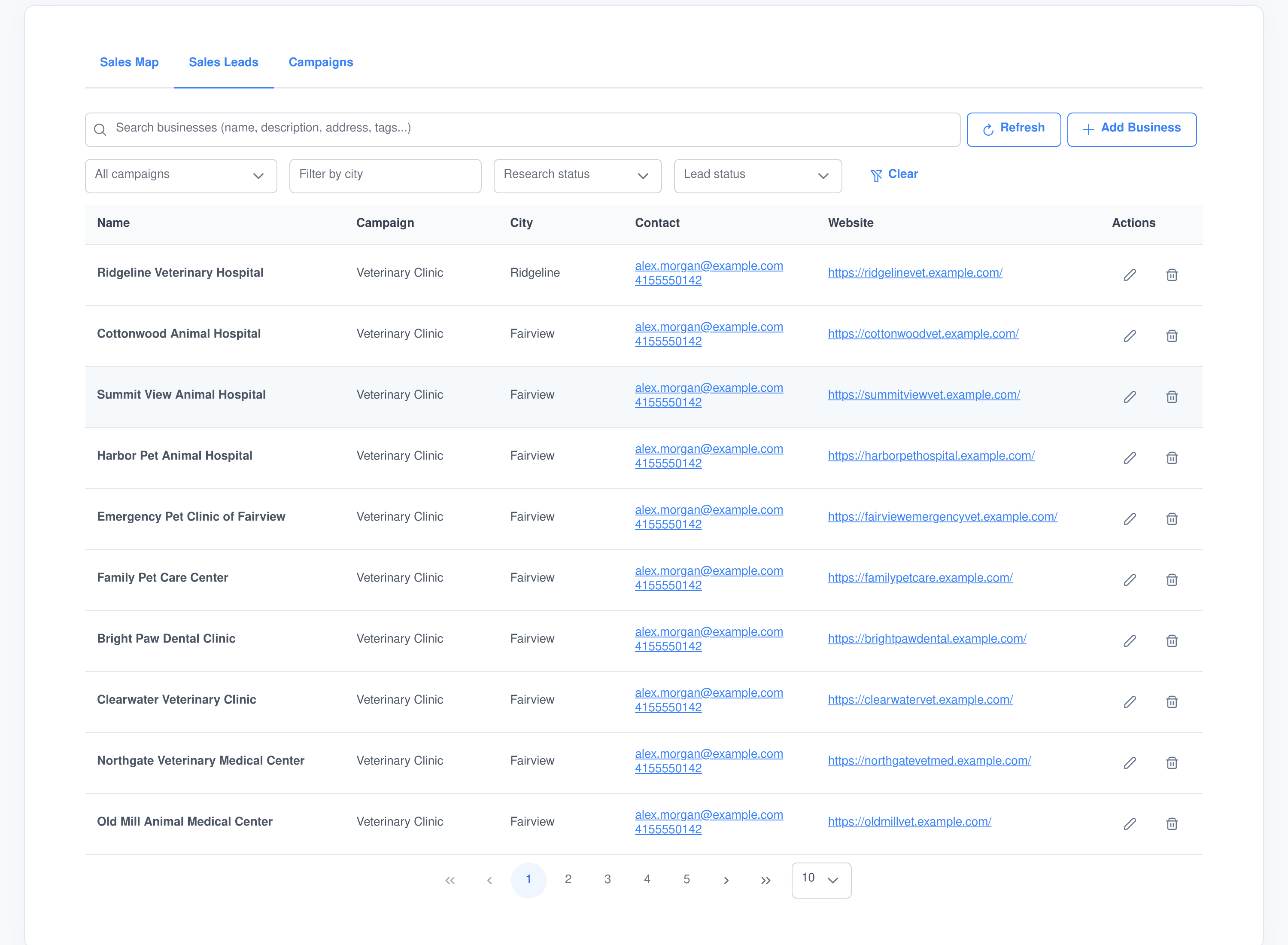
Everything the research agent creates lands in one list, alongside anything you add by hand. Narrow it by the campaign that sourced it, by city, by how far the research got, or by where the deal has reached, and search the free text across names, descriptions, addresses and tags.
Find the record
- Full-text search. Queries run against an Elasticsearch index of every business and contact, and business search falls back to a database name lookup if that index is unavailable.
- Four filters that stack. Campaign, city, research status and lead status, cleared in one click.
- Structured search too. An agent can search the same records by column, operator and value — equals, greater than, like — and ask for only the columns it needs.
See the state at a glance
- Which campaign found it. Every researched business keeps a link back to the campaign that sourced it.
- Where it sits. Research status runs incomplete, in progress, complete, verified or archived, separately from the deal stage.
- Who to call. The primary email address and phone number sit on the row, with the rest on the record.
The record is the deal, not just an address book entry
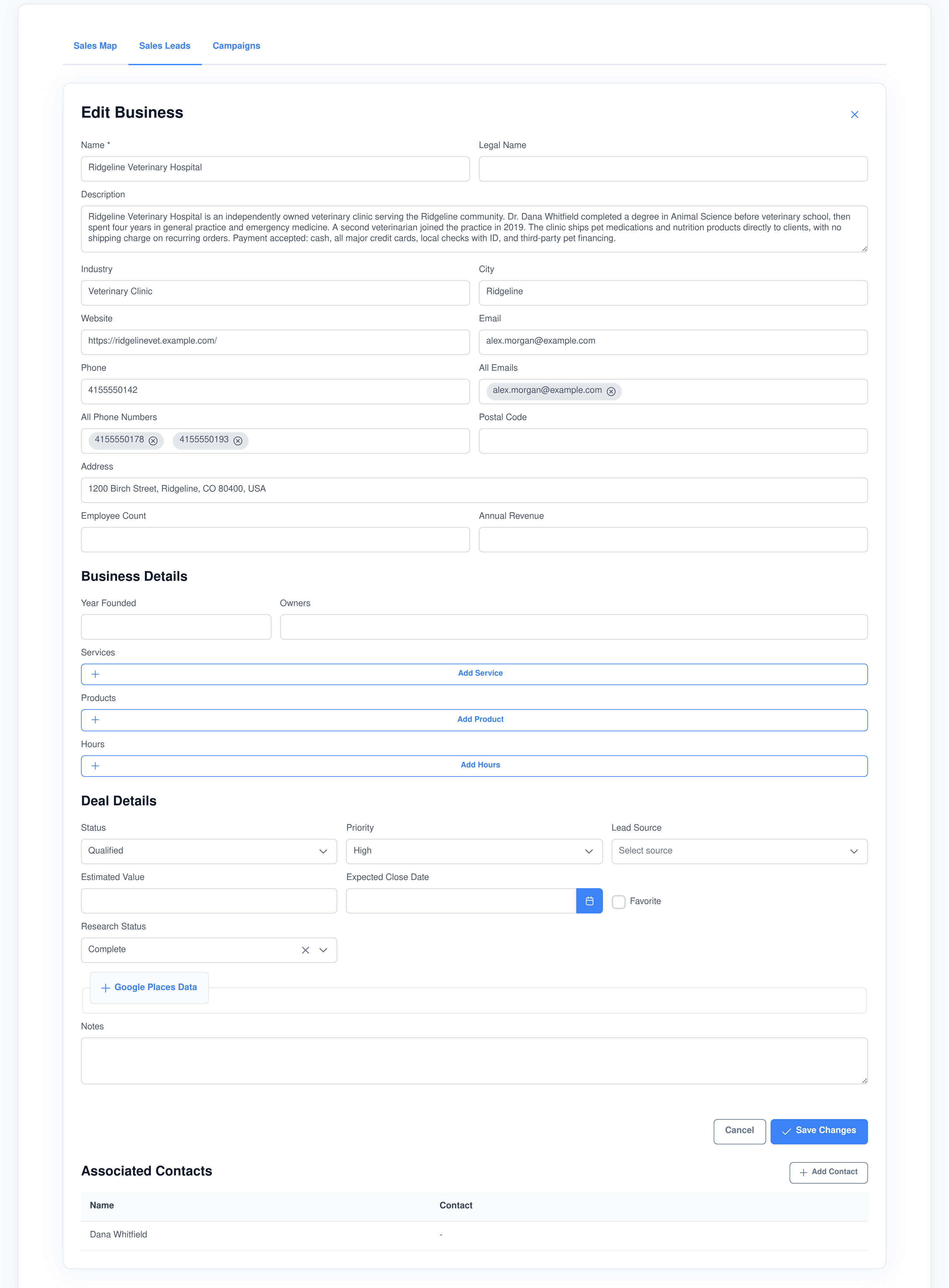
The business carries the pipeline stage, the value and the close date, and the people you know there hang off it as contacts. That is why a phone number found on the company website and the same number found on a named contact are treated as two ways to reach one deal.
What research puts on it
- Every address it can find. A primary email and phone, plus the full list of addresses and numbers the website crawl turned up.
- How the business runs. Year founded, owners, opening hours, and the services and products it sells with descriptions and prices.
- Map data. Google place ID, operating status, rating, review count, price level, category types and coordinates.
- Firmographics. Industry, employee count, annual revenue, legal name, postal address and city.
What you put on it
- Seven stages, in order. New, contacted, qualified, negotiation, won, lost and invalid.
- Deal detail. Priority, lead source, estimated value, expected close date and a favourite flag.
- People. Contacts with job title, department, several emails, phone numbers, postal addresses and social profiles each.
- Your own notes and tags, on both the business and each contact.
Two kinds of campaign, because finding and selling are different jobs
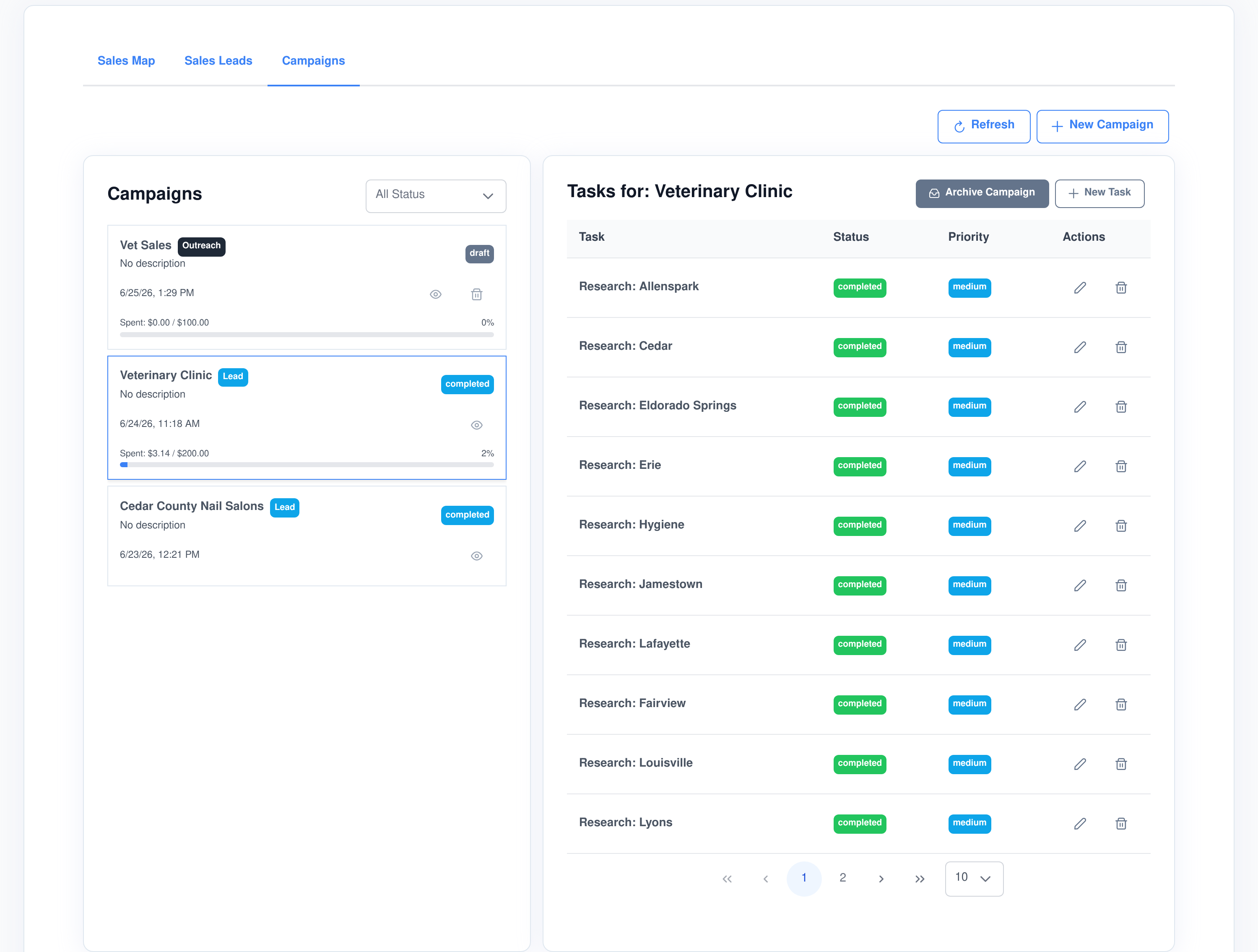
A campaign is either a lead campaign, which goes and finds businesses, or an outreach campaign, which works the ones you already have. Both move through draft, active, paused, completed and archived, and both carry a budget.
Lead campaigns — discovery
- Targeted by geography. Country, region and business type — “veterinary clinics in Colorado”, not a list of postcodes.
- Fanned out to cities. Selecting a region creates one research task per city in it and in every sub-region beneath it.
- Worked automatically. A scheduled agent picks up pending tasks in batches and marks each one complete when the city is done.
- Closed by itself. When no task is left pending or in progress, the campaign is set to completed.
Outreach campaigns — contact
- Channels you choose. Email, phone and LinkedIn, ticked per campaign.
- Businesses you pick. Only businesses whose research is complete are offered, filtered by the lead campaign that found them and by stage.
- A named product. Attach a sales product and the campaign knows the pitch, the pricing and how long a demo runs.
- A named sender. Pick the email account and the phone number the outreach goes out from.
A researcher that works a whole region while you sleep
The research runs as a scheduled task, not as something you sit and watch. Every minute it looks at your active campaigns, takes the next batch of pending city tasks and hands each one to an AI agent with its own script.
- A grid, not a single search. The Places API returns about twenty results per query, so the agent geocodes the city to a bounding box, samples an evenly spaced grid of points across it — three miles apart by default — searches at each point and de-duplicates the results.
- Then the website. Businesses still marked incomplete are picked up in the next pass, their site crawled up to ten pages deep, and the details written back without overwriting anything already on the record.
- An honest verdict. A business whose site crawls cleanly is set qualified; one that cannot be crawled is set invalid and disabled, and a business with no website at all is closed out rather than left in limbo.
- Five agents at a time. Concurrency is part of the task definition, so a large region is worked steadily instead of in one burst.
Outreach tasks are generated from the data, not typed in
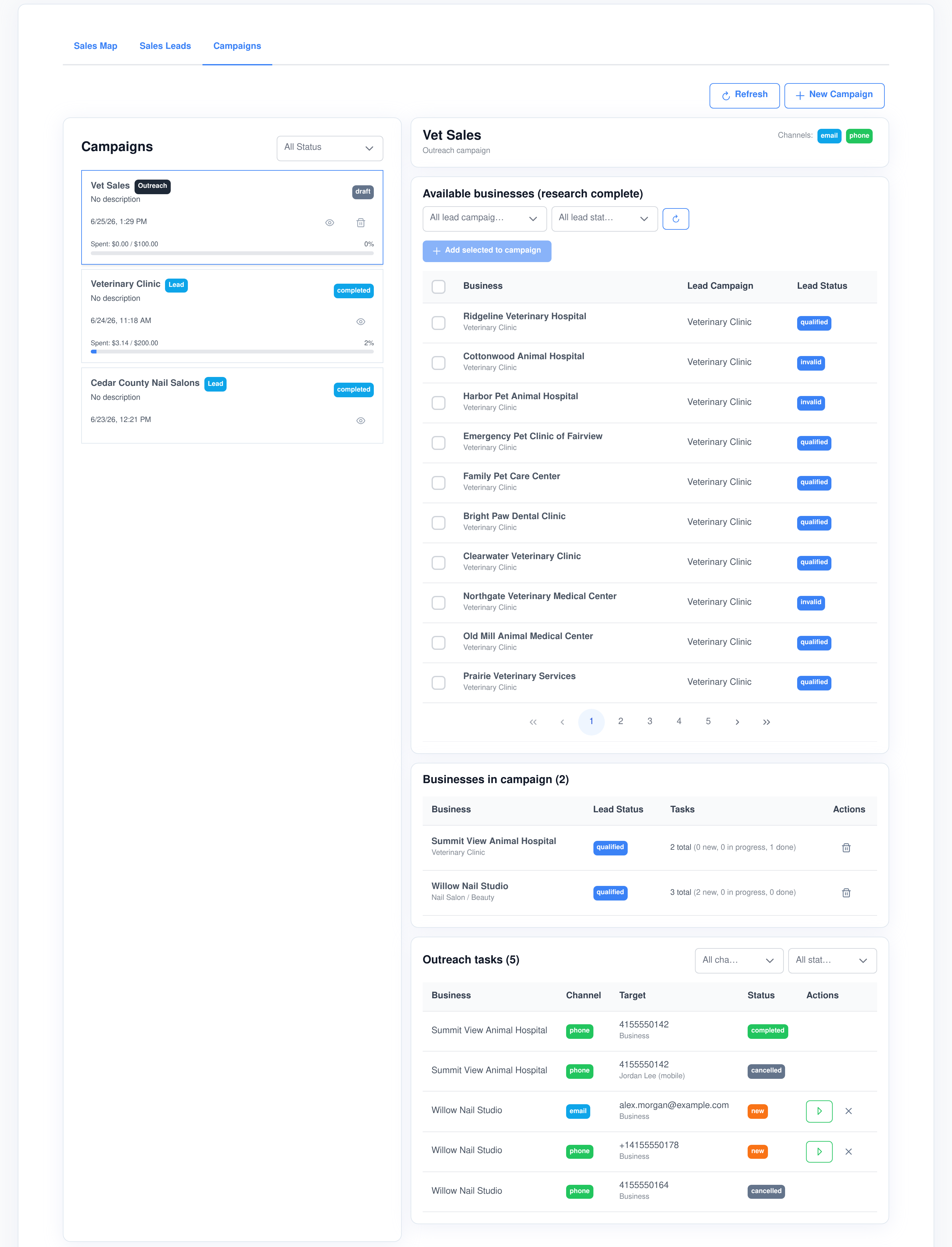
Add a business to an outreach campaign and the app reads everything it holds about that business, and about every contact attached to it, then creates one task per way of reaching them on the channels the campaign has enabled. Each task records the exact address or number to use and who it belongs to.
- Labelled by owner. A number on the company record is labelled “Business”; a number on a person is labelled with that person’s name and the type of number, so nobody dials a mobile thinking it is a switchboard.
- Deduplicated properly. The same number written as
(555) 123-4567,555-123-4567and+1 555 123 4567is one task, not three, and a number that appears on both the company and two contacts is still one task. - Counted per business. Each business in the campaign shows its total tasks and how many are new, in progress or done.
- Tracked to an outcome. A task moves new, in progress, completed, cancelled — or booked, once a demo is on the calendar.
Sales Pipeline produces the task, the target and the account it should come from. The sending itself is done by your agents through the Email Accounts and Phone Numbers applications, which is why the same outreach can go out as a written email or as a spoken phone call.
Every campaign says who it comes from and what it may spend
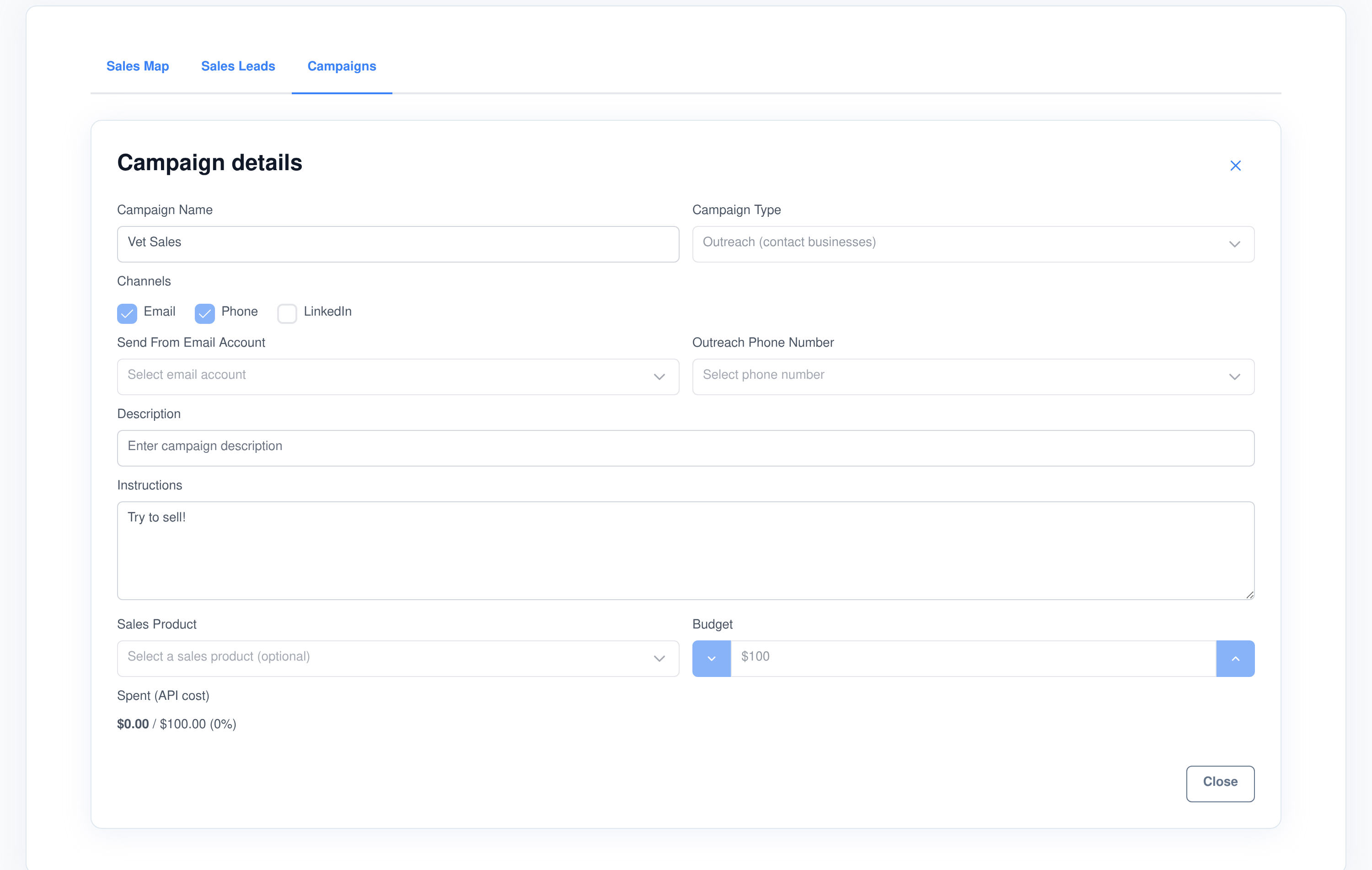
An outreach campaign names the mailbox its emails are sent from and the phone number its calls and texts come from, chosen from the accounts and numbers already configured in your workspace. A campaign with only email configured still works; the phone side simply is not offered.
Sent from an account you control
- Real mailboxes. The send-from list is the email accounts configured in the Email Accounts application, so replies land where a person will read them.
- Real numbers. The outreach number is one of your provisioned phone numbers, so the caller ID is yours and the call is recorded and transcribed like any other.
- Written instructions. Each campaign carries free-text instructions that are handed to the agent working it, so the pitch changes with the campaign rather than with the prompt.
Spend that stops itself
- A budget per campaign. Geocoding, map searches and place lookups are charged against the campaign at the per-call rates you set.
- Automatic pause. When spend reaches the budget the campaign is paused, and a run that starts over budget stops before it spends anything.
- Degrades, not fails. If the budget runs out mid-run the agent skips the paid detail lookups and still records what it found.
- Always visible. Spend against budget shows as a bar on the campaign in the list and as a figure on the campaign itself.
Demos booked against your team’s real availability
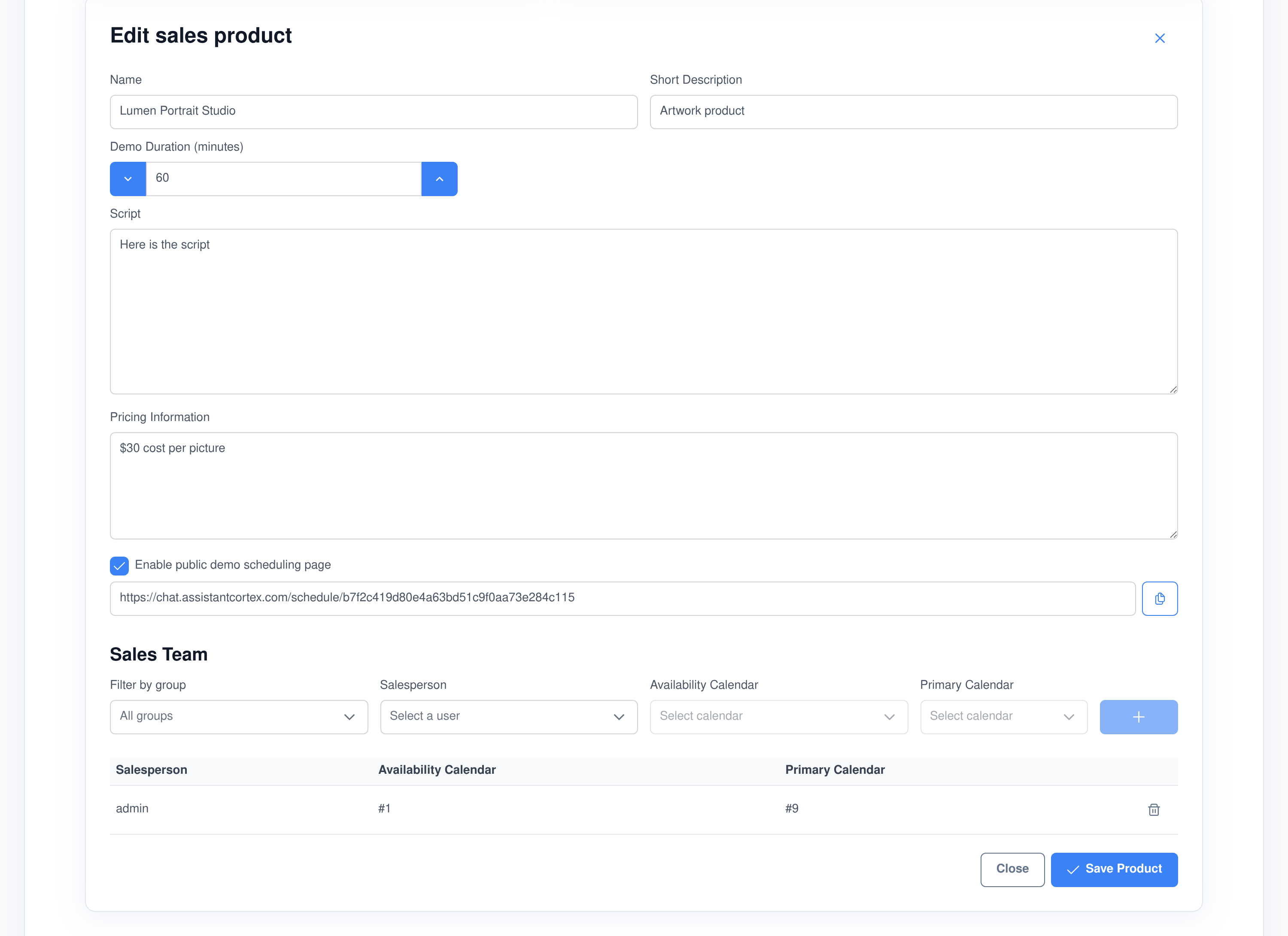
A sales product holds the pitch script, the pricing and how long a demo runs, and it names the people who give that demo. Each of them is mapped to two calendars: one that says when they are available, and one that holds what is already booked. Availability is the first minus the second.
- A slot has to fit. A time is only offered when it sits entirely inside an availability block and overlaps nothing on the booked calendar, stepped on a half-hour grid and never in the past.
- Across the whole team. Slots are gathered from every salesperson on the product, each one labelled with whose time it is, over a two-week window by default.
- Checked again at booking. The slot is re-tested at the moment of booking; if someone got there first, the next free salesperson takes it, or the booking is refused rather than double-booked.
- Written back to the deal. Booking creates the calendar event on that salesperson’s own calendar and marks the outreach task booked, with the time and the person recorded on it.
Or let them book it themselves
Publishing a product gives it a scheduling link you can put in an email signature or an outreach message. It opens without a login, shows the same availability your team’s calendars produce, and writes the booking back to the same place a salesperson would.
- One link per product. Copy it from the product screen. The token in the URL is what the page resolves, so nothing about your pipeline is exposed by the address itself.
- Publishing is deliberate. The page will only answer for a product that is both enabled and explicitly published for public booking; anything else is refused as unavailable, so a link cannot be guessed into a private product.
- Three read-and-book operations, and nothing else. An unauthenticated visitor can fetch the product’s name and demo length, list open slots, and book one. No other part of the pipeline is reachable from that page.
- The same booking rules apply. Slots come from the team’s real availability and are re-checked at the moment of booking, so a self-served demo cannot double-book a salesperson any more than an internal one can.
Permissions, ownership and the data you keep
The researched pipeline is a shared asset — records created by an agent overnight have to be usable by whoever is selling in the morning — so access is granted by permission rather than by who typed the record, while campaigns and their outreach tasks stay with the person who created them.
Four permissions, viewed and managed separately
- Businesses, contacts, campaigns and sales products each have their own view and manage permission.
- Tabs follow the grant. Someone without the campaigns permission never sees the campaigns tab, not a tab that errors.
- Campaigns are owned. Reading, editing or deleting another user’s campaign, campaign task or outreach task is refused, and only draft or archived campaigns can be deleted at all.
- Chat re-checks everything. A request that arrives from a chat card is authorised against the same permission as the equivalent screen, using the signed-in user rather than anything in the message.
It is your database
- Self-hosted. Businesses, contacts, campaigns and outreach tasks live in your own database and your own search index, on your own infrastructure.
- Exportable. A user data export includes this module’s records for that person automatically.
- Retention-aware. A retention sweep removes expired records and prunes their search-index documents with them.
- Erasable. Deleting a user removes the pipeline data belonging to them, in the same pass as the rest of the platform.
Every pipeline action is an AI ability — and an MCP tool
The pipeline is not a screen an agent looks at; it is a set of functions an agent calls. Thirteen of them, available to your agents mid-conversation — ask in chat for the qualified leads in a city and the answer comes back as a pipeline card you can page and filter, with a demo bookable from the card itself. The same functions are published by the Assistant Cortex MCP server, so Claude, an IDE or any other MCP client can drive them under the same permissions as the person running it.
Two agents ship with the application and are built from these tools: a Sales Lead Researcher that finds and enriches businesses, and a Sales Representative that works the pipeline, writes the outreach and books the demos.
sales_lead_ability_execute_search_places_city_grid
Search Places (City Grid)
Searches an entire city exhaustively, working around the map API’s twenty-result cap. It geocodes the city to a bounding box, samples an evenly spaced grid of points across it, searches at every point, de-duplicates what comes back, creates a business record for each unique place linked to the city and the campaign, and returns the records it created.
sales_lead_ability_execute_search_businesses
Search Businesses
Finds businesses either by full-text search or by SQL-style conditions on any column, so an agent can ask for “qualified vets in this city” or for every record whose expected close date is before a given day.
sales_lead_ability_execute_get_business_schema
Get Business Schema
Returns the complete database and search-index schema for the business record, so an agent knows exactly which fields exist before it writes to any of them.
sales_lead_ability_execute_upsert_business
Upsert Business
Creates a business, or updates an existing one by id. Columns can be explicitly excluded from an update, which is how the research agent adds what it learned without overwriting what a person already set.
sales_lead_ability_execute_search_contacts
Search Leads
Searches the people in the pipeline by full text across name, company, phone and email, or by SQL-style conditions, with filters for the business they belong to, their tag and their source.
sales_lead_ability_execute_view_contact
View Lead
Opens one person by id or by name and returns it as a contact card in the conversation, with their addresses, numbers and the business they belong to.
sales_lead_ability_execute_get_contact_schema
Get Lead Schema
Returns the complete database and search-index schema for the contact record, including the shape of the email, phone, address and social-link collections.
sales_lead_ability_execute_upsert_contact
Upsert Lead
Creates a person against a business, or updates one by id — the tool the research agent calls when a website names a practice manager, an owner or a head of purchasing.
sales_lead_ability_execute_complete_campaign_task
Complete Campaign Task
Marks a campaign’s research task finished, stamping the completion date and any notes. It is what closes the loop on a city, and what eventually completes the campaign.
sales_lead_ability_execute_get_demo_time_slots
Get Demo Time Slots
Returns the times a demo can actually happen for a given outreach task, computed from the sales product’s team and each salesperson’s availability and booked calendars, over as many days ahead as you ask for.
sales_lead_ability_execute_book_demo
Book Demo
Books one of those slots: it reserves the time on a salesperson’s calendar — a named one, or the first who is genuinely free — and marks the outreach task booked. This is the function an agent calls while the prospect is still on the phone.
sales_lead_ability_execute_delete_business
Delete Business
Removes a business by id, from the database and from the search index together.
sales_lead_ability_execute_delete_contact
Delete Lead
Removes a person by id, from the database and from the search index together.
Frequently asked questions
Do I need a lead list to get started?
No. That is the point of a lead campaign. You give it a country, a region and a type of business, and it builds the list itself — one research task per city, one record per business found. You can still add businesses and contacts by hand, and both live in the same pipeline.
Where do the businesses actually come from?
From a Google Places search run across a grid of points covering the whole city, using your own API key. A single Places query returns about twenty results, so the agent samples points a few miles apart across the city’s bounding box, searches at each of them and de-duplicates by place ID. Contact details then come from each business’s own website.
How does a lead get qualified?
An agent crawls the business’s website, up to ten pages, and extracts the description, valid email addresses and phone numbers, opening hours and services against the campaign’s written instructions. A site that reads cleanly leaves the business qualified; one that cannot be read leaves it invalid and disabled, so it stays out of your outreach.
Can I cap what the research costs?
Yes. Each campaign has a budget, and geocoding, map searches and place lookups are charged against it at rates you configure. Reaching the budget pauses the campaign, a run that starts over budget does no work at all, and a run that hits the limit part way through drops the paid detail lookups rather than stopping halfway through a record.
Does the application send the emails and make the calls itself?
Sales Pipeline generates the outreach task, the exact address or number to use, and the account it should be sent from. The sending is done by your agents through the Email Accounts and Phone Numbers applications, which is why a campaign can reach the same prospect as a written email or as a spoken phone call, and why the reply lands in a real mailbox.
How does demo booking know when someone is free?
Each salesperson on a sales product is mapped to two calendars: one holding their available hours and one holding their booked meetings. A slot is only offered if it fits entirely inside an available block and clashes with nothing already booked, and it is checked again at the moment of booking so two people cannot take the same time.
Can an AI agent run the pipeline directly?
Yes. Thirteen functions cover searching, reading, creating and updating businesses and contacts, completing campaign tasks, and finding and booking demo slots. Two agents ship using them — a researcher and a sales representative — and the same functions are exposed through the Assistant Cortex MCP server to any MCP client, under that user’s permissions.
Who can see the pipeline?
Access is granted by four separate view and manage permissions, for businesses, contacts, campaigns and sales products, so a junior seller can read the pipeline without being able to delete it. The researched records are shared across everyone who holds the permission, while campaigns and their outreach tasks belong to the person who created them.
Start with a region and a business type
Point Sales Pipeline at a market, set a budget, and let it come back with a researched, qualified list you can start calling.