Compliance controls for an AI platform, checked every time it starts
Choose which standards this deployment enforces — GDPR, CCPA/CPRA, HIPAA, SOC 2, PCI DSS — and Assistant Cortex validates the deployment against them at boot. Behind that switch sit three modules that do the actual work: an append-only audit trail, a daily retention sweep, and a versioned consent gate.
None of this is a certification, and the page never pretends otherwise. These are the mechanisms your own compliance programme needs to point at, implemented in the platform and visible on an admin screen.
One switch, three things happen
1. You pick the standards
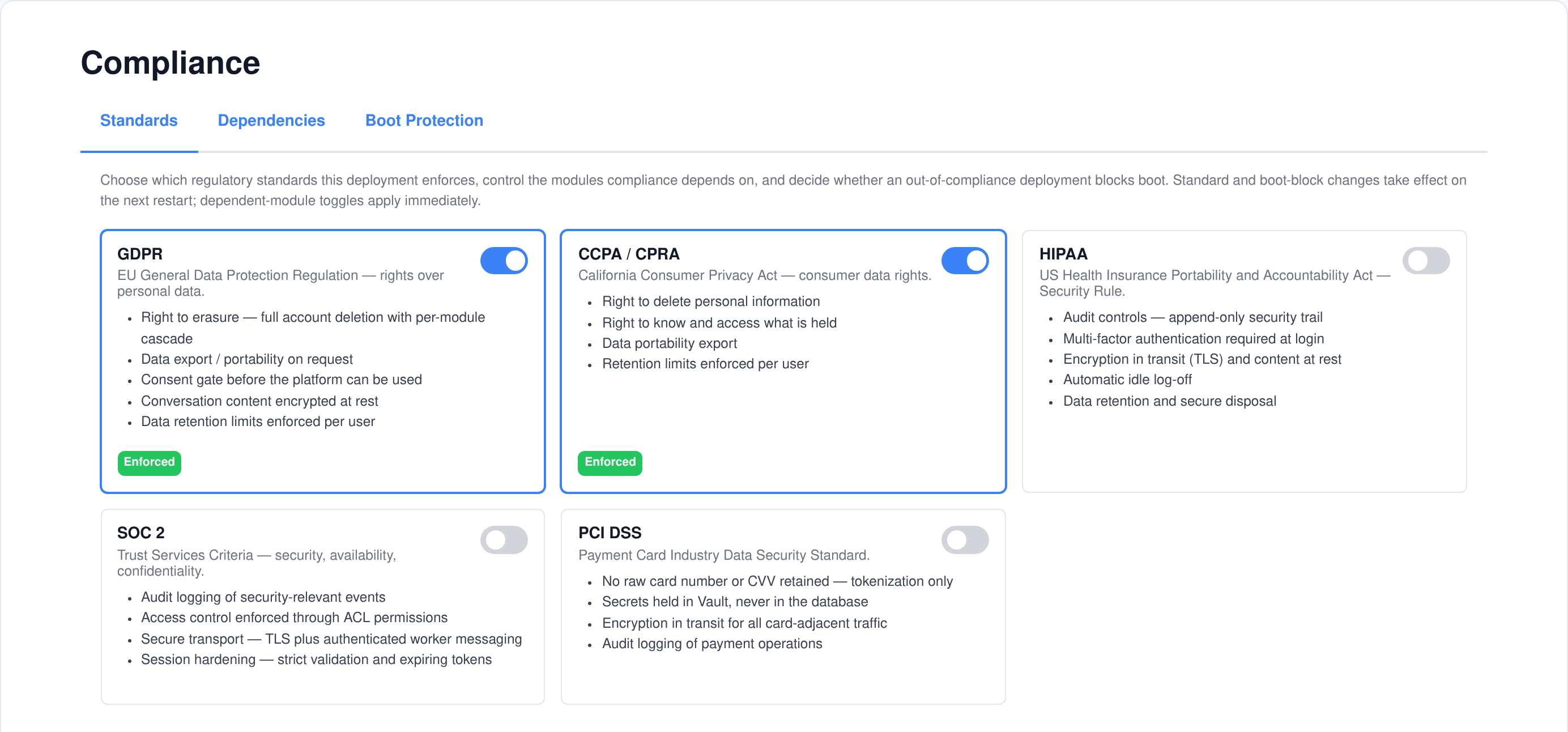
Five standards, each with its own switch and its own card describing what enforcing it entails. You can enforce one, several, or none. The choice is stored as configuration, not compiled in.
2. The deployment is checked
At startup the platform evaluates every requirement those standards mandate, and checks every installed module against them. Each violation is named individually in the log, with the exact setting to change.
3. The controls run
Chat content is encrypted at rest, the audit trail records who did what, the retention sweep runs nightly, and the consent gate stands in front of the application. You did not wire any of it up.
Five standards, and what each one turns on
The Compliance application is the one place the deployment’s regulatory posture is set. Each standard is a card that states, in plain language, what enforcing it requires of the platform — so an administrator is choosing behaviour, not ticking a box whose meaning is documented somewhere else.
What the boot check actually tests
- Strict socket validation is on. Every socket payload is schema-checked; the opt-out is not allowed under any enforced standard.
- Tokens expire. The non-expiring-token setting must be off.
- TLS verification is not disabled. The switch that skips certificate checking must be off.
- Secure cookies are on. Which in practice means the instance is served over HTTPS behind a TLS-terminating proxy.
- Worker messages are authenticated. A shared message-authentication secret must be set on the API and on every worker — required by HIPAA, SOC 2 and PCI DSS, not by the consumer-privacy standards on their own.
How the check behaves
- Each requirement is evaluated once. Requirements are declared in one table with the standards that mandate them, so a rule shared by four standards is not checked four times.
- Every failure is named. The log lists one line per violation, each carrying the exact configuration key to change.
- Changing standards takes effect on restart. The gate runs at startup, and the screen says so rather than implying an instant apply.
- Turning the profile off is safe. An encryption key that already exists is still loaded, so content encrypted earlier keeps decrypting.
Every installed module has to declare itself
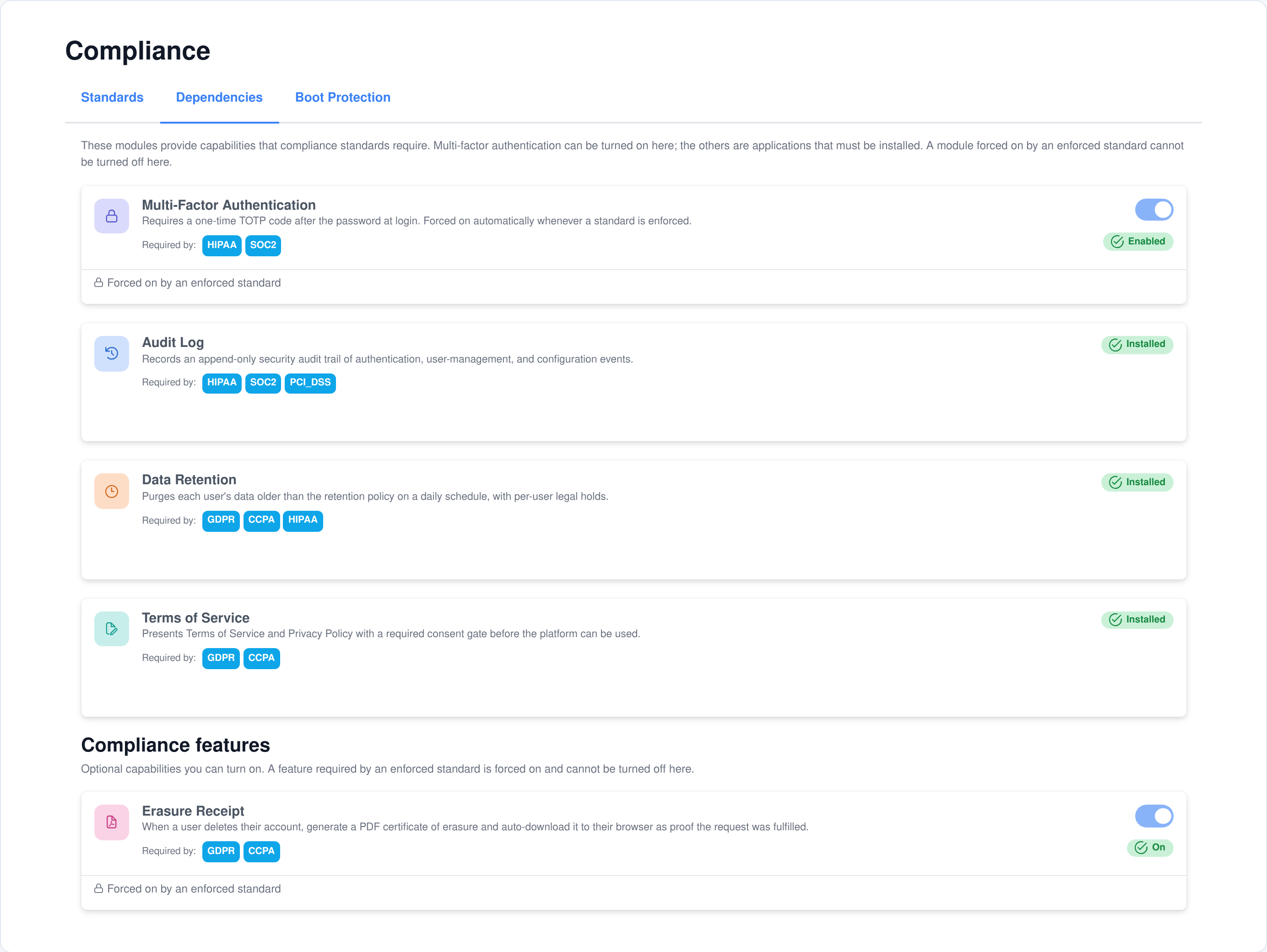
A platform is only as governed as the applications running on it. Each installed module carries a manifest declaring which standards it was built for, and the boot check requires that declaration to cover every standard you enforce. A module that does not list HIPAA is reported by name the moment you enforce HIPAA.
Warn loudly, or refuse to start
- Block boot is a separate switch. With it on, an out-of-compliance deployment refuses to start and the API process does not come up.
- It is off by default. A mis-configured profile then warns at every start rather than bricking the instance — the safe default for the moment you first turn a standard on.
- The list you get is the same either way. Warning mode logs exactly the violations that blocking mode would refuse to start on, so you can fix them and then arm the switch.
Dependent modules, in one place
- Audit Log, Data Retention and Terms of Service report as installed or not. They are applications you add, and the tab tells you which of your enforced standards each one is there to satisfy.
- Optional features follow the same rule. The erasure receipt is an admin toggle that a GDPR or CCPA profile forces on and holds on.
Conversation content encrypted at rest, without a migration
Turning the profile on encrypts the two columns that carry chat message content. It is applied at the two points every read and every write already pass through, so no application code, no database model and nothing in the platform core had to learn about ciphertext.
The cipher
- AES-256-GCM, with a random initialisation vector per value and an authentication tag stored beside it.
- The key lives in HashiCorp Vault, generated as 32 random bytes the first time a standard is enforced, and never written to the database.
- Encrypted values are marked. A version prefix on every ciphertext lets encrypted and older plaintext rows sit in the same column, so switching encryption on is not a migration.
- A failed decrypt never breaks a read. The stored value is surfaced instead of throwing, so a key problem degrades a message rather than an application.
How it is wired in
- Two choke points, not a hundred call sites. Content is encrypted on the way into the single write path and decrypted on the way out of the single read path.
- Decryption is not conditional on the profile. It runs whenever a value carries the marker and a key is loaded, so turning enforcement off later does not orphan data.
- Rows stay clean after a read. Decrypting in place would otherwise mark the field changed, and a later partial update of an unrelated column would write plaintext back over the ciphertext. That flag is explicitly cleared.
The audit trail records itself — nobody instruments anything
There is no logging call scattered through the platform to forget. The Audit Log application attaches middleware around the operations that already exist — the login route, the user and group handlers, the configuration writer — and records what it observes. Install the application and the history starts; remove it and nothing else changes.
What gets recorded
- Sessions. Login success and login failure — the outcome read from the HTTP status the login route returned — plus logout, each with the attempted username and the source IP.
- User management. User created, updated and deleted; group created, updated and deleted, with the permission set on a group change.
- Passwords. A user changing their own, and an administrator resetting somebody else’s, recorded as separate event types.
- Configuration. Every write to a configuration group, recorded by path only.
- Second factor. Enrolment, a passed check, a failed code, and an administrator resetting a user’s enrolment.
And what deliberately does not
- Never the values you configured. A configuration change records the group path that was written, not what was written into it.
- Never a secret. Any field whose name looks like a password, token, secret, API key, CVV or private key is dropped from the stored detail before the row is written.
- Not the noisy internal paths. The session-token store, encryption key material and per-user credential groups are skipped, so the trail is not drowned by a row per login.
- Never at the cost of the operation. A failed audit write is logged and swallowed, so auditing can never break the thing it was auditing — and a failed operation still records its own warning event before the error is rethrown.
A viewer built for the question you are actually asking
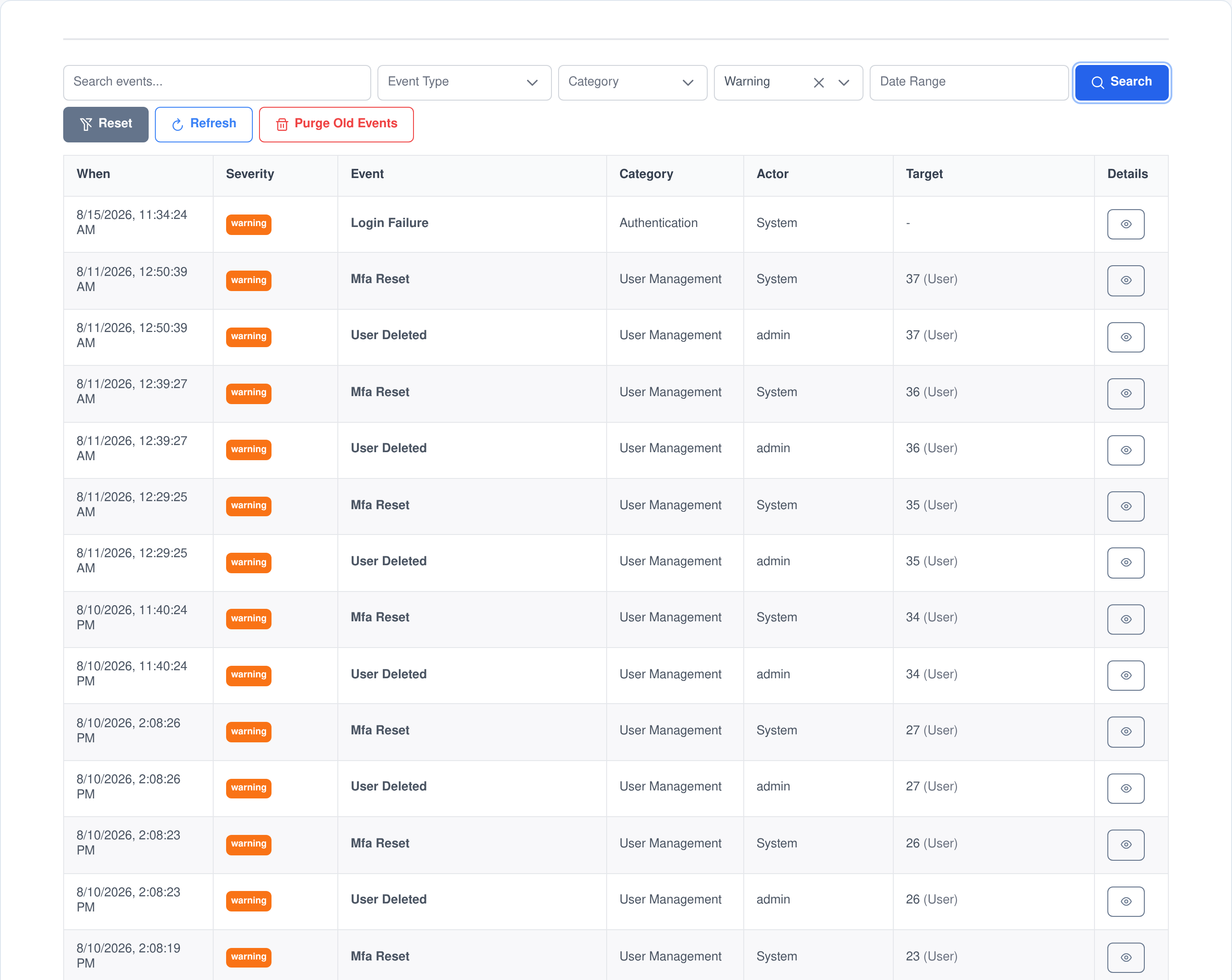
Auditors and incident reviews ask narrow questions: who reset that password, which failures happened that night, what changed on the day the behaviour changed. The events screen filters on all of it at once and the dropdowns are built from the data actually present, so you are never offered a filter that returns nothing.
Search and filter
- Free text across the identifying columns. One box searches the event type, the acting username, the target and its type and id, and the source IP.
- Structured filters alongside it. Event type, category, severity, acting user, target type, and a date range, all applied together.
- Newest first, paged on the server. The table asks for a page at a time rather than pulling the history into the browser.
The numbers, on their own tab
- Four headline counts. Total events, events in the last 24 hours, failed logins in the last 24 hours, and critical events in the last 30 days.
- Breakdowns by severity, category and type, over the last 30 days.
- A 30-day daily series with the quiet days zero-filled, so a gap reads as a gap rather than as missing data.
- The ten busiest accounts over the same window.
One event, written once and never edited
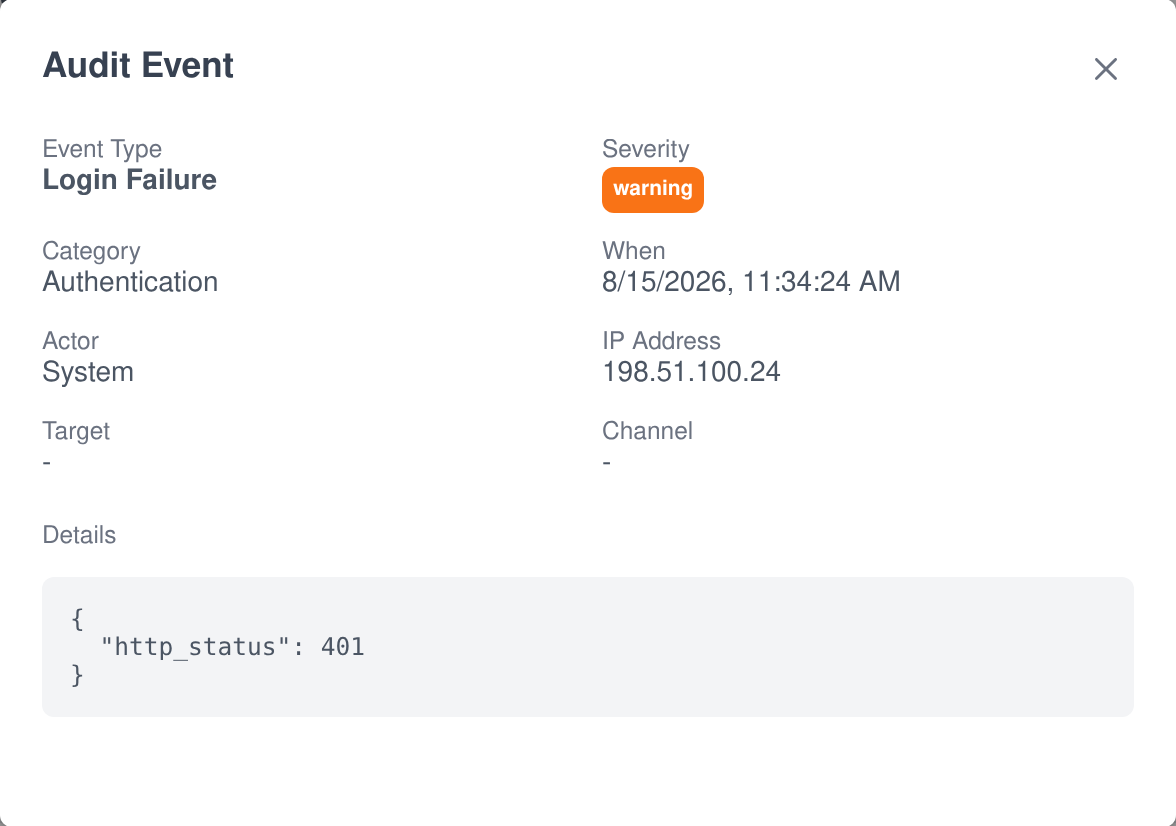
The events table is append-only by construction: rows carry a creation timestamp and no updated timestamp, because nothing updates them. Open one and you get the whole record.
- What happened. The event type, its category, and a severity of info, warning or critical.
- Who did it. The acting user id and the username resolved at the time of writing, so a later rename does not rewrite history. System-generated events are recorded as actor zero rather than being attributed to somebody.
- What it was done to. The target’s type, id and label — a user, a user group, or a configuration path.
- Where from. The source IP address, and the chat channel when the action came from one.
- The detail. A JSON payload, sanitised on the way in: secret-looking keys removed, long strings clipped, long arrays capped, and deep structures truncated so one pathological payload cannot bloat the table.
Retention that every module honours, because every module implements it
A retention policy that only covers the tables somebody remembered to list is not a retention policy. Data Retention works out each user’s cutoff date and then calls one platform-wide cleanup hook per user. Every application that stores anything about a user attaches to that hook and deletes its own expired rows — 45 of the modules Assistant Cortex ships do exactly that today, including the core module that removes expiring conversations along with their messages, attached files and workspace folders.
Whose data, and for how long
- A system default in days, set once in configuration. Zero means keep forever, which is what a fresh install does — nothing is ever deleted until somebody decides it should be.
- A per-user override. Any signed-in user sets their own retention from their account, choosing 30 days, 90 days, six months, a year, keep forever, or simply following the system default.
- Clearing an override removes the row. The user falls back to the current default rather than being frozen at whatever the default was on the day they chose.
- A legal hold exempts an account entirely. Held users are skipped by the sweep, with the reason and who placed it recorded, until the hold is released.
How the sweep behaves
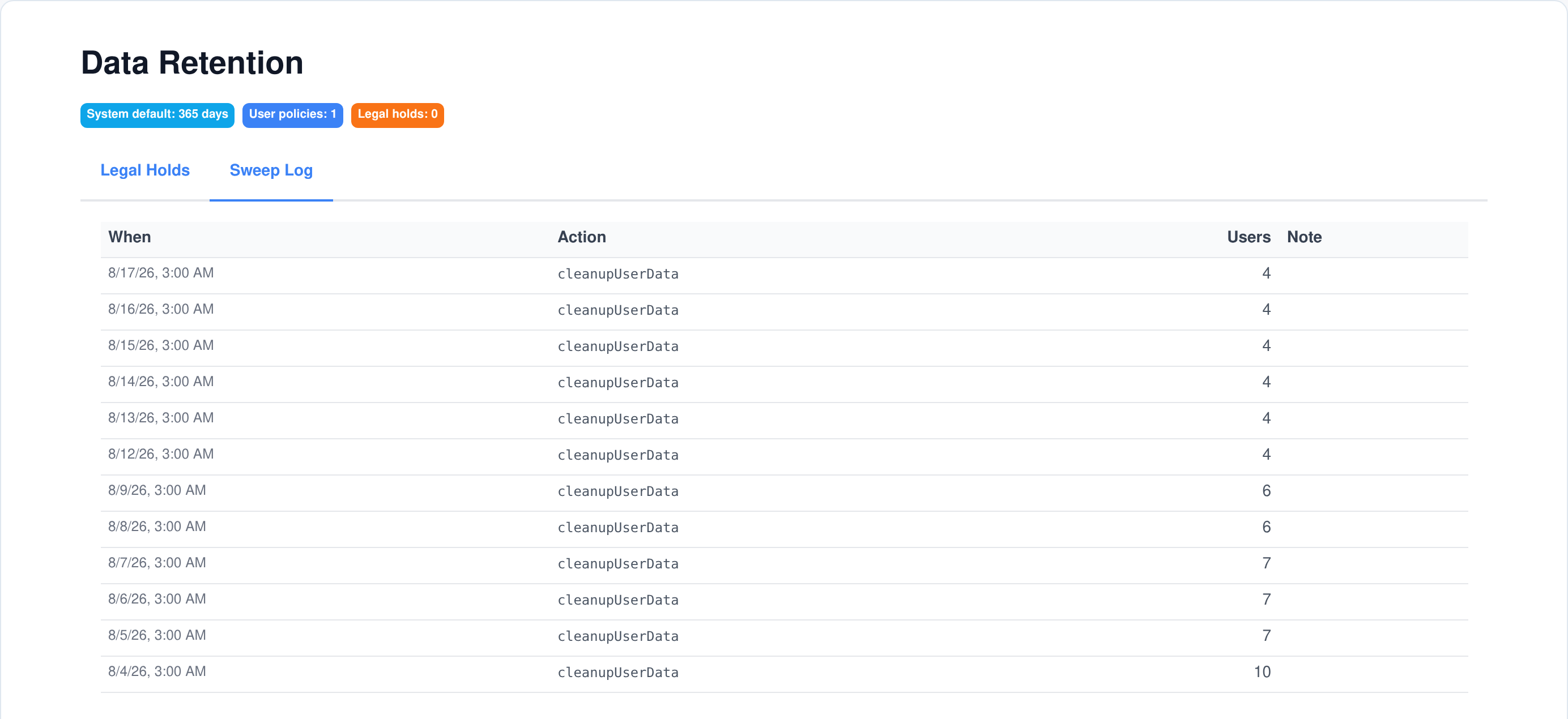
- Nightly, and on demand. A scheduled task runs it at 3am; an administrator can run it immediately from the screen.
- Per user, not per table. Each account gets its own cutoff date derived from its own policy, so one user keeping a year and another keeping a month is a normal configuration rather than an exception.
- One user’s failure does not stop the run. Each account is handled independently and errors are logged rather than aborting the sweep.
- Every run is recorded. The sweep log keeps a row per run with how many accounts were processed, which is the evidence that the schedule is alive.
- It warns when it would do nothing. If a standard is enforced but no default and no user policy exist, boot says so explicitly instead of quietly purging nothing.
Access, export and erasure requests, answered by the whole platform at once
The same extension pattern that drives retention drives the two data-subject requests you will actually receive. Export and erasure are single platform operations that every application contributes to from inside itself, which is why adding an application does not leave a new blind spot behind. The Knowledge Base is one of the modules that plugs in this way.
Export what is held
- The user asks for it themselves. Personal-data export is a request the account owner makes, not a ticket for an administrator.
- Each application adds its own section. 46 of the shipped modules contribute their slice of the export, so the file describes the whole platform rather than the account row.
- Machine and human readable. The archive contains the structured data and a rendered version of it, alongside the user’s own files, behind a single-use download link.
Erase, and prove it
- Deleting an account cascades. 52 of the shipped modules remove their own rows, their child records and their search-index entries as part of the same operation.
- Self-service deletion re-checks the password before it runs the identical cascade an administrator’s delete would, then revokes the sessions.
- A certificate of erasure is generated. With the erasure-receipt feature active, a PDF is rendered and downloaded to the departing user’s browser, carrying the account, the timestamp, the standards in force and a unique reference.
- It says what was kept. The certificate states plainly that records retained on an independent legal basis — the security audit trail among them — are kept, and contain no restored personal content.
Consent you can version, and evidence you can produce
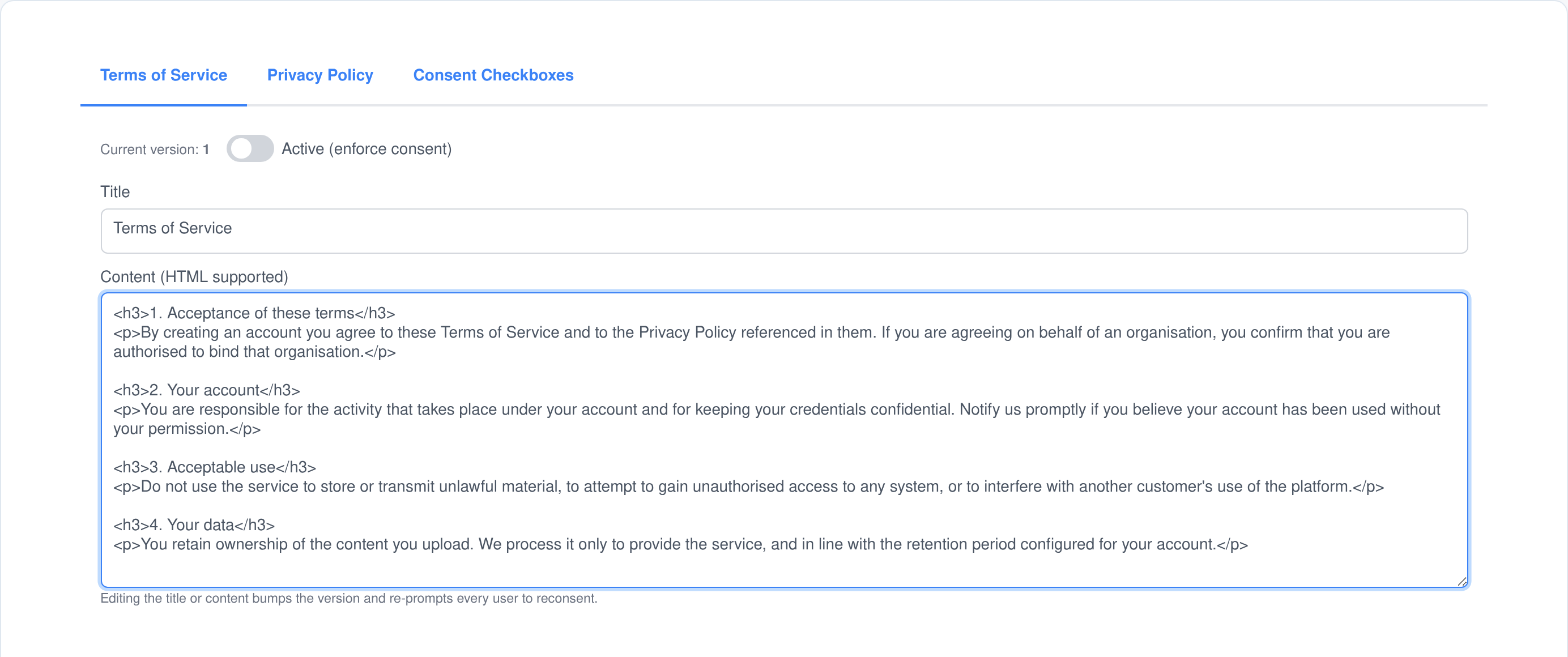
Write your Terms of Service and Privacy Policy in the application, mark them active, and a consent dialog stands in front of the platform until each user accepts. What is recorded is not a boolean: it is which version of each document that person agreed to, which checkboxes they ticked, and when.
Versioning that only fires when it should
- Changing the title or the wording bumps the version, and every user is asked again on their next check because their stored version is now behind the current one.
- Nothing else does. Toggling a document active, or re-saving it untouched, leaves the version alone — so an incidental save does not send a consent prompt to your whole user base.
- A document is only enforced when it is active and has content. An empty draft demands nothing, so the module can be installed long before the legal text is written.
- Both documents are tracked separately. A privacy policy update re-prompts on its own without touching the terms the user already accepted.
Consent checkboxes
- Required and optional, in the order you choose. Each checkbox carries a label, an explanation, whether it is mandatory, and where it sits in the list.
- An item can be retired without deleting it, so the consent records that reference it stay meaningful.
- The requirement is enforced on the server. A submission missing a required item is rejected there, not merely greyed out in the dialog.
- The accepted items are stored with the versions, so a consent record answers what somebody agreed to and to which text.
Who can see it, who can change it, and what we are not claiming
Permissions, split view from change
- Each application ships two permissions. View compliance and manage compliance; view and manage the audit log; view and manage data retention; view and manage terms of service.
- An auditor can be given read access to the trail, the retention configuration and the consent setup without being able to change or purge anything.
- Purging the audit log is admin-only on top of the manage permission — and the purge writes its own warning-level event recording how many rows went and how old they were.
- Two things are self-service by design. Setting your own retention preference and recording your own consent need no permission at all, because they belong to the person, not the administrator.
What this is, and what it is not
- These are mechanisms, not attestations. Assistant Cortex implements controls that regimes such as GDPR, CCPA/CPRA, HIPAA, SOC 2 and PCI DSS call for. It is not certified, audited or validated against any of them, and enforcing a standard here does not make your deployment compliant with it.
- The module declarations are scope, not proof. The manifest in which a module names the standards it was built for is an author’s declaration, read by this product’s own boot check. It is not a third-party assessment.
- Compliance stays your programme. What the platform gives you is enforceable configuration, an append-only record, a working erasure and export path, and evidence you can show — the parts a compliance programme normally has to build itself.
- Install only what you need. The compliance profile is a separate module for deployments that require it; the other four are applications you add individually.
Frequently asked questions
Which compliance standards can I turn on?
Five: GDPR, CCPA/CPRA, HIPAA, SOC 2 and PCI DSS. You can enforce any combination of them or none at all, and each one is described on its own card with the controls it puts in force.
Does turning on a standard make my deployment certified?
No. Assistant Cortex is not certified, audited or validated against GDPR, CCPA/CPRA, HIPAA, SOC 2 or PCI DSS, and enforcing a standard in the product does not make your deployment compliant with it. What the switch does is put specific technical controls in force and refuse to let the deployment drift out of them. Certification remains something you pursue with an assessor, using this as evidence.
What does “block boot” actually do?
With it on, a deployment that fails any enforced requirement does not start: the compliance service reports failure at startup and the API process exits. With it off — the default — the same violations are logged as errors and the instance starts anyway. Both modes produce the identical list, so the normal sequence is to enforce a standard, read the warnings, fix them, then arm the switch.
How are audit events captured — do I have to instrument anything?
No. The Audit Log application wraps the platform operations that already exist — the login and logout routes, the user and group handlers, the password handlers, and the configuration writer — and records what it sees. There are no logging calls to add, and no application code changes when you install or remove it.
Can an administrator delete audit history?
Only by age, and only visibly. Individual rows cannot be edited or removed — the table is append-only. An administrator with the manage permission can purge everything older than a number of days, and that purge writes its own warning-level event recording how many rows were removed and what cutoff was used. A configured retention window does the same thing nightly, and zero means keep events forever.
What happens to a user’s data when their retention period runs out?
The nightly sweep works out that user’s cutoff date and asks every installed application to remove its own data older than it. Each module deletes its own rows, and the core module removes expiring conversations together with their messages, attached files and workspace folders. Nothing is deleted at all until a default or a per-user policy has been set.
Can a user be exempted from retention?
Yes, in two ways. A legal hold placed on an account — with a reason and the administrator who placed it recorded — makes the sweep skip that user entirely until it is released. Separately, a user can set their own retention preference to keep forever, which overrides the system default for their data.
Does editing the Terms of Service force everyone to accept again?
Only when you change the substance. Editing the title or the content raises the version, and every user whose recorded version is now behind it is asked again on their next check. Toggling a document active, or saving it without changing the text, leaves the version alone and prompts nobody.
Is conversation content encrypted?
Yes, once any standard is enforced. Chat message content is encrypted with AES-256-GCM using a key held in Vault, applied at the single write path and reversed at the single read path. Encrypted and older plaintext rows coexist in the same column, so switching it on is not a migration — and switching the profile off later still decrypts what was already encrypted.
See what your deployment would have to fix
Enforce a standard with block boot left off, restart, and read the list. That is the whole first step.