AI agent credentials your agents can use without ever seeing them
The Agent Credentials application gives every AI agent its own logins, API keys and payment cards. The secret half of each record — the password, the card number, the CVV — is written to HashiCorp Vault instead of the application database. When an agent works with a credential it receives a random placeholder, and the real value is substituted in only at the instant a tool call runs, then stripped back out of the response before the model reads it.
Nothing new to run. It uses the Vault instance Assistant Cortex already depends on, and adding a credential is one screen.
How an agent uses a secret it never reads
1. Store it once
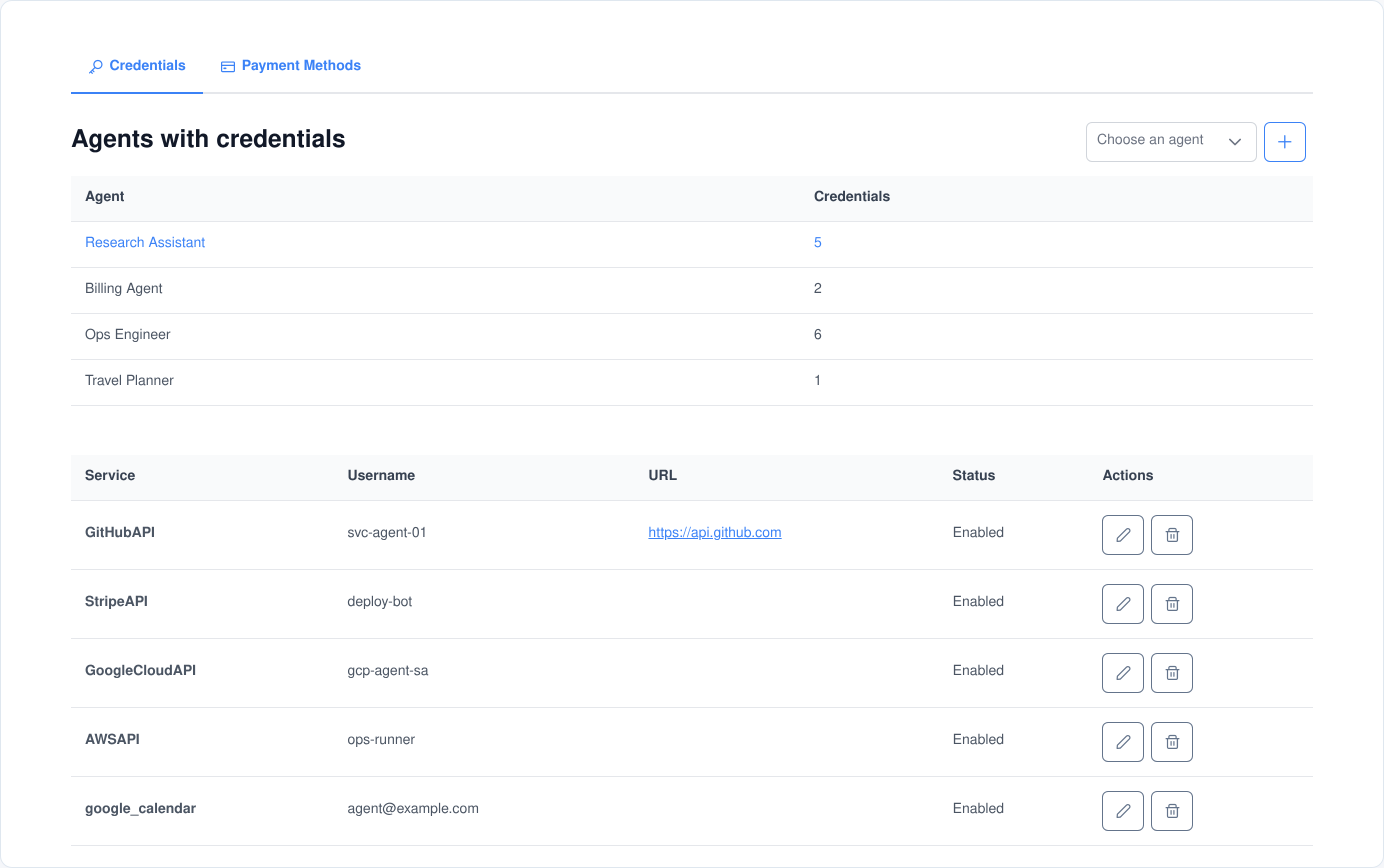
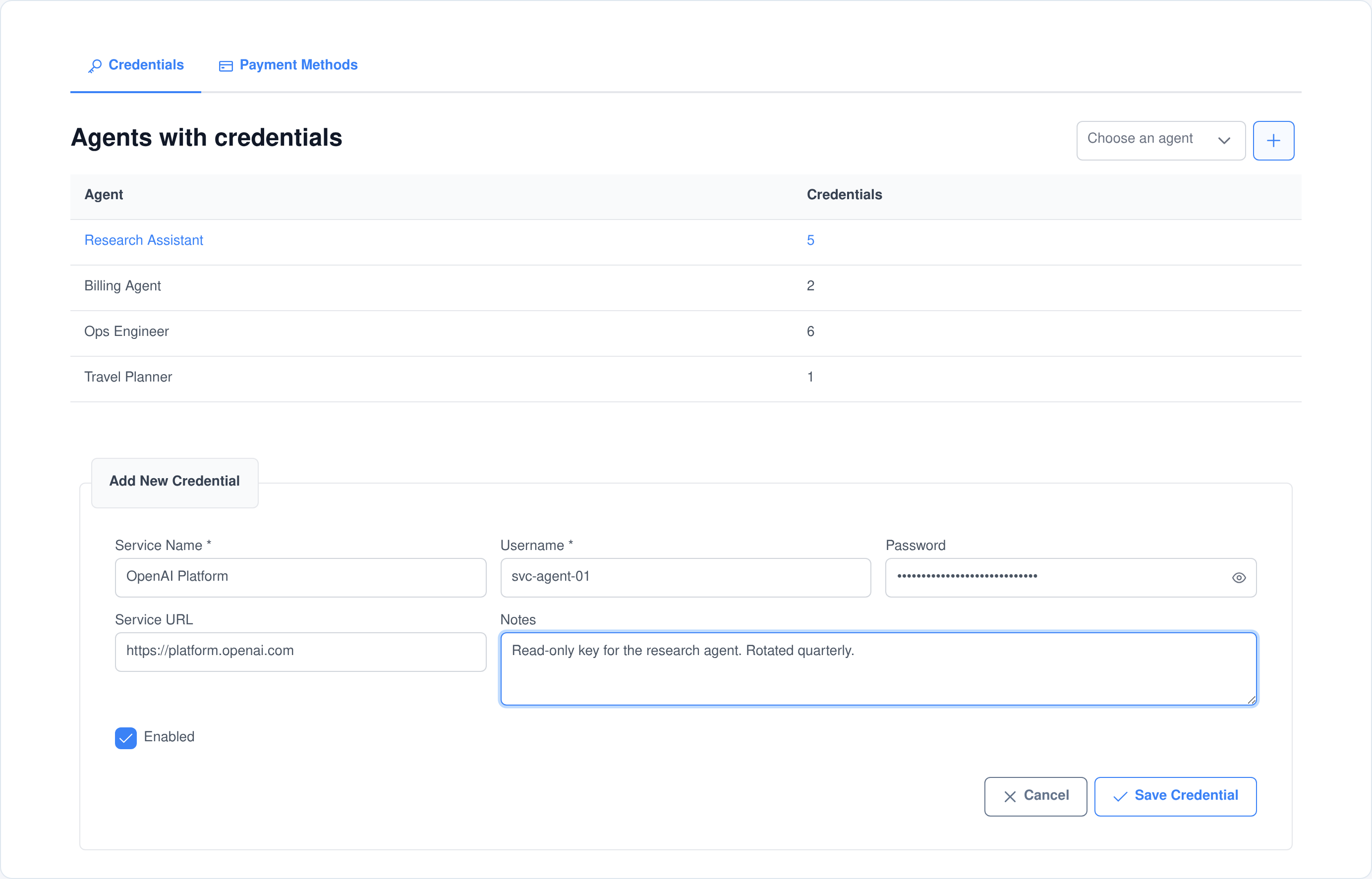
Add a credential against a specific agent: service name, username or key identifier, the secret, a service URL and notes. The secret is written to Vault and the database column is left holding a placeholder in its place.
2. Hand the agent a placeholder
When the agent looks up what it has, the secure search returns random strings — user_…, pwd_…, acct_…, cvv_… — generated fresh for that request and mapped back to the real records in Vault.
3. Swap it in at the last moment
A plugin wrapped around ability execution walks the outgoing parameters, replaces any placeholder it recognises with the real value from Vault, runs the call, and puts the placeholders back before the response reaches the model.
Two kinds of record, both keyed to one agent
Every entry belongs to a single agent, not to a shared pool. An agent asking what it has access to only ever sees its own rows, and the ability functions resolve which agent is asking from the conversation rather than trusting a parameter.
A credential
- Service name. What the credential is for — a SaaS product, an internal system, an API.
- Username or key identifier. The account name, the key id, the service-account address.
- Password or secret. The API secret, token or password. This is the part that goes to Vault.
- Service URL. The endpoint or console the credential belongs to, rendered as a link in the list.
- Notes. Free text — scope, rotation schedule, who owns it.
- Enabled. A per-record switch, so a credential can be parked without deleting it.
A payment method
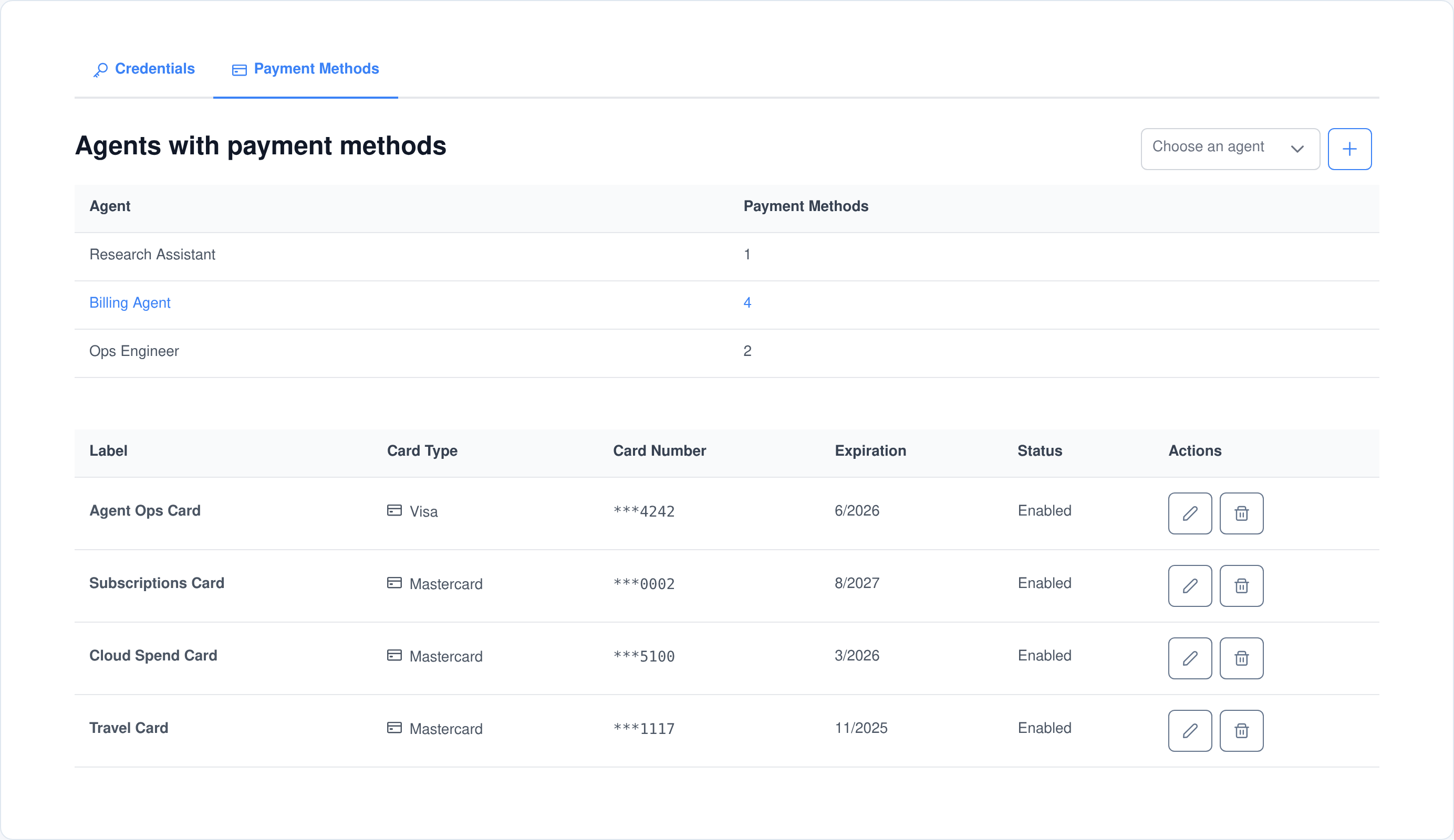
- Label. A name you will recognise in a list — the card’s job, not its number.
- Card type. Visa, Mastercard, American Express, Discover or Other.
- Card number. Captured in full, then reduced to its last four digits in the database.
- CVV. Entered masked and never written to the database in readable form.
- Expiry. Month and year, picked from dropdowns covering the next ten years.
- Enabled. The same per-record switch as a credential.
The application database never holds the secret
Writing a credential splits it in two. The row that lands in the database is the part you need in order to find and manage the entry; the part that would matter if the database leaked is written somewhere else.
- Passwords go to Vault. The secret is stored under a per-agent Vault path and the database column is set to a fixed sentinel value instead.
- Card numbers are truncated. The stored row keeps the last four digits and a stub CVV; the full number and the real CVV are held in a per-agent Vault group.
- Editing cannot clobber it. An update only rewrites Vault when a genuinely new secret is supplied, and forces the column back to the sentinel either way — so the form echoing a mask back cannot overwrite the real value.
- Deleting removes both halves. Removing a record deletes the row and the matching Vault entry in the same operation.
- Older records were migrated. A schema migration moved any legacy secret that predated the split out of the database and masked the column behind it.
Be clear about what that does and does not cover: service names, usernames, URLs, notes, card type, expiry and the last four digits stay in the application database in readable form, because they are how you recognise a record. Only the secret half moves, and its confidentiality is whatever your Vault deployment provides.
Placeholders, so the model never handles the real value
A language model that has seen a secret can repeat it — in its next sentence, in a summary, in a log. So the secure lookup functions do not return secrets at all. They return stand-ins, and the substitution happens below the model, in the execution layer.
Fresh every request
Placeholders are generated per lookup, not stored on the record: a random twelve-character username stand-in, a twenty-four-character password stand-in, and their equivalents for card type, account number and CVV. Two lookups of the same credential produce two different placeholders.
Mapped in Vault, scoped to the session
The map from placeholder to record is written to Vault under the agent and the conversation it was issued in — or the channel, when there is no conversation, which is how the same mechanism works for MCP tool calls that have no chat around them.
Unmasked late, re-masked after
Substitution runs deliberately late in the plugin chain, so a review step such as human approval still sees placeholders rather than secrets. Afterwards the response is walked again and every real value that was used — whole or embedded in a longer string — is turned back into its placeholder.
The plain, non-secure lookup is not a way around this. It reads the database row, and the database row’s password field is the sentinel — so no ability function returns a real password to anyone.
Payment methods, scoped to one agent at a time
An agent that books, renews or buys needs a card, and handing it the company card is how a card ends up in a chat transcript. Payment methods are stored the same way credentials are: attached to one agent, masked everywhere they are displayed, and reachable only through the placeholder path.
- Masked in the list. The table shows the label, the card type, the expiry and the last four digits — the full number is not in the page at all.
- Masked to the model. The secure lookup returns placeholder card type, account number and CVV, resolved only when a tool call actually needs them.
- One card per job. Cards are keyed to an agent, so a subscriptions agent and a travel agent hold different cards rather than sharing one.
- Turn one off without deleting it. The enabled switch works the same as it does on a credential.
Set up in the browser, in one form
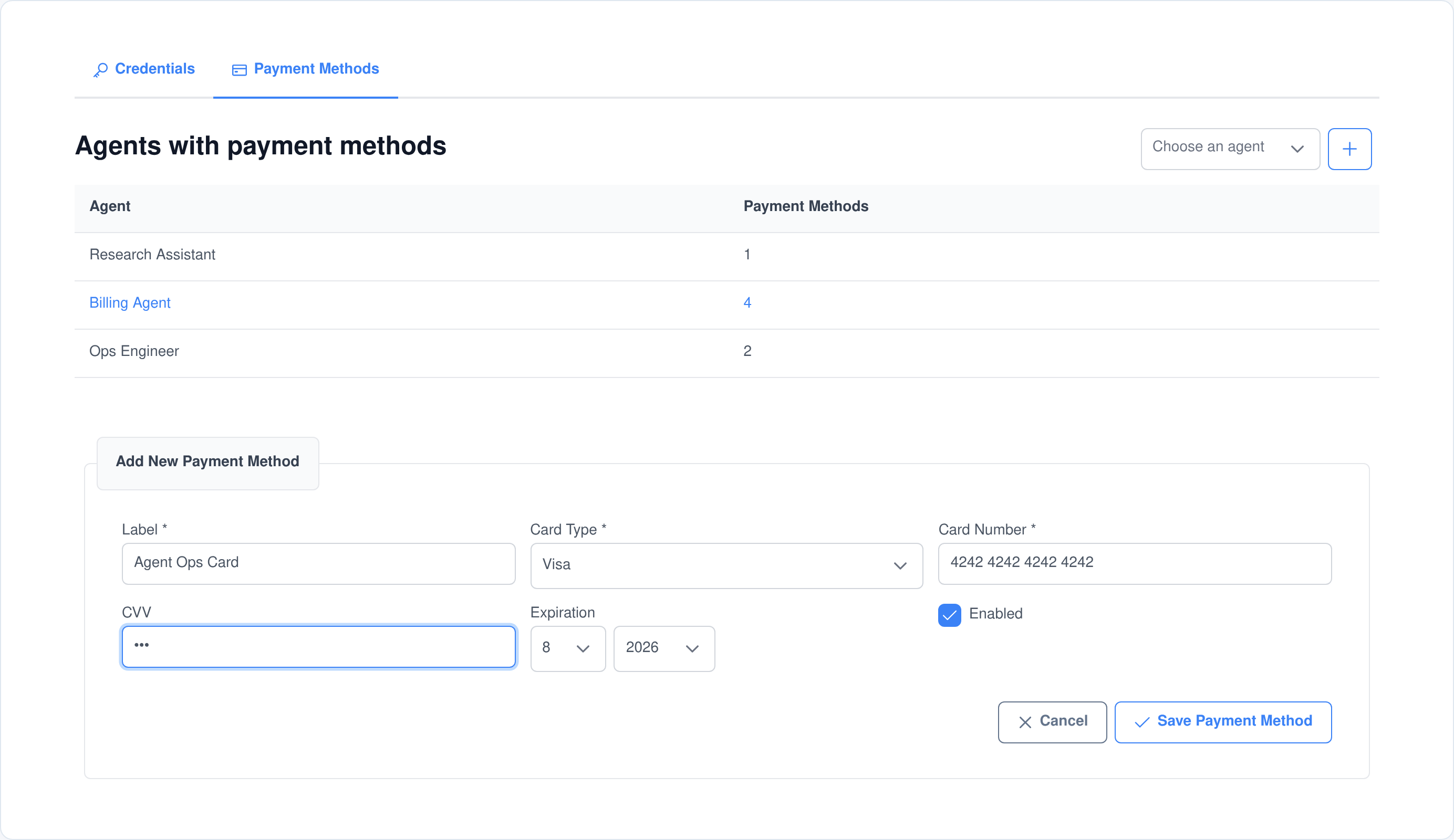
Both tabs work the same way. Pick the agent, press the plus, fill in the form and save. There is no separate secrets console to open, no file to edit and no restart.
- Pick the agent first. A filterable dropdown lists your agents with their short descriptions, so you attach the credential to the right one.
- See who already has what. A roll-up above the table counts credentials and payment methods per agent; clicking a row switches to that agent.
- Secrets are entered masked. The password field is a masked input with a reveal toggle, and the CVV field is a password input — neither is echoed back to the page after saving.
- Only the tabs you are allowed to see. Credentials and Payment Methods each appear only if you hold the matching view permission, and the add, edit and delete controls are disabled without the manage permission.
It cleans up after itself
Delete a user account and this module removes its own data: the credentials and payment methods belonging to that user’s agents, together with the per-agent Vault groups holding the secrets behind them. A retention sweep deletes records older than the cutoff you set. And a subject-access export includes the stored records in their masked form — the secrets stay in Vault and are deliberately left out of the file.
Every operation is an AI ability — and an MCP tool
These are the functions an agent can call mid-conversation to find out what it has access to and to keep its own credential list in order. The same functions are published by the Assistant Cortex MCP server, so Claude, an IDE or any other MCP client can drive them under the same permissions. Every one of them resolves the calling agent from the conversation, so a tool call can only ever reach that agent’s own records.
agent_credentials_search_agent_credentials_masked
Search Agent Credentials (Secure)
Search the agent’s credentials by service name and get back secure placeholder values instead of the real ones. This is the function to use when credentials have to pass through a language model, because it keeps the sensitive data out of the model’s context entirely.
agent_credentials_search_agent_payment_methods_masked
Search Agent Payment Methods (Secure)
List the agent’s payment methods with placeholder card numbers and CVVs in place of the real ones. Use it whenever payment data has to be handled by a language model, so financial details are never exposed in the conversation.
agent_credentials_search_agent_credentials
Search Agent Credentials
Search the agent’s credentials by service name. A keyword matches on the service, the username or the notes; leave it out and the agent gets its whole list back.
agent_credentials_search_agent_payment_methods
View Agent Payment Methods
List all payment methods held by the agent, with the account number reduced to its last four digits.
agent_credentials_create_agent_credential
Create Agent Credential
Create a new credential entry for the agent’s service access. It takes a service name, a username or key identifier and the secret itself, plus an optional service URL and notes — and the secret goes straight to Vault on the way in.
agent_credentials_create_agent_payment_method
Add Agent Payment Method
Create a new payment method for the agent from a card type, account number, CVV, expiry month and year, and a friendly label to identify it by.
agent_credentials_delete_agent_credential
Delete Agent Credential
Delete a credential by its service name or its id. If nothing matches, the agent is told which service names it does have rather than failing silently.
agent_credentials_delete_agent_payment_method
Delete Agent Payment Method
Delete a payment method by its id, removing the stored row and the card details behind it together.
There is deliberately no update function. Agents can add, look up and remove their own credentials; changing one is done on the application screen, behind the manage permission.
Permissions, and how it fits the rest of the platform
Four permissions, granted separately
- View agent credentials. Opens the Credentials tab and allows the stored entries and the per-agent counts to be read.
- Manage agent credentials. Allows creating, updating and deleting credentials, and is what enables the add, edit and delete controls.
- View agent payment methods. Opens the Payment Methods tab and allows the stored cards and their counts to be read.
- Manage agent payment methods. Allows creating, updating and deleting payment methods.
Credentials and payment methods are separate grants, so the person who administers service logins does not have to be the person who administers cards.
Built to be extended
- A validated socket API. Ten commands cover reading, counting, creating, updating and deleting both record types, each gated on its permission and each checked against a JSON schema before it runs.
- Sixteen UI injection points. Other modules can add their own columns, header buttons, row actions, form fields and empty states to either tab without forking this one.
- It owns its own data lifecycle. Erasure, retention and export are handled by this module’s own plugins hooking the platform’s account hooks, rather than by foreign keys into someone else’s tables.
- It runs where your agents run. The application installs from the marketplace like any other Assistant Cortex application, on your own instance.
What people put in it
Agents that act on your systems
- API keys for the services an agent calls. A key per agent, so revoking one agent’s access does not take the others down with it.
- Service accounts rather than personal logins. The agent authenticates as itself, and the audit trail on the far side shows which agent did it.
- Machine and database logins. The username, the endpoint and a note about scope, with the secret held apart from the record.
- A parked credential. Disable an entry while you rotate the key, then enable it again, without losing the record.
Agents that spend
- A subscriptions card. Renewals and seat top-ups handled by one agent holding one card, not by everyone sharing the finance card.
- A cloud-spend card. Separated from the card used for anything else, so the statement reads clearly.
- A travel or procurement card. Attached to the agent that does the booking, and switched off when that workflow is paused.
- A card the model cannot recite. Whatever the agent is doing, the number and CVV reaching the far end are substituted below the model, not typed into the conversation.
Frequently asked questions
Where is the password actually stored?
In HashiCorp Vault, under a path belonging to the owning agent. The application database row keeps a fixed sentinel value in the password column instead of the secret, and the same split applies to a card’s full number and CVV.
Is the whole record encrypted?
No, and it is worth being exact about it. Only the secret half is separated out. Service names, usernames, service URLs, notes, card type, expiry and the last four digits stay in the application database so you can find and manage the record. The password, the full card number and the CVV are held in Vault, and their confidentiality is whatever your Vault deployment provides.
Can the language model see a real password?
No. The secure lookup functions return random placeholders, and no lookup function returns a real password at all — even the plain one reads the masked database column. Real values are substituted into a tool call by a plugin that runs below the model, and are turned back into placeholders in the response before the model reads it.
Can one agent reach another agent’s credentials?
No. Every ability function works out which agent is calling from the conversation rather than accepting it as a parameter, and only ever queries that agent’s own rows. Updates and deletes additionally check that the record belongs to the agent making the request before they touch it.
Can an agent change a credential on its own?
No. There is no update function among the abilities by design. An agent can create, look up and delete its own entries; editing one is done on the application screen, behind the manage permission.
What happens when a user account is deleted?
The module removes its own data. It captures the ids of that user’s agents before the account is torn down, then deletes the credentials and payment methods belonging to those agents and clears the per-agent Vault groups holding the secrets behind them.
Can I use it from Claude or another MCP client?
Yes. The same functions are published by the Assistant Cortex MCP server under the same permissions, and the placeholder mapping falls back to the channel when there is no conversation, so the masking works for MCP tool calls too.
What kinds of credential can I store?
Anything that fits a service, an identifier and a secret: an API key and its secret, a service-account login, a database or machine login, a token. There is one credential shape rather than a type per protocol, so the secret field holds whatever the far end expects.
Give your agents their own keys
Store a credential once, let the agent use it, and keep the secret out of the conversation.