Create, assign and automatically grade tests with AI
Test Creator is the assessment application inside Assistant Cortex. Turn a document into a question set, assign it to people online or as printed sheets, and have the answers graded for you — typed answers by embedding similarity or an LLM judge, and completed paper tests by a vision model that reads the scan page by page and marks it against your answer key.
No separate assessment platform, no special scanner. A PDF from the office copier or a photo from a phone is enough, and every mark the system makes is shown back to you next to the crop of the page it read.
From source material to a graded test in three steps
1. Write the questions
Type them in, dictate them to an agent in chat, or upload a PDF, EPUB or text file to the knowledge base and let the Test Extract analysis write the question and answer pairs for you. A typed test can be converted to multiple choice afterwards, five options per question, generated by the model you pick.
2. Assign it
Choose people by group or by name, decide how many questions each of them gets, and randomise the subset per person so no two papers carry the same questions. They take it in the browser, or you print one sheet per person with their name and a QR code on it.
3. Grade it
Multiple choice is matched to the answer key. Typed answers are scored by embedding similarity, judged by an LLM, or held for a person to decide. Scanned paper joins the same grading once the vision model has read the page and worked out which question each answer belongs to.
Two kinds of test, four ways to grade an answer
A test is either a set of typed question and answer pairs or a set of lettered multiple choice questions. How a typed answer turns into a mark is a setting on the test, and you can change it whenever you like — including after people have already taken it.
Question types
- Question and answer. A question and the answer you expect; the taker types their own words and the system decides how close they got.
- Multiple choice. Lettered options with one marked correct, editable one option at a time.
- Convert a written test. Generate a five-option set for every question in a test with the model you choose, up to twenty questions at a time, with a progress bar you can cancel mid-run.
- Two flags per question. Any question can be offered as a study flash card, and any question can be left off the assigned test — so one set can hold both the exam and study-only material.
How an answer becomes a mark
- Multiple choice is always matched against the correct option, with no model involved.
- Similarity. The given answer and the expected answer are both embedded and compared; the test’s threshold, 0.8 by default, decides where correct begins.
- LLM judge. The model is handed the question, the expected answer and the taker’s answer, and returns a verdict with a short reason for it.
- Manual. Answers land in a review queue where you mark each one correct or incorrect and the score recalculates.
- Nothing is guessed. An answer the system could not grade is flagged for review rather than quietly marked wrong.
Build the test by hand, or let a document write it
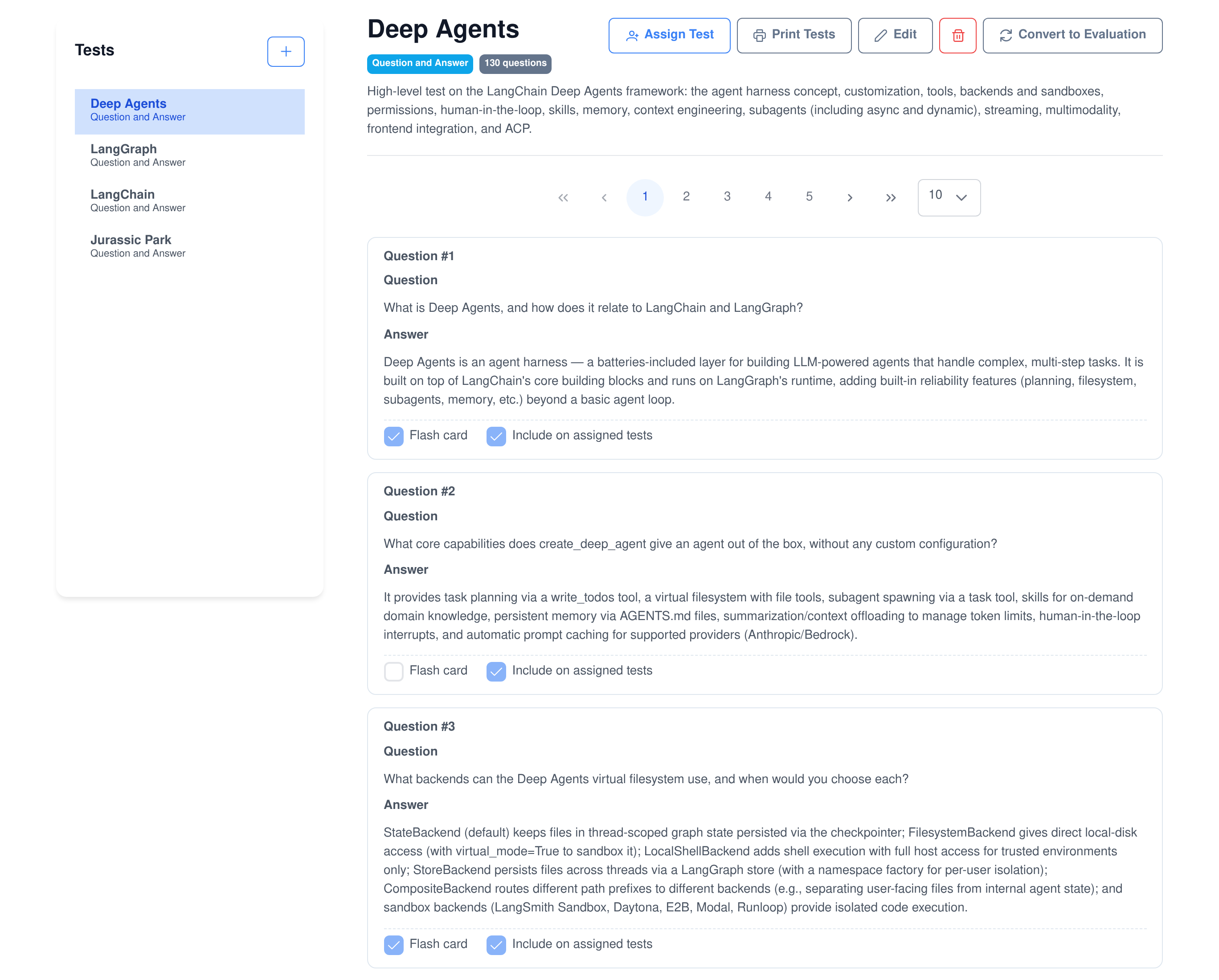
The editor is a list of tests on the left and the selected test’s questions on the right, paged ten, twenty or fifty at a time. Every question shows its answer, whether it is a flash card and whether it counts on the assigned test.
- Test Material is a knowledge base document type. Upload a PDF, EPUB or text file, choose the Test Extract analysis, and the questions are written from the text as it is processed.
- The test is named after the document and tied to it, so running the extraction again adds to the same test instead of creating a second one.
- Editing preserves question identity. Rows are updated in place rather than replaced, so an assignment that pointed at question 14 still points at question 14 and recorded answers keep their meaning.
- Long tests are not a problem. Question sets are saved in chunks and reassembled server side, so a test with hundreds of questions saves in one action.
Assign it to the right people, in the right form
An assignment is not just “this test, these people”. It records the exact questions each person was given and the order they were given in, which is what makes randomised papers and printed sheets work.
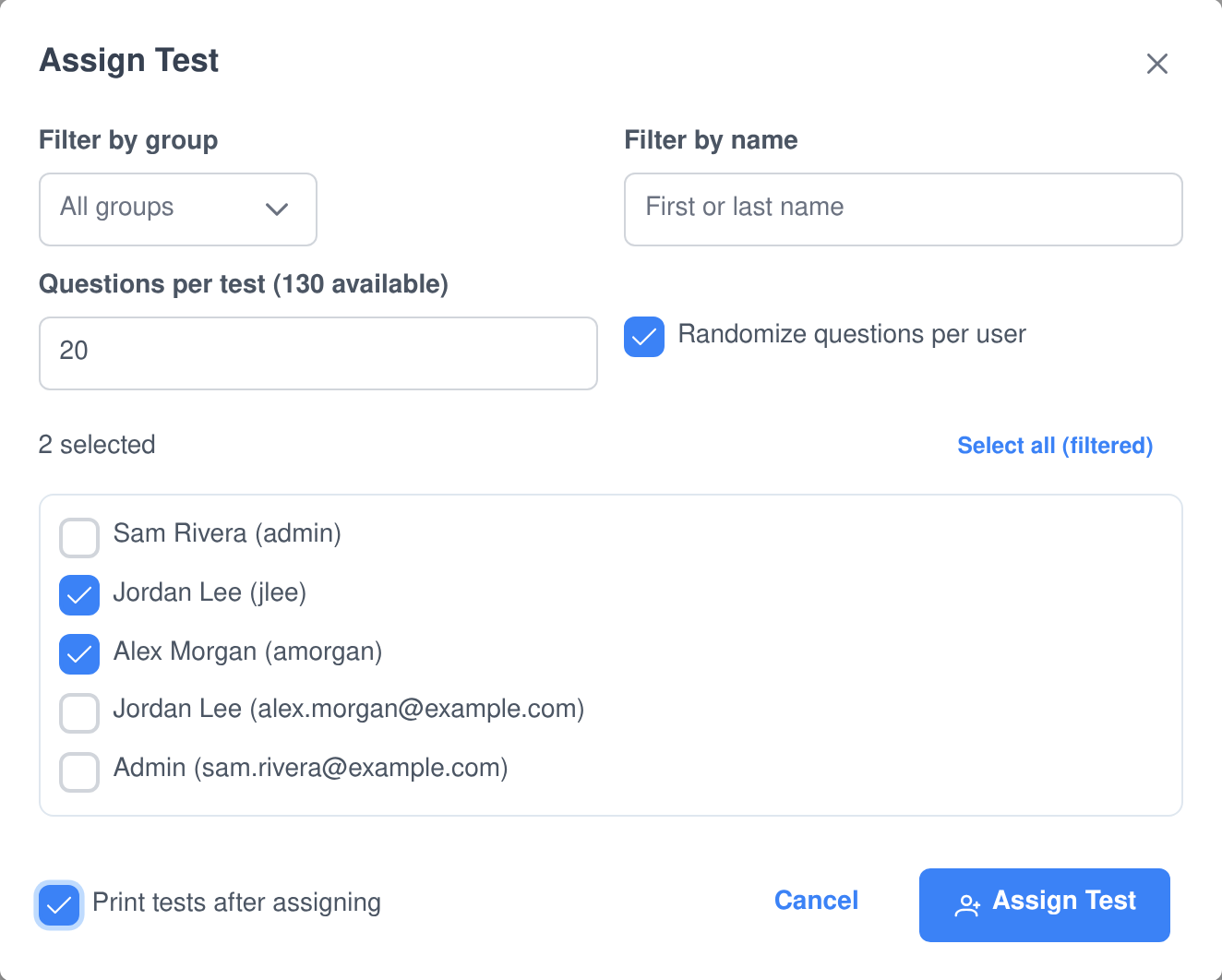
- Filter by group or by name and select everyone matching the filter in one click.
- Questions per test. Give everyone the same first twenty questions, or tick randomise and give each person their own twenty out of the pool.
- Online. Takers see what they have been assigned, how many questions it has and their last score, and can save a part-finished attempt and resume it later.
- On paper. Print one page per person — their name, a score line, their own question set, and lettered bubbles or ruled answer lines. Print straight after assigning, or reprint later for the people who have not handed anything in.
- Retakes and review are per test. Decide whether people may sit it again, and whether they get to look back over their graded answers with the correct ones shown.
Grade a whole stack of scanned paper
Upload one scanned PDF of everybody’s completed papers, or a single photo of one. The pages are rendered, each sheet is identified by the QR code printed on it, and every question region is found, read and graded. You do not sort the stack, and you do not tell it whose paper is whose.
The QR code says whose it is
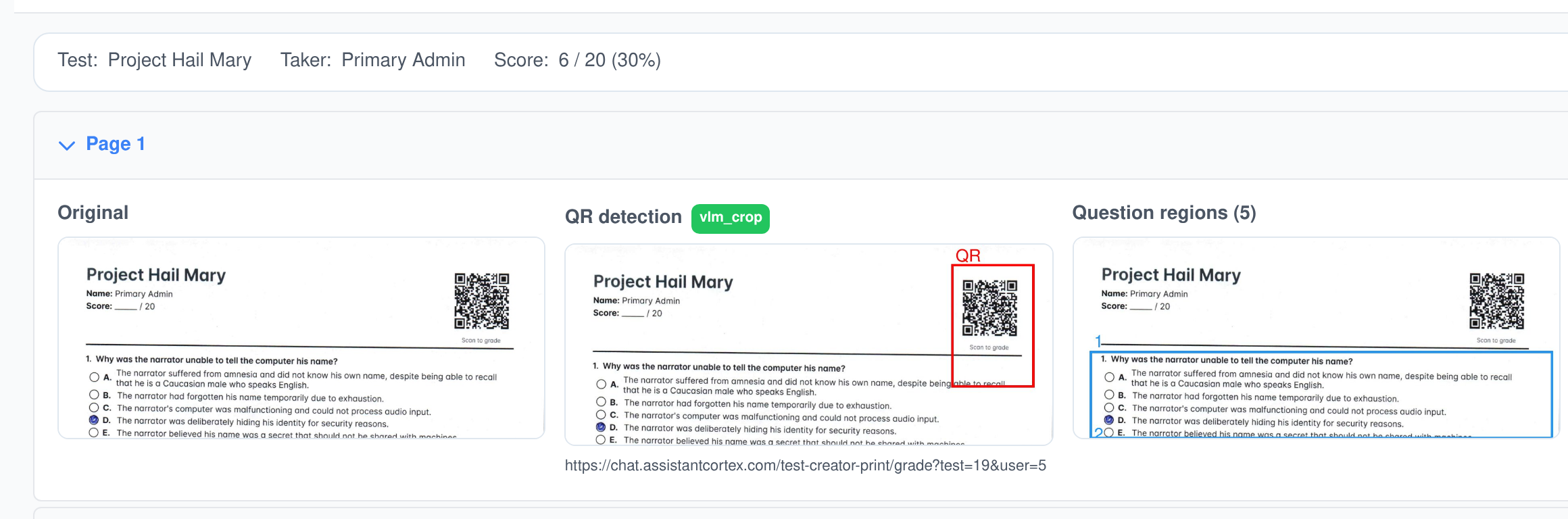
Every printed sheet carries a QR code identifying the test and the taker. The vision model is asked whether the page has one and where it is, the crop is decoded, and a full-page scan is the fallback. A page with no QR code joins the sheet that is already open, so multi-page papers stay together.
Regions, then answers
The model boxes each question block on the page. Every box is cropped, its printed question text is transcribed, and that text is matched to one of the questions on that person’s paper by embedding similarity — so a shuffled or partial paper still lines up with the right answer key.
Bubbles and handwriting
On a multiple choice paper the model reports which option was filled, shaded, circled or crossed, and says nothing when two are marked. On a written paper it transcribes what the person wrote on the answer lines, and that transcription is graded like any typed answer.
You choose the models and the rule they grade by
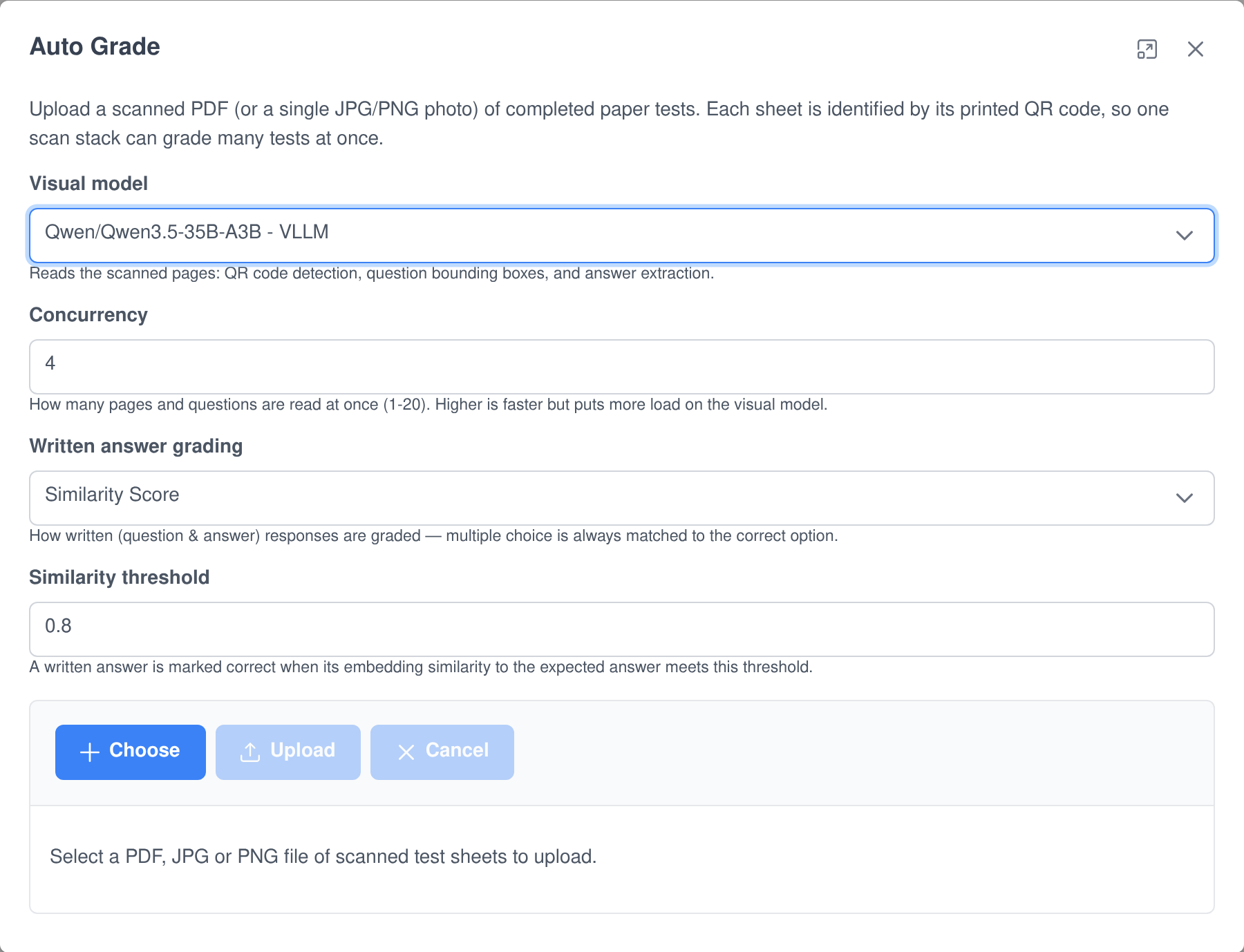
A grading run is set up in one dialog and then reports its own progress — rendering pages, locating QR codes, extracting and grading answers, recording attempts — while it works.
- Pick the visual model that reads the pages, from the models running on your own servers.
- Pick the grading rule for written answers: embedding similarity with a threshold you set, or an LLM judge with the model you name.
- Set the concurrency from one to twenty, trading speed against the load you put on the visual model.
- Feed it what you have. A multi-page PDF up to 100 MB, or a single JPG or PNG. Phone photos are rotated the right way up before anything reads them.
Every mark it makes, you can check and change
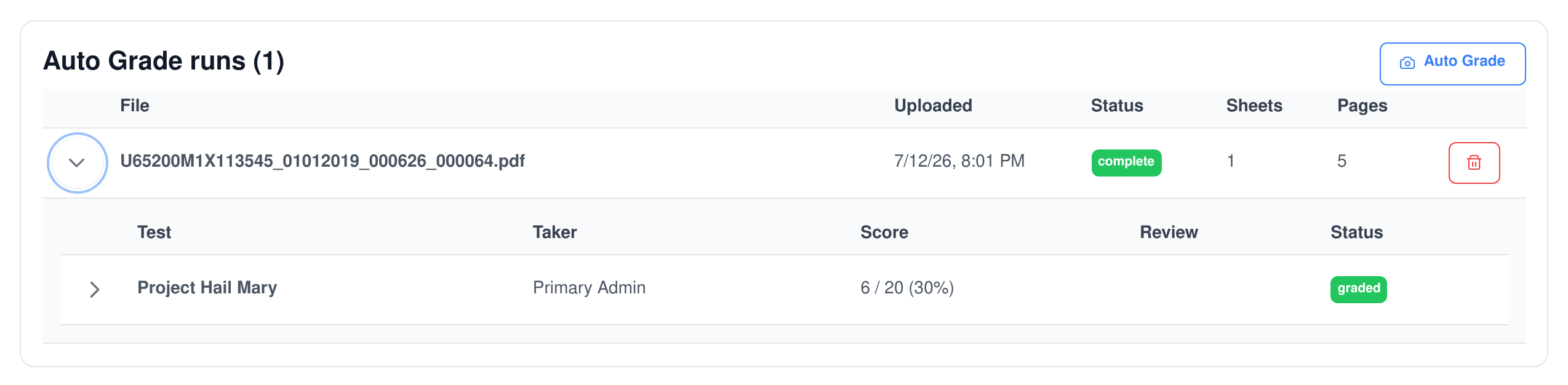
The audit trail
- Every upload is kept as a run with its file, status, page count and the sheets it produced.
- Every sheet opens into its pages — the original render, the QR annotation with the text it decoded, and the boxed question regions.
- Every answer keeps its evidence: the cropped image, the question text read from it, how strongly that matched a question on the paper, what the model saw in the answer area, and the verdict.
- Pages nothing claimed are surfaced, not silently dropped, so an unreadable QR code is visible rather than invisible.
Correcting it
- Anything uncertain is flagged for review with the reason it was flagged, rather than being marked and forgotten.
- Re-point an answer at a different question, edit the text that was read off the page, or simply override the verdict.
- Applying a correction re-grades the sheet and clears the review flag, and the person’s recorded attempt is rebuilt to match.
- Deleting a run deletes the audit, not the grades. Recorded attempts survive, so clearing out old scans never un-grades anybody.
The same questions make a study deck
Flash cards are not a separate thing you have to maintain. Any question in a test can be flagged as a card, and a question can be a card without ever appearing on the exam.
- Flag a percentage. Turn a share of a test’s questions into cards in one action, optionally taking them off the assigned test at the same time.
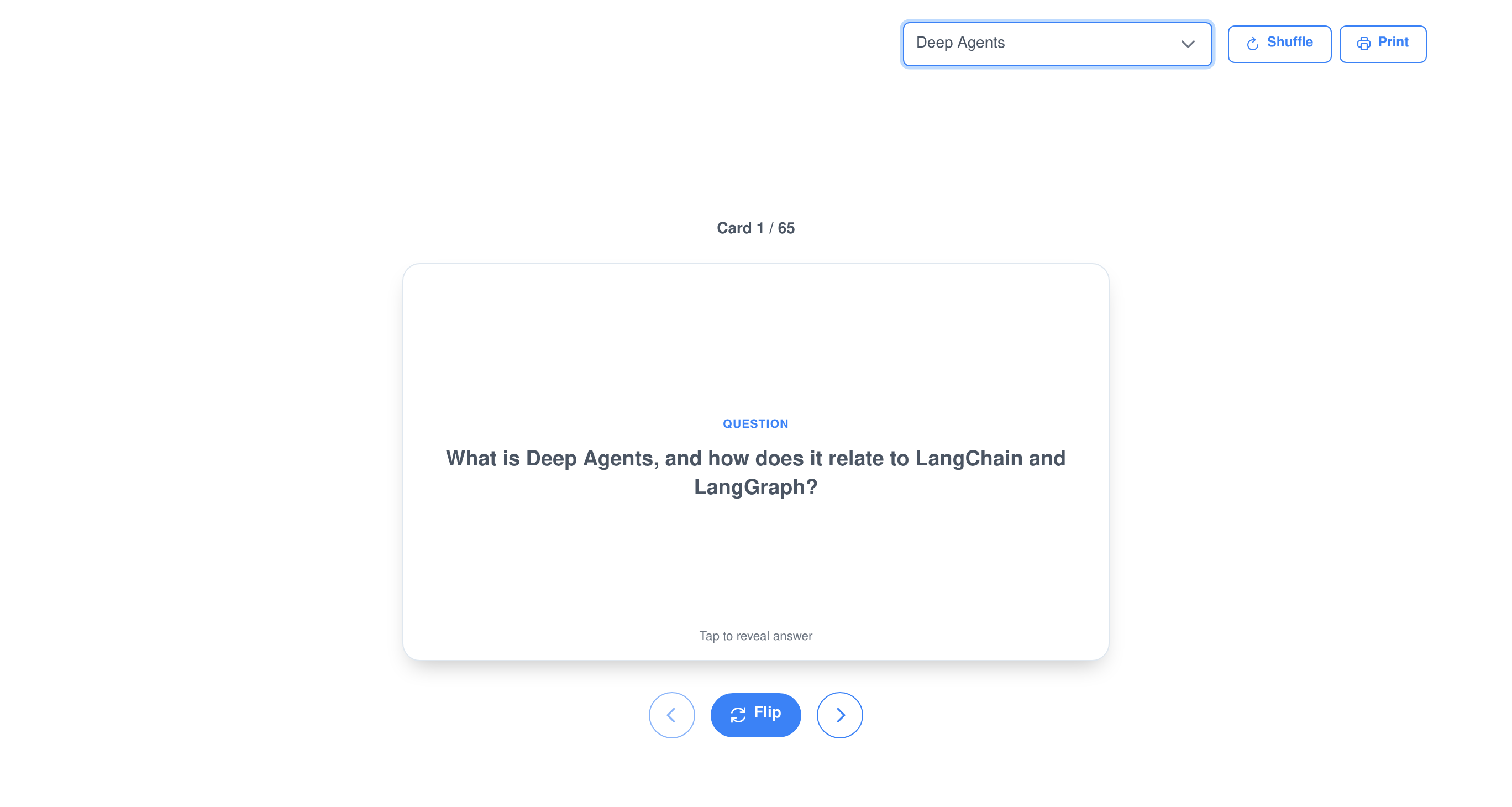
- Study in the browser. Flip the card, move through the deck, shuffle it, and see where you are in it.
- Study in chat. Ask an agent for a deck and get a real one: space to flip, arrows to move, K and R to sort a card onto the known or review-again pile, and a second pass over just the ones you flagged.
- Print them. Several layouts, with or without a cut border.
See how the test performed, not just who passed
Each test reports how many people were assigned it, how many have handed it in, the completion rate, the average score, the pass rate and how many answers are still waiting on a human. A score distribution and a per-question accuracy chart show whether a question was hard or simply badly worded, and the list of people who have not finished comes with a reprint button next to each name.
Every test action is an AI ability — and an MCP tool
The Test Creator Manager ability puts the whole question set under an agent’s control, so “read this documentation and build me a study test from it” is a single instruction rather than an afternoon. The same functions are published by the Assistant Cortex MCP server, which means Claude, an IDE or any other MCP client can drive them with exactly the capabilities — and exactly the permissions — your agents have. On channels that render UI components the answers come back as interactive cards; voice, SMS and the REST API get the text.
test_creator_ability_execute_search_tests
Search Tests
Finds the caller’s tests by name and description, optionally narrowed to written or multiple choice tests. Leave the query out and it lists everything they own.
test_creator_ability_execute_upsert_test
Upsert Test
Creates a test, or updates one that already exists: its name, description, whether it is written or multiple choice, how typed answers are graded, the similarity threshold, whether retakes are allowed and whether takers may review their answers. A new test starts as a written test graded by similarity.
test_creator_ability_execute_add_questions
Add Questions
Appends question and answer pairs to a test. Each pair can be marked as a study flash card on its own, and can be kept off the assigned test — which is how an agent builds study-only material alongside the exam.
test_creator_ability_execute_get_test_questions
Get Test Questions
Lists a test’s question and answer pairs with their ids, whether each is a flash card and whether each is included on assigned tests — the reference an agent needs before it changes anything.
test_creator_ability_execute_set_flash_cards
Set Flash Cards
Marks or unmarks questions as study flash cards — either the specific questions named, or every question on the test at once.
test_creator_ability_execute_delete_questions
Delete Questions
Removes individual questions from a test by their ids, so a bad question can be dropped without touching the rest of the set.
test_creator_ability_execute_delete_test
Delete Test
Deletes a test and all of its questions. In a chat card the deletion asks for confirmation first, and the permission is checked again before anything is removed.
Who can do what, and where the data goes
Six permissions, not one switch
- Creating and editing, deleting, converting to multiple choice, assigning, taking and viewing results are six separate permissions you grant to different groups.
- The interface follows the permission. Someone who may only take tests and study never sees the authoring or results tabs at all.
- A test belongs to its author. Loading, editing or grading someone else’s test is refused — grading it would expose its answer key.
- Chat cards re-check. The commands behind a card’s buttons verify the same permissions again before they change anything.
Your data, on your servers
- The models are yours. The visual model that reads the scans, the embedding model that matches answers and the judge that grades them all run on your own Assistant Cortex servers.
- Scans stay in the uploader’s workspace, and an upload cannot be pointed at anybody else’s.
- Tests, attempts, answers and grading audits are included in a user’s data export and removed by the platform’s account deletion and retention jobs.
- Nothing is lost to a restart. A grading run interrupted by a restart is reported as failed rather than left spinning forever.
What people use it for
Teaching and training
- Classroom tests on paper. Print a personalised sheet per student, collect them, scan the pile once, and get the marks back with the evidence attached.
- Onboarding and compliance training. Turn the handbook into a question set, assign it by group, and watch the completion rate rather than chasing individuals.
- Certification study. Publish the same material as a test and as a flash card deck, so people can revise with the questions they will actually be asked.
- Question quality review. The per-question accuracy chart shows which questions everybody got wrong, which is usually the question’s fault.
Inside the rest of the platform
- Recruiting. The recruiting application uses Test Creator for candidate skills tests: an interview step assigns a test, and the score comes back on the candidate’s record.
- Agent evaluation. Question sets built here are reused to score models and agents rather than people.
- Knowledge base. Any document you have already indexed can be turned into a test without uploading it a second time.
- Extension points. Other modules can add their own controls to the test editor, the results page and the study screen, which is how the recruiting and evaluation buttons appear there.
Frequently asked questions
Can it write the questions for me?
Yes. Upload a PDF, EPUB or text file to the knowledge base as Test Material and run the Test Extract analysis: the question and answer pairs are written from the text and collected into a test named after the document. You can also ask an agent in chat to read something and build a test from it.
Does it really grade tests taken on paper?
Yes. Upload a scanned PDF of the completed papers, or a photo of a single one. Each page is read by a visual model, which finds the filled-in bubble on a multiple choice paper and transcribes the handwriting on a written one, and the answers are then graded against the answer key like any other attempt.
How does it know whose paper is whose?
Every printed sheet carries a QR code identifying the test and the person it was printed for. The system finds and decodes it, so one scan of a mixed stack grades everybody at once, and pages without a QR code are treated as continuations of the sheet before them.
What happens when the model reads something wrong?
You see it and fix it. Every graded answer is stored with the crop of the page it came from, the text read out of it and how confidently it was matched to a question, and anything doubtful is flagged for review. You can re-point it at another question, correct the text, or override the verdict, and the sheet is re-graded on the spot.
Can two people get different questions from the same test?
Yes. When you assign a test you choose how many questions each person gets, and you can randomise the selection per person. The exact questions and their order are stored with the assignment, so the printed sheet, the online test and the grading all use that person’s own set.
Do takers see the correct answers afterwards?
Only if you allow it. Answer review is a per-test setting; with it on, a taker can look back over every question with their own answer next to the correct one. Retakes are a separate setting, so you can allow one without the other.
Can an AI agent manage tests on its own?
Yes. Seven functions — search, create or update, add questions, list questions, set flash cards, delete questions and delete a test — are available to your agents in conversation and published as MCP tools for external clients, all under the same permissions a person would need.
Stop marking papers by hand
Test Creator ships with Assistant Cortex. Start a trial, turn a document into a test, and let the next stack of papers grade itself.