AI email agents that read, file and answer your inbox
The Email Accounts application connects your real mailboxes to your Assistant Cortex agents. Mail is synced over IMAP, filed into folders by a language model, answered by the agent that knows the subject, and recorded with a full trace of what the agent thought, which tools it called and what it finally sent.
No new email provider, no forwarding, no code. Point it at the mailbox you already use, choose the agents that answer it, and decide whether replies go out on their own or wait for a person to press send.
From an existing mailbox to an AI-answered inbox in three steps
1. Connect the mailbox
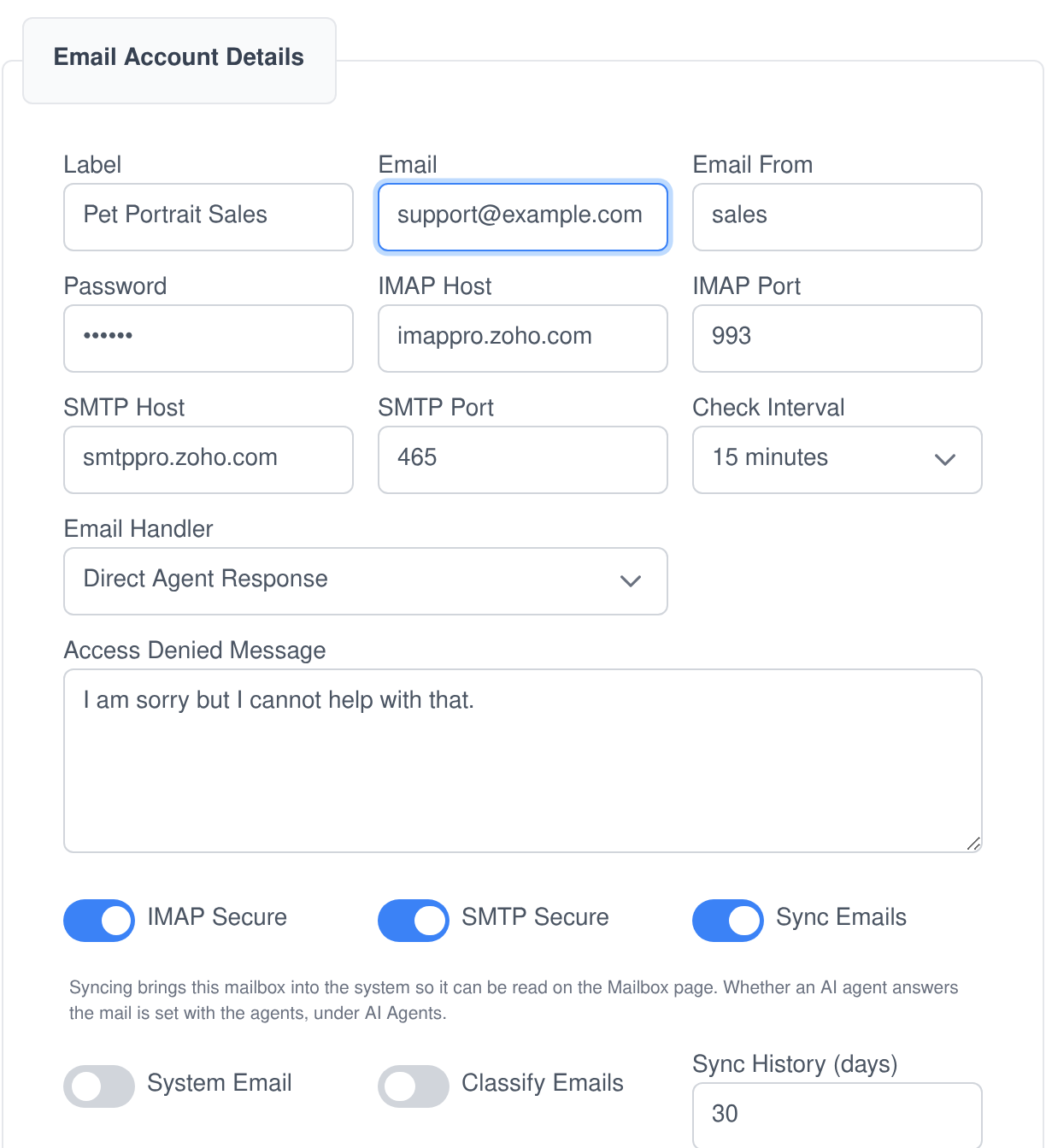
Enter the IMAP and SMTP details of a mailbox you already have, choose how far back the first sync reaches and how often it checks. The password goes into your Vault, never into the database.
2. Assign the agents
Pick which AI agents answer that mailbox, which user groups are allowed to write to it, and what an unrecognised sender is told instead. Set a date before which mail is synced but never answered.
3. Let it answer
New mail is read, filed, routed to the right agent and answered from the same address it arrived at. Every step is written to the trace, and replies can wait for a human signature if you would rather they did.
An AI email assistant that answers as the mailbox, not as a bot
Email is a first-class channel in Assistant Cortex, alongside chat and the phone. An incoming message opens a conversation your agent works in with the same knowledge, the same abilities and the same permissions it has anywhere else, and the reply goes back out through your own SMTP server, threaded onto the original.
The right agent takes the email
- Routing by expertise. Assign several agents to one mailbox and a model reads the message against each agent’s own description to decide which of them should answer it.
- Threads stay together. A reply is matched back to the earlier messages it references, so the agent picks up the conversation instead of starting a new one.
- Attachments come along. Files on an incoming email are placed in the agent’s workspace, so it can open them as part of answering.
- Tools mid-thread. The agent can look records up, write to other systems and call any ability it has while it is composing the reply.
- Nothing answered twice. A message that has already been answered is marked as such, so a resync never replies to it again.
You decide who it will answer
- Senders are resolved to people. A shared mailbox looks the sender’s address up against your user accounts and checks the groups that mailbox is open to before an agent sees the message.
- Strangers can be welcomed or turned away. Unknown senders can be given a guest account automatically, or answered with a message you write, or simply not answered at all.
- Personal mailboxes stay personal. A mailbox a user connects for themselves runs as them and can be limited to an allow list, by address or by whole domain.
- No backlog surprises. Switching auto-response on never replies to the unread mail already sitting there — mail older than the date you set is synced and left alone.
A real mailbox, not a queue of tickets
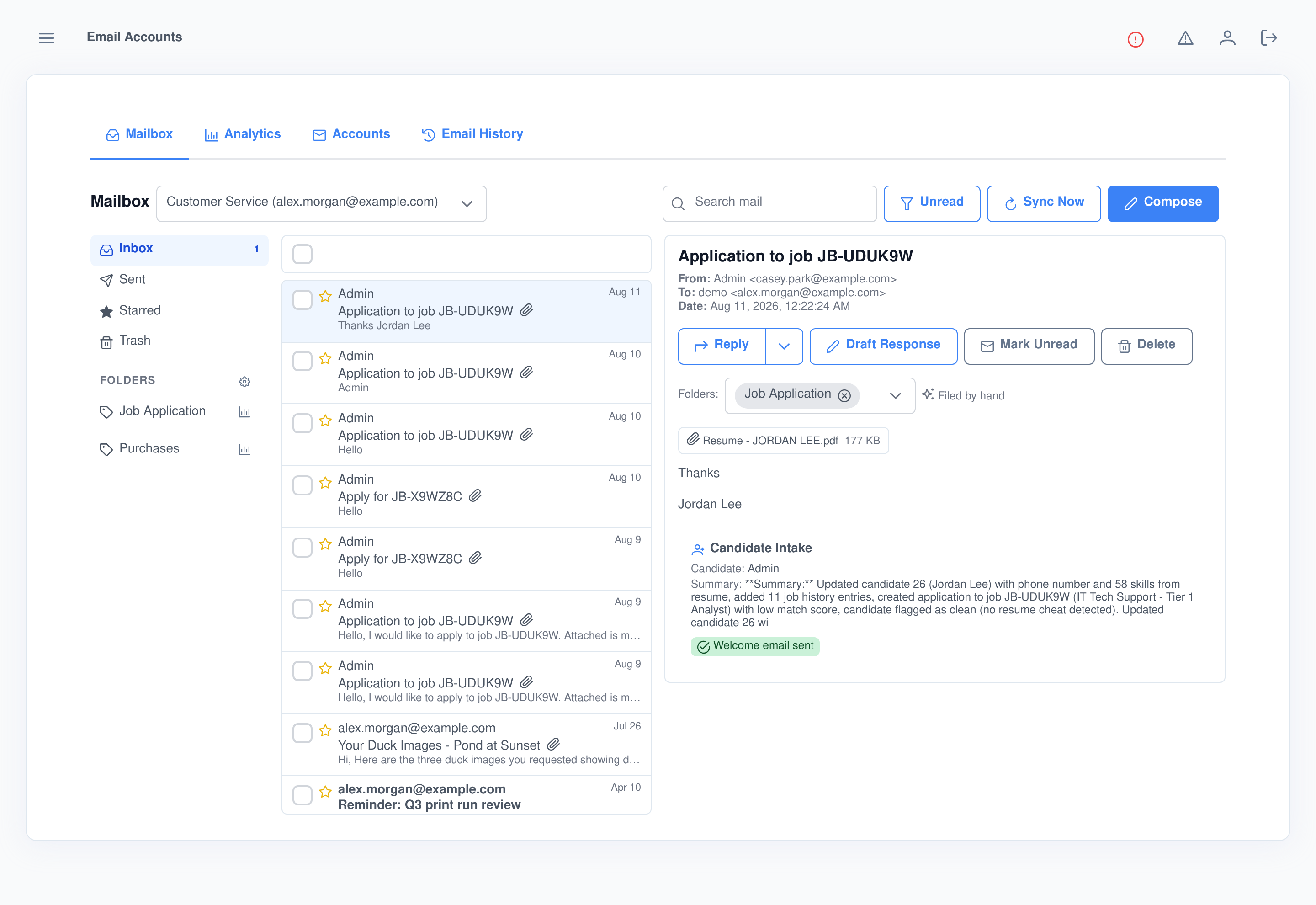
Assistant Cortex syncs the mailbox both ways over IMAP, so what you see here is what your mail client sees. Read and starred flags are mirrored in both directions, sent mail is synced too so threads read properly, deleting moves the message to the server’s trash, and attachments are saved alongside the message. Search, filter to unread, or fetch on demand with Sync Now.
Every answered email, explained line by line
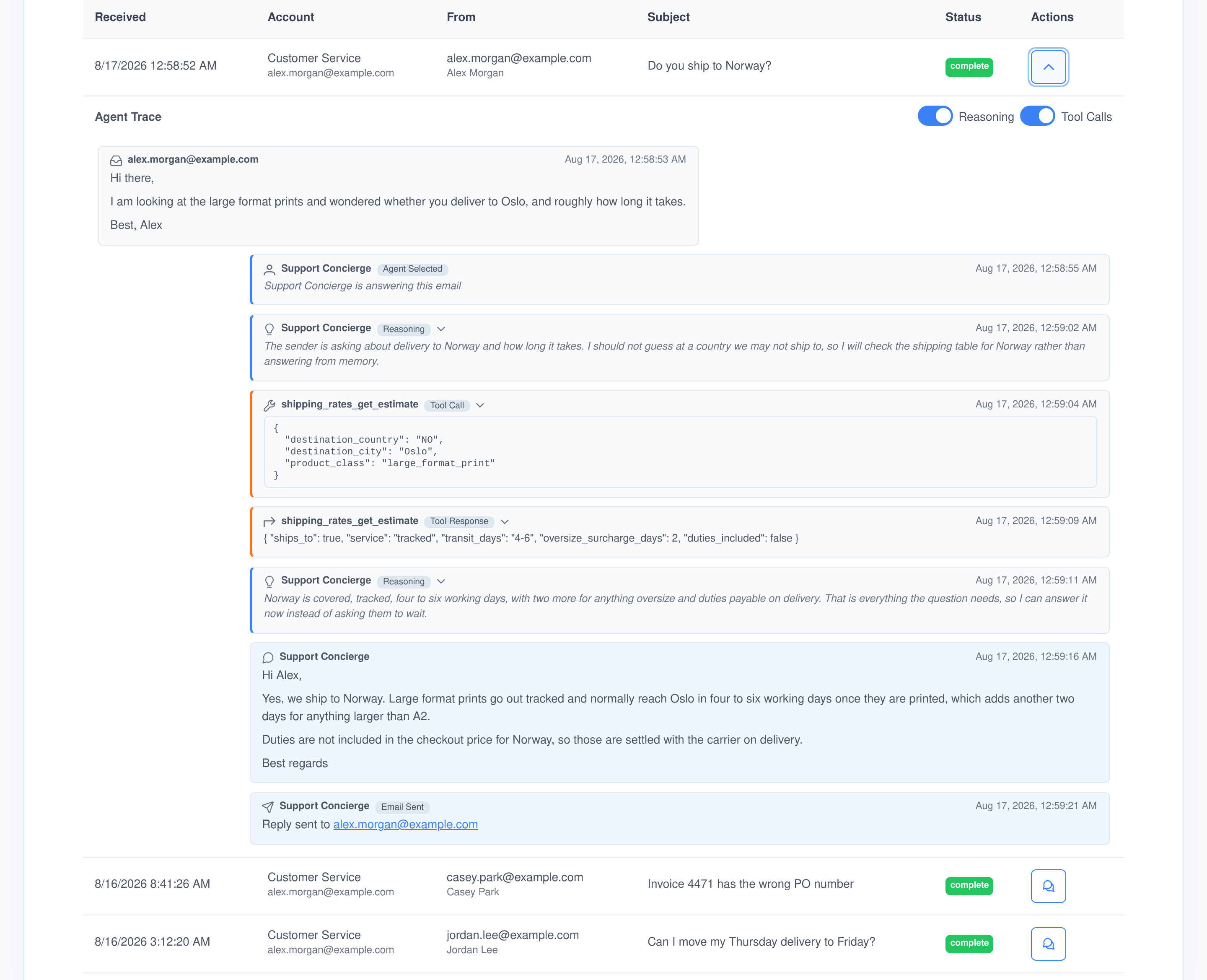
Assistant Cortex does not just log that a reply was sent. Each processed email keeps a trace of the whole turn: the message that came in, which agent was chosen and why, every reasoning block, every tool call with the exact parameters it was given, what each tool answered, the reply that was written and the moment it went out.
Reasoning you can switch off
Toggle reasoning blocks and tool calls independently to follow the agent’s internal steps, or to hide them and read the trace as a plain conversation.
Refusals are recorded too
When a sender is not allowed to use a mailbox the trace says so, names the address and records the message that was sent back instead of an answer.
Filter it like a report
Filter processed email by mailbox, status, subject and date range, and read the counts of replies sent, tools called and reasoning blocks produced across the period.
Folders that file themselves — and then do something about it
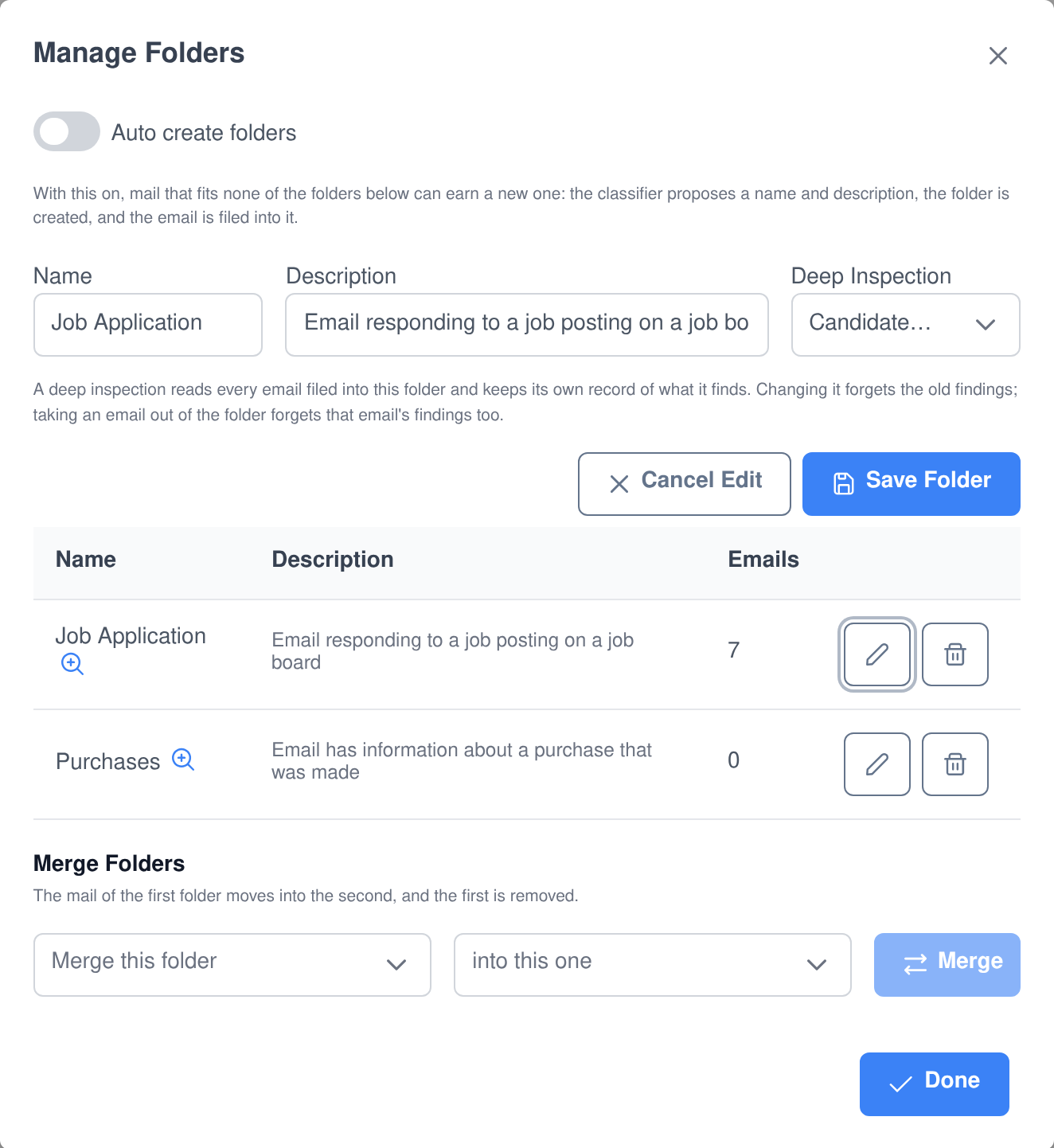
You describe a folder in your own words — “bills, receipts, payment confirmations and anything else finance needs to file” — and a language model reads that description to decide what belongs in it. A folder is not a label an agent ignores: it can carry its own agent, its own approval rule and its own analysis.
- More than one folder at a time. A promotional newsletter is both list mail and advertising, and it is filed under both rather than forced into one.
- It says why. Each filing records a one-sentence reason, and mail the classifier looked at is never re-read on the next pass.
- It can invent folders. Turn auto-creation on and mail that fits nothing can earn a new folder, named for the kind of correspondence rather than for the one message. There is a ceiling, so a mailbox cannot end up with hundreds.
- Answering per folder. A folder can nominate the agent that answers the mail filed into it, with its own human-approval setting, and that reply happens instead of the mailbox-wide one.
- Merge, rename, retire. Fold one folder into another and its mail moves across; delete a folder and its mail returns to the main folder rather than disappearing.
Write it with you, or send it without you
Full automation is one setting, not the only mode. The same models that answer mail on their own will draft a reply for you to read first, rewrite it when you say what to change, or hold everything they write in a queue until somebody approves it.
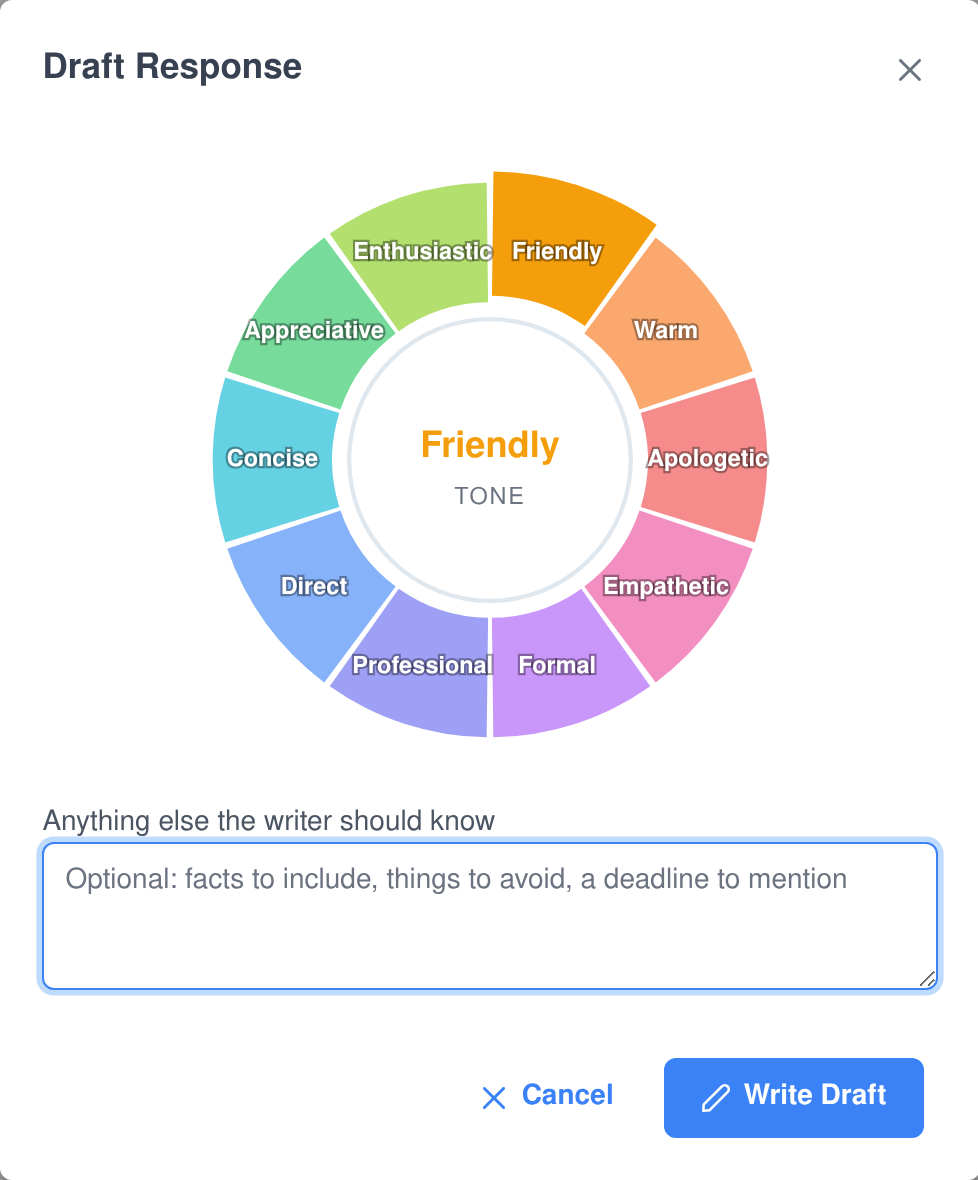
- Pick a tone, get a draft. Ten tones from apologetic to concise, plus a box for the facts to include or the deadline to mention, and the draft appears in the composer as it is written.
- It will not make things up. The writer is told to answer only from the email in front of it and to leave a bracketed placeholder wherever it needs a detail it was not given.
- Revise in words. “Add that the workaround is the CSV export, and make it a bit warmer” rewrites the draft while keeping everything the instruction did not ask to change.
- Approve before anything leaves. With human approval on, an agent’s reply waits in the reading pane to be approved, revised and then approved, or discarded — and nothing is sent until somebody decides.
- Hand a message over on the spot. Pass any email to an agent from the mailbox, one at a time or a whole selection at once, with the count of real emails shown before it happens.
Email analytics without a separate reporting tool
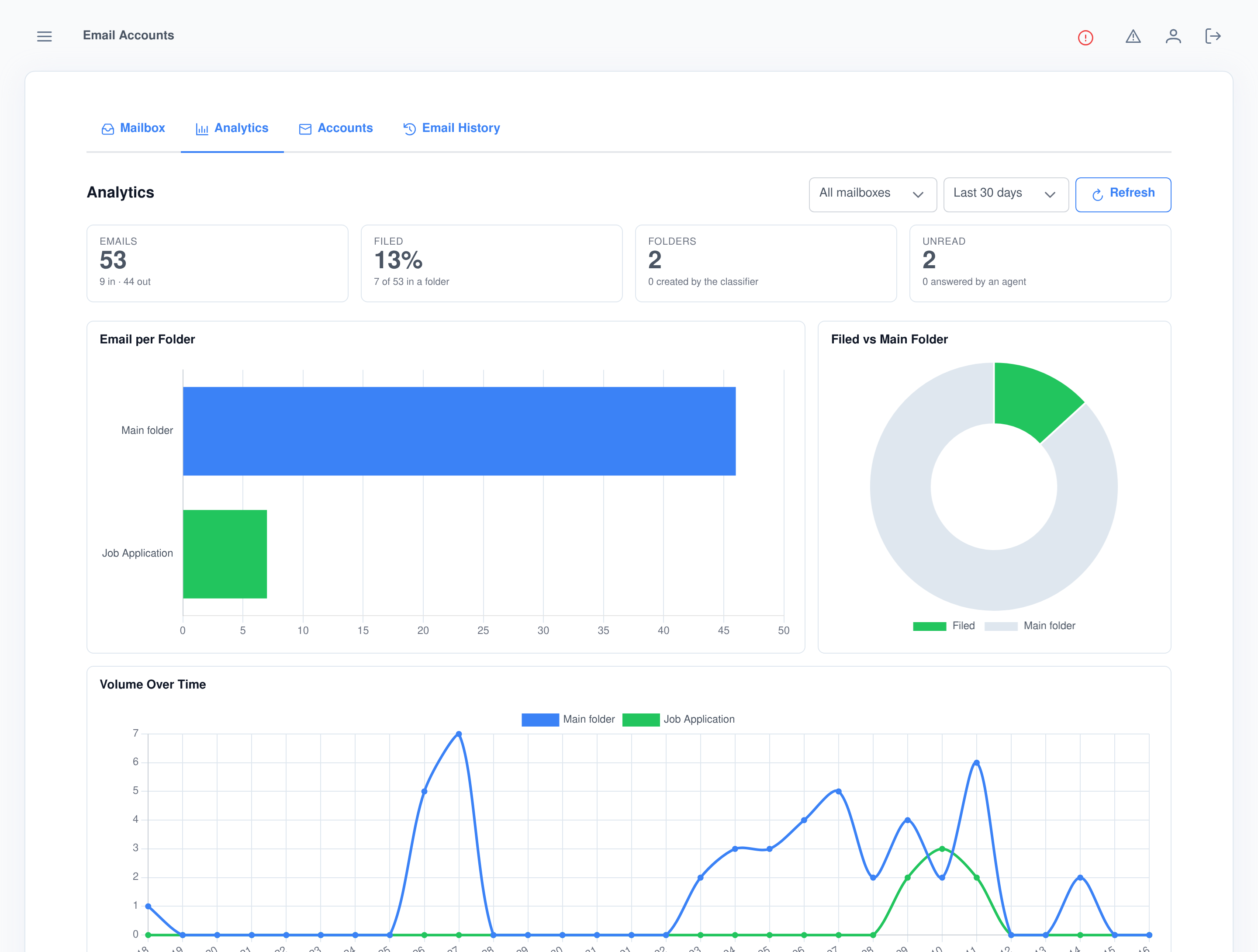
Pick a mailbox and a window — seven days to a year — and the analytics screen counts the mail in and out, the share of it that reached a folder, how many folders the classifier made for you and how much was answered by an agent, then charts the volume per folder and over time.
Shared mailboxes for the company, personal ones for everybody else
- Two kinds of mailbox. System mailboxes are set up by administrators for the whole organisation; personal ones are connected by users for themselves and are never visible to anyone else.
- Self-service, within limits. A separate permission lets people manage their own mailboxes without giving them any say over the shared ones.
- Passwords live in Vault. The mailbox password is written to HashiCorp Vault keyed to the account, and the database column only ever holds a mask.
- One mailbox for system mail. Nominate the address the platform’s own notifications are sent from, separately from how any mailbox handles what arrives.
Send it later, and mean it
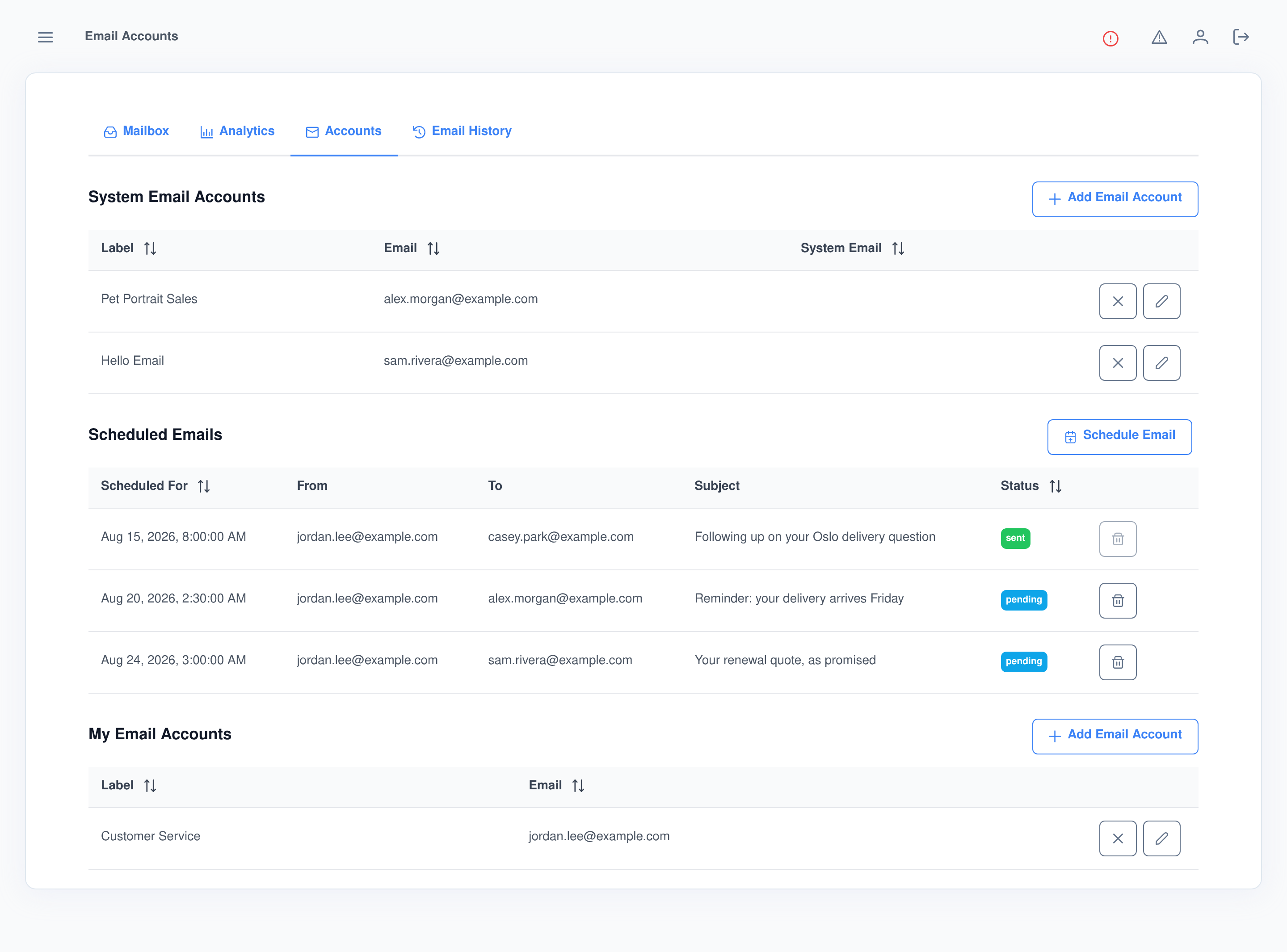
Any email can be booked for a future moment, from the accounts screen or by asking an agent in chat. The time has to carry a timezone, so “9am Denver time” means 9am in Denver wherever the server is. If the platform is restarted, an email that came due while it was down still goes out if it is only recently overdue — and is recorded as missed rather than landing in somebody’s inbox hours late.
Every email action is an AI ability — and an MCP tool
The Email Accounts ability puts the mailbox itself under an agent’s control, so it can check mail, read a message and send one as part of solving a task rather than as a separate errand. The same functions are published by the Assistant Cortex MCP server, which means Claude, an IDE or any other MCP client can drive your mailboxes — and only ever reaches the accounts that caller is allowed to act on.
ability_email_accounts_list_email_accounts
List Email Accounts
Lists the mailboxes this caller may act on — the shared system ones plus any they own personally — with the address, the name mail is sent under and the server configuration of each.
ability_email_accounts_check_email_account
Check Email Account
Fetches new mail for one address straight from the IMAP server, rather than waiting for the next scheduled check, and returns the recent messages with their subject, sender, recipient, date and the id needed to read them.
ability_email_accounts_read_email
Read Email
Opens one message from a named mailbox by the id the check returned, and hands back the full content — subject, sender, recipient, date, and both the plain text and the HTML body.
ability_email_accounts_send_email
Send Email
Sends from one of those mailboxes with a subject and body, optional HTML, and files from the agent’s workspace as attachments. Give it the id of an earlier message and the reply is threaded onto it; give it a time instead and the email is booked and sent at that moment rather than now.
Built for the compliance conversation you will have next
Permissions that match your org
- Separate rights to view mailboxes, manage mailboxes, view or manage the shared email accounts, manage only your own, view scheduled email, manage scheduled email, and read your own or everyone’s email history.
- People who connect a personal mailbox see only their own mail and their own history.
- A shared mailbox only answers the user groups it has been opened to, and everyone else gets the message you wrote instead.
Data that knows when to leave
- Processed email, its traces and its finished replies expire under the retention policy of the person the thread ran as. Approvals still waiting on a decision and email still waiting for its send time are treated as work in progress, not as history.
- A user data export includes their mailboxes, messages, traces, scheduled email and pending replies, with the password column left out.
- Deleting a user account removes the email data that belonged to them.
- Runs self-hosted or hosted, against the language models of your choosing, including fully private ones.
What people use AI email agents for
- A support address that answers overnight and hands the hard ones to a person in the morning.
- A sales inbox where the agent knows the catalogue and can look an order up before it replies.
- Recruiting intake where every application filed into a folder is read, and the candidate record is built from it.
- Receipts and invoices filed automatically and read into the finance records, without anybody answering them.
- A drafting assistant for a mailbox nobody wants automated: every reply written for you, every reply sent by you.
- Follow-ups that send themselves at a time you chose weeks earlier.
Frequently asked questions
Do I have to move my email somewhere else?
No. Assistant Cortex connects to the mailbox you already have over standard IMAP and SMTP, and syncs it both ways. Mail read or starred in your normal client shows the same way here, replies are appended to your Sent folder, and deleting moves the message to the server’s trash.
Will it start replying to my entire backlog?
No. Auto-response is a switch of its own, separate from syncing, and it carries a date before which mail is synced but never answered. Turning it on without naming a date is treated as meaning today, so the unread mail already in the mailbox is left alone.
Can a person approve replies before they go out?
Yes. With human approval on, an agent’s reply is held rather than sent. From the reading pane you can approve and send it, describe a change in plain language and have it rewritten, or discard it. Approval can be set for a whole mailbox or for a single folder.
How does it decide which folder an email belongs in?
You write a sentence describing what belongs in each folder, and a language model reads that description against the message. An email can be filed under several folders at once, each filing records a one-sentence reason, and with auto-creation on a message that fits nothing can earn a new folder of its own.
Can I see why the agent said what it said?
Yes. Every processed email keeps a trace: the message that arrived, the agent that was chosen, its reasoning blocks, each tool call with the parameters it was given and what came back, the reply that was written and the confirmation it was sent. Reasoning and tool calls can be toggled on or off while you read it.
Can each user connect their own mailbox?
Yes. Alongside the shared mailboxes an administrator sets up, users with the right permission can connect mailboxes of their own. A personal mailbox runs as its owner, is never visible to anyone else, and can be limited to an allow list of senders by address or by whole domain.
Can agents send email on their own from chat?
Yes. An agent can list the mailboxes it may act on, fetch new mail, read a specific message and send one, with workspace files attached and threaded onto an earlier message. It can also book the email for a future time instead of sending it now. The same functions are exposed to any MCP client.
Put your agents on email
The Email Accounts application ships with Assistant Cortex. Start a trial, connect a mailbox and let an agent answer the next message that arrives.